Users
In Real User Monitoring (RUM), a "User" is not merely a "person using the product". It is an "independent, traceable, and analyzable entity" formed by combining "identity", "behavioral trajectory", and "device environment". It serves as the core dimension for linking "User Sessions, Actions, and performance data". Its definition revolves around "how to accurately identify and correlate user experience data across the entire lifecycle".
User Types
Users are categorized into Visitors and Authenticated Registered Users.
Visitor
If a user does not log in authentically, or if the customer has not configured a user identification interface, the platform will identify such users as "Visitors" to enable normal statistical analysis.
- Android/HarmonyOS NEXT application: Uses the Android ID to uniquely identify a visitor user.
- iOS application: Uses the IDFV to uniquely identify a visitor user.
- Web application: Generates a unique GUID randomly for each device to uniquely identify a visitor user.
- MiniProgram application: Generates a unique GUID randomly for each device to uniquely identify a visitor user.
Authenticated Registered User
The platform uses the collected User ID to uniquely identify users, enabling statistics such as new users and active users. During user identification, the same User ID used across different applications is considered to represent different users.
Methods for obtaining Authenticated Registered User IDs include: passing the ID to Bonree ONE via API and automatic collection through configuration rules.
Passing the ID to Bonree ONE via API
Refer to SDK API for details.
Automatic Collection via Configuration Rules
This feature is currently supported only by the auto-injected Web SDK.
You can configure data collection rules per application to collect page data as the User ID. Currently supported data types for collection as User ID include: CSS selector, Javascript variable, Meta tag, Cookie value, Query string, HTTP request header, and HTTP response Header.
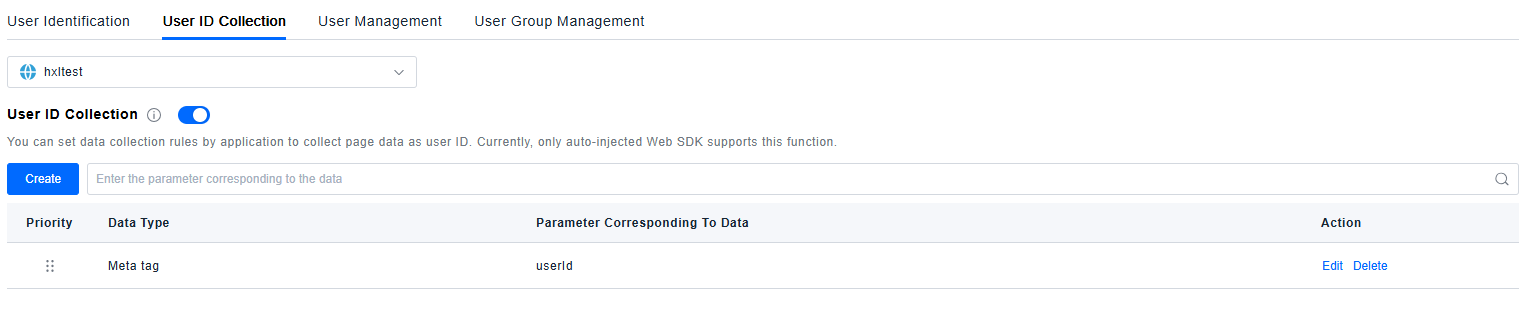
The configuration shown in the image above will collect the value of the userid parameter from the Meta tag as the User ID.