Composite Detection
Composite Detection combines the triggered states of multiple existing alert rules (monitors) into a single result using a logical expression, suitable for complex scenarios that require joint judgment across multiple conditions — for example, only generating a higher-level alert when "Availability Anomaly" and "CPU Usage Too High" are both triggered, reducing false alarms from any single rule and improving alert accuracy.
Quick Start
Step 1: Enter the Creation Page
Enter Smart Alert → Alert Rules, click New Alert Rule, and select Composite Detection type to enter the configuration page. It is recommended to create the underlying rules to be combined in advance (such as Threshold Detection, Event Detection, etc.).
Step 2: Configure Detection Rules
- Select Effective Scope (resource domain, default empty, required)
- In Associated Rules, add the existing rules to combine (such as Availability, CPU Usage Too High); each rule shows its detection type and aggregation dimensions
- In Expression, use rule aliases (a, b, c...) and logical operators to build the trigger condition, such as
a && !b || (c && d) - Confirm the Alert Level: when jointly triggered, the highest level among all triggered rules is used as the alert level
- Set Trigger Conditions: the alert is marked as recovered once the trigger condition is inverted (no longer met) and remains so for N consecutive times
Step 3: Fill in Alert Content and Save
- Fill in Alert Title (supports variables)
- Fill in Notification Content as needed (default template used if left blank)
- Select Notification Strategy
- Set Effective Time (All Time / Periodic Time / Custom Time)
- Click Save to complete creation
Feature Description
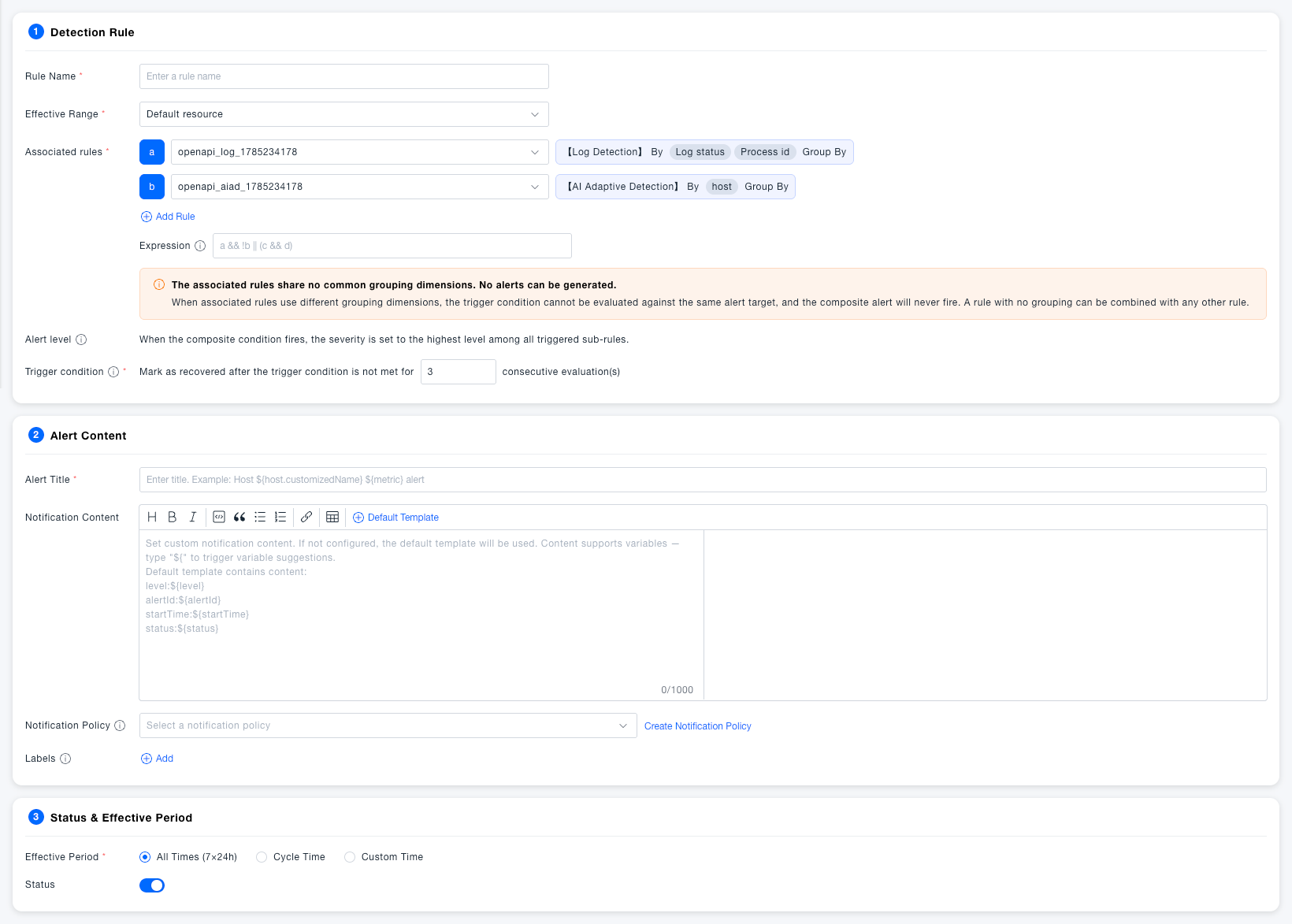
Detection Rules
Basic Configuration
| Field | Required | Description |
|---|---|---|
| Rule Name | Yes | The name of the alert rule, used for quick identification and search in the rule list |
| Effective Scope | Yes | Select the resource domain to which this rule belongs; the rule only applies to data within this resource domain |
| Associated Rules | Yes | Add the existing alert rules to combine; each rule can select a detection type (such as Threshold Detection), automatically showing its aggregation dimensions (such as aggregated by region, aws_namespace, instance_id) |
| Expression | Yes | Use the aliases of the associated rules (a, b, c...) and the logical operators&& (AND), || (OR), ! (NOT) to combine the triggered states of multiple rules, e.g., a && !b || (c && d) |
When the associated rules' aggregation dimensions have no common intersection, no alert can be generated. When the associated rules have different aggregation dimensions, the trigger condition cannot be matched to the same alert object, causing the composite alert to fail to trigger. When a rule has no grouping at all, it can be combined with any other rule.
Trigger Conditions
| Field | Required | Description |
|---|---|---|
| Alert Level | System-determined | When jointly triggered, the highest level among all triggered associated rules is used as the level of this composite alert |
| Trigger Conditions | Yes | Once the composite expression's trigger condition is inverted (no longer satisfied) and remains so for N consecutive times, the alert is marked as recovered, default 3 times |
Alert Content
| Field | Required | Description |
|---|---|---|
| Alert Title | Yes | The title of the alert event, supports variables; it is recommended to include the associated rule or scenario name for quick identification |
| Notification Content | No | The body of the alert notification, supports rich text editing and variable interpolation |
| Notification Strategy | No | Select the notification channel and recipient configuration after the alert is triggered; if none exists, clickCreate Notification Strategy to create one |
| Labels | No | Tag alert rules for easy filtering and classification management |
When notification content is left blank, the system uses the default template, which includes Alert Level ${level}, Alert ID ${alertId}, Alert Time ${startTime}, and Alert Status ${status}. Since Composite Detection may combine rules involving different resource objects at once, the default template does not include a specific resource field — add the corresponding variable manually in the notification content if needed.
Status & Effective Time
| Field | Required | Description |
|---|---|---|
| Effective Time | Yes | All Time (7×24 hours): Always effective; Periodic Time: Set by workday/weekend cycle; Custom Time: Specify specific time periods to be effective |
| Start/Stop Status | Yes | Controls whether the alert rule is running; after being closed, the rule pauses detection and does not generate alert events, defaultEnabled |
Common Scenarios
Scenario: Joint conditions to avoid false alarms
Associate the "Availability Anomaly" and "CPU Usage Too High" rules, and set the expression to a && b, so a composite alert is only generated when both are triggered at the same time, avoiding false alarms from a single metric's transient jitter.
Scenario: Tiered drill-down to identify complex failures Associate multiple underlying monitoring rules (such as network latency, error rate, CPU usage), and use an expression to combine them to identify compound failure patterns, quickly pinpointing the root cause and reducing troubleshooting time.
Notes
The expression only supports the aliases of added rules combined with the operators &&, \|\|, ! — make sure parentheses are properly paired. If the associated rules' aggregation dimensions are inconsistent, the composite alert will fail to trigger; confirm that the aggregation dimensions of each rule have an intersection before adding them.