Audit Logs
Prerequisites
- Menu access: Access to AI Studio > Security Operations > Audit Logs is required.
- Permissions: Read access is typically sufficient; export depends on assigned permissions.
- Data scope: Logs are recorded per environment and resource domain where applicable.
Overview
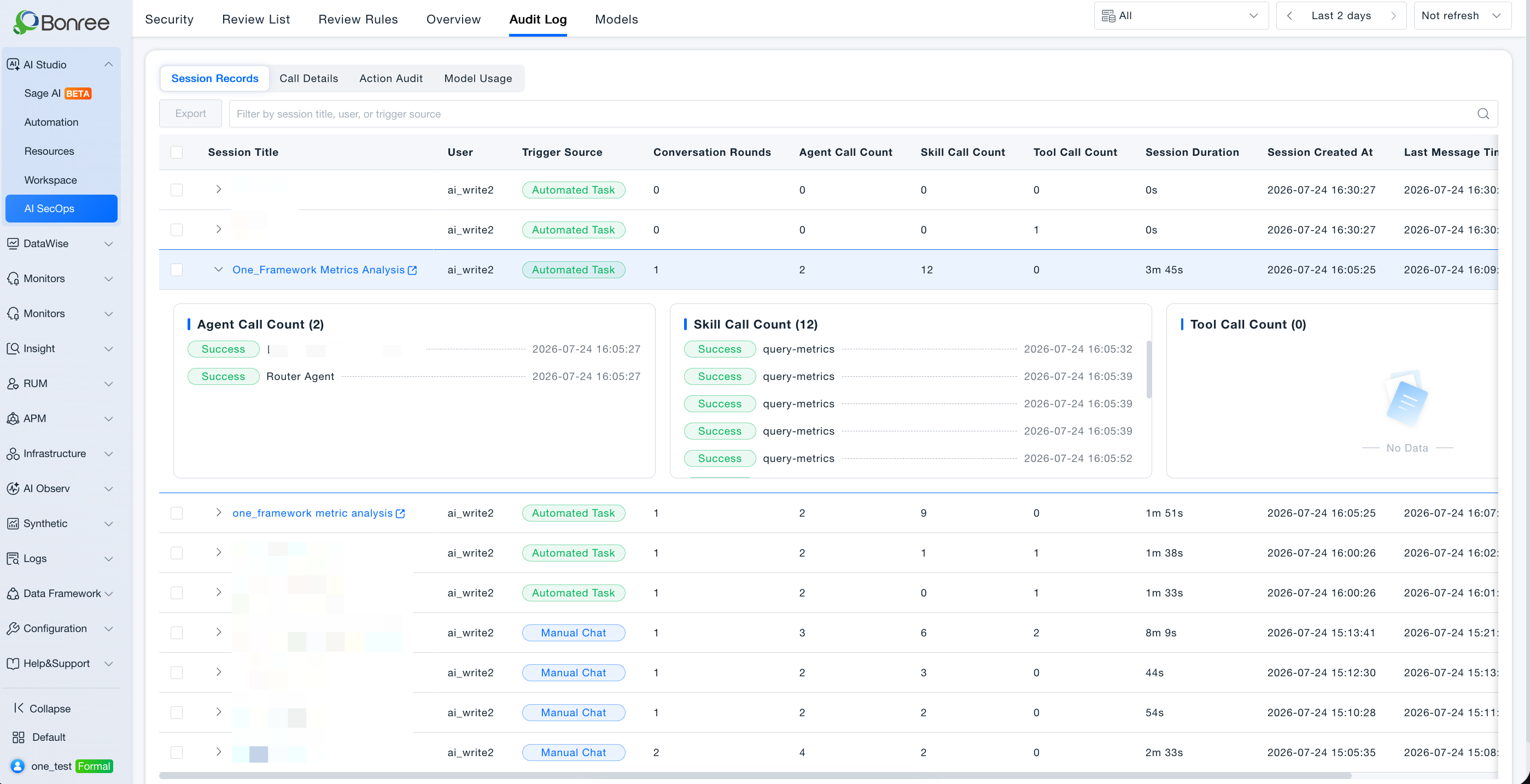
Audit Logs (Tab 5 under Security Operations) record runtime invocation behavior in AI Studio for traceability, security analysis, and compliance. The page provides a time range control at the top and four tabs below for different audit dimensions.
Complements Operations Overview: overview shows how much and how trends move; audit logs show who, when, and what was invoked.
Tab reference
Audit Logs includes four tabs. Each tab covers the following scope:
| Tab | Audit scope | Typical fields (per UI) |
|---|---|---|
| Session Records | Session-level audit of each Sage AI conversation and its full invocation chain | Session title, user, trigger source (manual chat / Automation / fault diagnosis / IM channel (DingTalk) / IM channel (Feishu) / IM channel (WeCom), etc.), conversation rounds, Agent / Skill / tool invocation counts, duration, start and last message time, resource domain; expand a row for Agent, Skill, and tool details within the session |
| Call Details | Single-invocation audit split by resource type (sub-tabs: Agents / Skills / Tools) | Agents: name, trigger source, user, linked session, status, time, resource domain; Skills: name, trigger source, caller (e.g., an Agent), user, linked session, status, time; Tools: tool name, MCP service, type, trigger source, caller, linked session, status, time |
| Execution Audit | Human-confirmed or approval-required actions and outcomes | Action description, trigger source, approval mode (e.g., always approve / risk approval / full access), matched command security rule, status (executed / blocked / timed out / canceled / skipped / failed, etc.), confirmer, linked session, confirmation time, resource domain |
| Model Consumption | LLM inference Token usage and latency per call | Model name, purpose (e.g., routing / answer summary / parameter extraction), trigger source, linked session, status, Token usage (input / output), duration, user, call time, resource domain |
Quick guide:
- “What happened in a conversation?” → Session Records
- “Who invoked an Agent / Skill / tool and when?” → Call Details
- “Was a command approved or blocked?” → Execution Audit
- “Where did Token spend go; which call failed?” → Model Consumption
Resource create, edit, publish, and review approve/reject events are operational audit records and may appear in operation logs elsewhere if enabled. This tab focuses on runtime invocation records.
Value
- Traceability: Meet enterprise controls for AI invocation records.
- Security analysis: Detect abnormal invocation patterns.
- Incident review: Reconstruct conversation and execution paths.
- Accountability: Clarify actions by users, confirmers, and callers.
Use Cases
Investigate inappropriate content
- Audience: Security administrators.
- Approach:
- Open Security Operations > Audit Logs;
- Under Session Records, filter by time, user, and trigger source; expand the target session for Agent / Skill / tool details;
- Use Call Details sub-tabs for single-invocation records if needed;
- Use Model Consumption to trace Token usage and latency for linked sessions.
Trace command execution and approvals
- Audience: Security and compliance auditors.
- Approach: Open Execution Audit; filter by action description, approval mode, and status; review confirmer and confirmation time.
Verify listing review trail
- Audience: Administrators and reviewers.
- Approach: Listing approve/reject is operational audit; use operation logs if provided. Runtime traces use the four tabs above; cross-check with Review Queue.
Operations Overview
- AI Studio > Security Operations > Audit Logs (Tab 5 in menu order).
- Set the time range at the top; confirm environment.
- Switch among Session Records / Call Details / Execution Audit / Model Consumption; filter and search per tab.
- Expand session rows or open record details as needed.
- Export if supported.
Notes
- Retention and field granularity depend on deployment policy.
- Narrow time ranges for large queries.
- Audit logs are read-only under normal operation.
- Sensitive fields may be desensitized per role.