Getting Started with AI Studio
Prerequisites
- AI Studio Token: An AI Studio Token license is required. This is a prerequisite for accessing the full capabilities of AI Studio.
- Menu permissions: Access to the AI Studio menu is required.
- Feature permissions: Read-Write access to the AI Studio module is required for operations such as adding, creating, editing, deleting, publishing, listing, and reviewing. Users with Read-Only access can view content but cannot make changes.
Overview
AI Studio is the unified entry point and management hub for AI capabilities on the Bonree ONE platform. It provides centralized management of AI assets including models, tools, Skills, knowledge bases, and Agents, and ensures that AI capabilities are usable, controllable, and auditable in production environments through two core mechanisms: the Safety Sandbox and Orchestration & Control.
The platform enables three primary roles to work together:
- Administrators: Responsible for foundational configuration and governance.
- Creators: Responsible for building and sharing AI capabilities.
- Users: Responsible for invoking resources to solve real-world problems.
A single user may hold multiple roles at the same time—for example, building Skills and Agents in Workspace while also adding resources listed by others from the Resource Marketplace.
Value
-
A secure and controllable operational foundation
Through the safety sandbox, permission controls, content security policies, and audit logs, AI capabilities are used in a compliant and traceable manner within the enterprise. -
A unified capability management entry point
Models, tools, Skills, knowledge bases, Agents, and other resources are managed in one place, avoiding fragmented configuration and significantly reducing maintenance overhead. -
Flexible creation and sharing
Supports both out-of-the-box usage and custom creation. Creators can publish capabilities for their own use or apply to list them on the Resource Marketplace for team-wide sharing. -
A multi-role collaborative experience
Administrators, creators, and users each play their part, completing the full loop of configuration, creation, review, usage, and operations on a single platform. -
Out-of-the-box capabilities with room to extend
The platform includes built-in tools, knowledge bases, Skills, and Agents, while also supporting on-demand integration of external tools and knowledge to meet diverse business needs.
Architecture
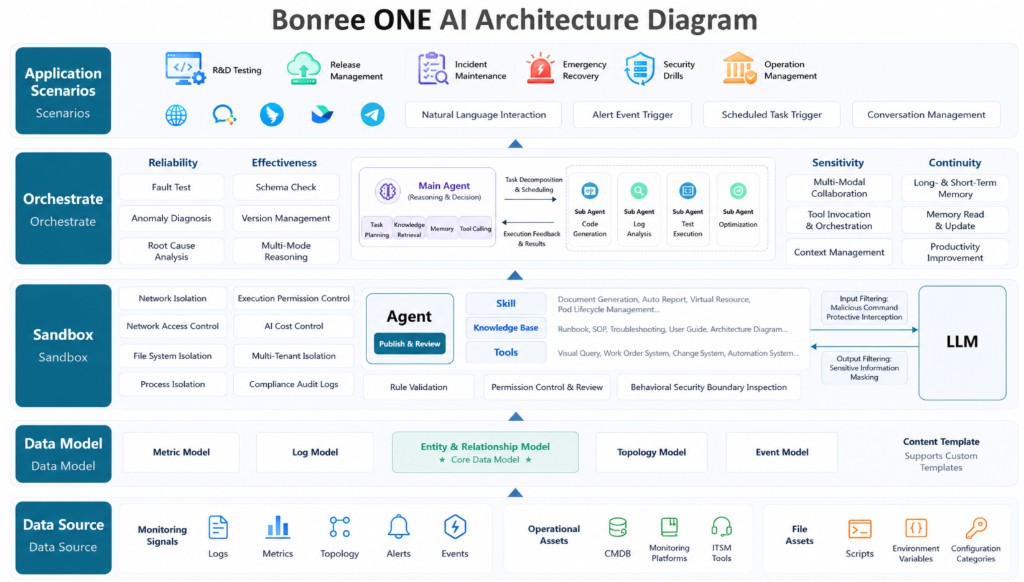
AI Studio is designed as a layered architecture with five tiers from bottom to top: Data Sources, Data Models, Safety Sandbox, Orchestration & Control, and Application Scenarios. Among these, the Safety Sandbox and Orchestration & Control are the two core mechanisms that keep the platform running reliably.
Data Sources
AI Studio capabilities are built on observability and operations data. Primary data sources include:
- Observability signals: Logs, metrics, traces, alerts, events, and more—for understanding system runtime status.
- Operations assets: CMDB, emergency response plans, ITSM tickets, and more—for providing business and operations context.
- File assets: Scripts, environment variables, authentication keys, and more—for supporting automated execution and system integration.
Data Models
Raw data must be structured through data models before Agents can invoke it reliably. The platform supports entity and relationship models, as well as metric, log, trace, and event models, with both preset templates and custom extension capabilities.
Safety Sandbox
The safety sandbox is the prerequisite and foundation for all AI Studio capabilities, ensuring that Agents operate within controllable boundaries. Key capabilities include:
- Isolation mechanisms: Resource isolation, network isolation, file system isolation, process isolation, and multi-tenant isolation—preventing Agent operations from affecting other systems.
- Permissions and governance: Execution permission controls, manual approval workflows, Agent/Skill publication review, specification validation, permission declaration checks, and behavioral safety boundary checks.
- Security protection: Input filtering (blocking malicious instructions) and output desensitization (handling sensitive information). Content security policies (such as key sensitive words) can be configured under Security Operations → Security Management to protect both inputs and outputs.
- Compliance auditing: Complete recording of operations and invocations, supporting post-hoc traceability and security analysis.
Orchestration & Control
Orchestration and control is responsible for turning user intent into reliable, effective task execution. Key capabilities include:
- Routing and planning: The main Agent interprets user intent, decomposes tasks, plans steps, and routes work to appropriate Sub Agents, with monitoring and correction during execution.
- Multi-Agent collaboration: Sub Agents cover specialized roles such as retrieval/knowledge, code generation, testing/execution, and review/optimization—working together to complete complex tasks.
- Quality assurance: Mechanisms including error retry, circuit breaking, schema validation, version management, context management, and artifact repository storage ensure reliability, effectiveness, agility, and continuity.
Application Scenarios
The top layer addresses real user-facing scenarios, including R&D testing, release management, operations assurance, emergency recovery, and operations governance. The platform supports natural language interaction, alert-triggered workflows, scheduled tasks, and session management. Sage AI and Automation are the primary entry points at this layer for day-to-day use.
Platform Capabilities
AI Studio includes the following main modules:
-
Sage AI: The unified intelligent interaction entry point. Drive Agents to complete tasks using natural language. Use built-in Agents and experts directly, or perform Q&A and analysis based on Skills, knowledge bases, tools, and other resources you have added.
-
Automation: Configure Agent capabilities as scheduled or periodic tasks for 24/7 automated execution. Filter and manage tasks by task name, enable/disable status, Agent/Skill, creator, and other dimensions.
-
Resource Marketplace: Browse, search, and add Agents, Skills, tools, knowledge bases, and other resources. After creator-submitted resources pass review, other users can add and use them.
-
Workspace: Create, debug, and publish Skills and Agents. Supports both Workflow and Autonomous Decision build modes.
-
Security Operations: The platform governance and compliance management entry point, including model management, security management, review rules, review queue, operations overview, and audit logs.
Roles and Usage Paths
Administrators
Administrators are responsible for establishing the operational foundation of AI Studio and ongoing governance. We recommend completing initial configuration in the following order:
- Add models: Connect large language models under AI Studio > Security Operations > Model Management to provide reasoning capabilities for Sage AI and Agents.
- Configure security rules: Maintain content security policies (such as key sensitive words) under AI Studio > Security Operations > Security Management to define acceptable content boundaries for the platform.
- Configure review rules: Set reviewers and review workflows under AI Studio > Security Operations > Review Rules to handle resource listing and delisting requests submitted by creators.
Day-to-day operations and management include:
- Processing listing and delisting requests in the Review Queue;
- Viewing platform operational status in the Operations Overview;
- Tracing invocations and operations in Audit Logs;
- Continuously maintaining security policies and review rules to align with organizational governance requirements.
Creators
Creators build and share AI capabilities based on business scenarios. The usage path is as follows:
- Use out-of-the-box resources: The platform includes built-in tools, knowledge bases, Skills, and Agents that can be used directly or as a foundation for extension.
- Extend foundational capabilities: Add tools (such as MCP services) and knowledge bases independently to consolidate Runbooks, SOPs, troubleshooting experience, and more.
- Create in Workspace: Build Skills and Agents, debug them, and publish. For personal use only, publishing makes them available within the platform; to share with other users or systems, submit a listing request.
- Submit listing and review: Listing requests are routed to reviewer accounts according to the review rules for the current environment. After approval, resources are officially listed on the Resource Marketplace.
- Switch to the user role: Creators can also go to the Resource Marketplace, add Skills and Agents listed by other creators, and invoke them from a user perspective.
Users
Users focus on quickly obtaining and invoking AI capabilities. The usage path is as follows:
- Out of the box: Use built-in tools, knowledge bases, Skills, and Agents directly.
- Add from the Resource Marketplace: Browse and add Skills and Agents listed by other creators to extend available capabilities.
- Use in Sage AI and Automation: After adding resources, perform Q&A and task execution in Sage AI, or configure scheduled tasks in Automation for periodic automated runs.
Role Relationships
Administrator, creator, and user are not mutually exclusive roles—a single user may hold multiple roles at the same time. For example, while sharing their own capabilities as a creator, a user may also add resources listed by others. Regardless of role, all users can experience and use Sage AI and Automation in their day-to-day work.
Typical Usage Journey
- Administrators complete model integration, security rules, and review rules configuration.
- Creators use built-in resources or extend tools and knowledge bases, then create Skills and Agents in Workspace.
- Creators publish for personal use or submit listing requests; after approval, resources enter the Resource Marketplace.
- Users add required resources from the Resource Marketplace.
- Users invoke resources in Sage AI or Automation to complete Q&A, analysis, and scheduled task execution.
- Administrators continue operations through the Operations Overview and Audit Logs, and maintain security and review rules as needed.
Notes
- Before using AI Studio, administrators should prioritize model integration and security and review rules configuration; otherwise, Agent invocation or resource listing workflows may be affected.
- Before submitting listing or delisting requests, creators should confirm that effective review rules are configured for the current environment; requests cannot be submitted if no rules are in place.
- Deleting resources or models may affect workflows, Agents, or automation tasks that reference them. Assess the impact before proceeding.
- Menu permissions and operation permissions are independent across modules. Assign permissions according to each user's actual role.
- This release is a major upgrade to AI Studio. We have maximized compatibility with historical data; however, due to deep refactoring of some features, a small amount of data could not be fully migrated. Core assets are not affected. If you need assistance, please contact us at any time.