Data Obfuscation and Encryption
The Network Request Desensitization feature refers to obfuscating sensitive information (such as user identity, account passwords, bank card numbers, ID card numbers, etc.) contained in collected Network Request data. While retaining the request structure and the analyzability of non-sensitive information, it prevents the leakage of sensitive data, balancing the needs of experience analysis with data security and compliance requirements.If you need to obfuscate user input content (such as passwords, phone numbers, etc.) in replay sessions, see Data Collection.
Many customers require SM encryption of data to protect sensitive user-side information and prevent privacy leakage, which can be fulfilled through SM encryption configuration.
Usage Scenarios
- Data Protection for Payment-Related Requests: In e-commerce and financial applications, Network Requests during the user payment process (such as order submission, payment confirmation) often contain highly sensitive information like bank card numbers and payment passwords.
- Compliant Handling of User Identity Information: Requests for login and personal information submission in social and medical applications contain private data such as phone numbers, ID card numbers, and medical record numbers.
- Filtering of Sensitive Parameters in Internal Interfaces: In enterprise-level applications, some internal interfaces (such as employee permission verification, customer management system interfaces) may contain sensitive data like internal codes, permission identifiers, and customer confidential information in their requests.
- Preventing Sensitive Data from Interfering with Analysis: If some sensitive fields (such as user-defined private notes, chat content) are fully collected, they not only pose privacy risks but may also interfere with normal analysis (such as log retrieval, anomaly troubleshooting) due to disorganized content.
- Customers require SM encryption: Secures data transmission between the client SDK and the platform using SM encryption to protect sensitive user information and prevent privacy leaks.
Getting Started
Data Obfuscation
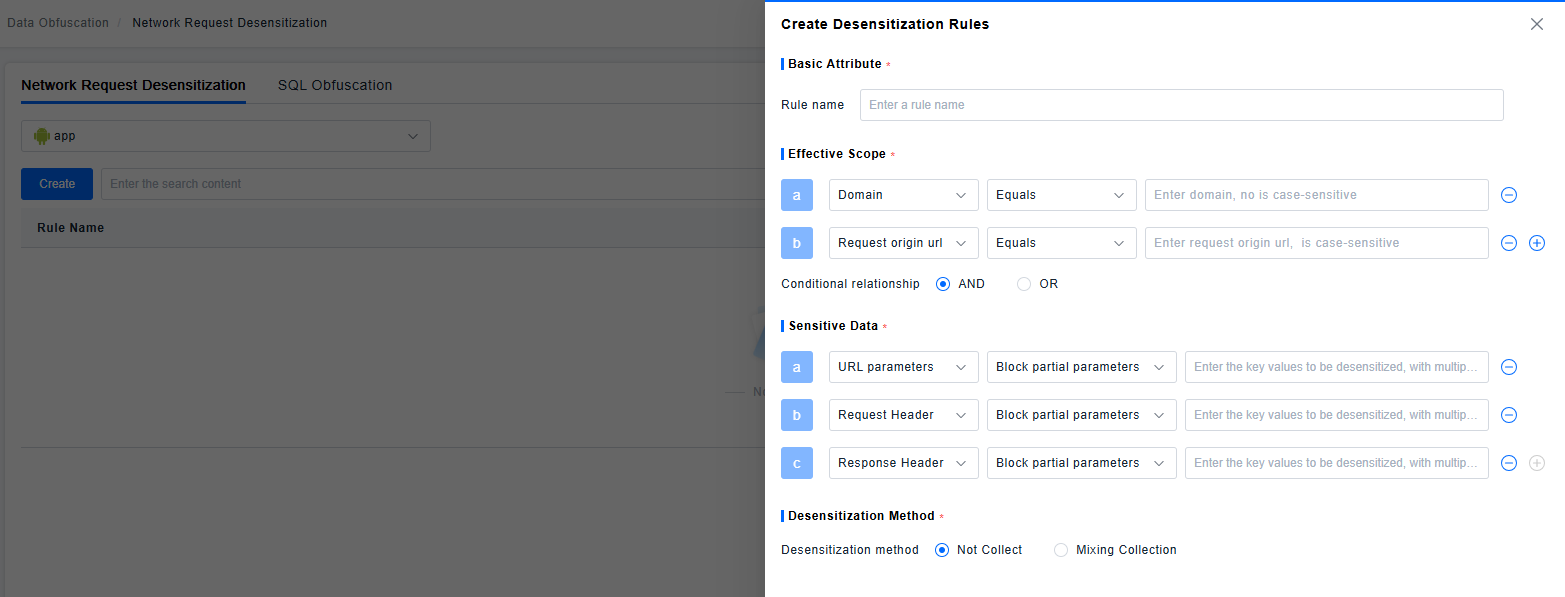
Filter which Network Requests require desensitization based on the original request address and domain name. Users can customize whether the filtering conditions are combined using "AND" or "OR" logic.
Desensitization is supported for URL, RequestHeader, and ResponseHeader parameters. You can mask all parameters or specify specific parameters to mask.
Two Data Obfuscation methods are supported:
- Do Not Collect: This parameter is not collected at all.
- Obfuscated Collection: The parameter is obfuscated during collection, and the obfuscated part is displayed as "**" on the frontend.
If the same Network Request matches multiple rules, the "Do Not Collect" method takes priority.
Example
Original URL: https://example.com/pay?orderId=P20230915001&cardNo=6222021234567890123&amount=999
| Obfuscation Target | Obfuscation Method | Obfuscated Result |
|---|---|---|
| All URL parameters | Do Not Collect | https://example.com/pay |
Specified URL parameters orderId, cardNo | Obfuscated Collection | https://example.com/pay?orderId=**&cardNo=**&amount=999 |
Specified URL parameter amount | Do Not Collect | https://example.com/pay?orderId=P20230915001&cardNo=6222021234567890123 |
Encryption
SM encryption requires configuration on both the platform and client project sides. Calling this interface enables SM encryption for requests initiated by the SDK itself. The following interface must be called for configuration before the agent starts. Ensure the configuration is consistent with the platform side; otherwise, it may cause exceptions in SDK data requests.
I. Interface Specification
| Parameter Name & Annotation | Constraints | Failure Result |
|---|---|---|
| key | The key for SM encryption (must be 16 bytes in length. Do not use the special characters < > & ' " %). | Encryption failure or platform-side decryption failure. |
| identifier | The unique identifier for the corresponding key (length: 1-256 characters. Only alphanumeric characters, underscores _, and hyphens - are supported). | Encryption failure or platform-side decryption failure. |
II. Configuration Method
- Platform-side Nacos Configuration Example:
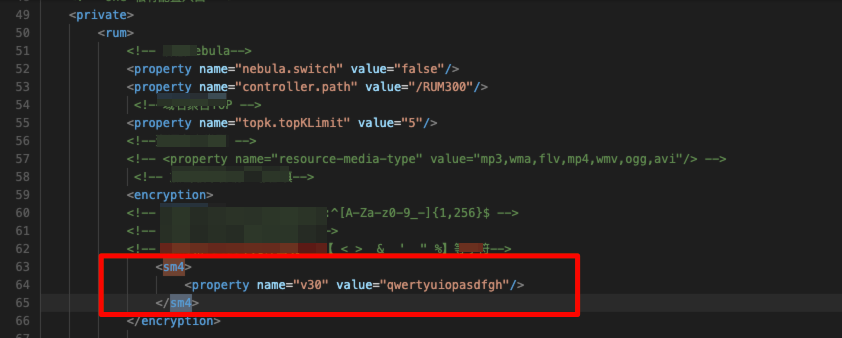
- Client-side Project Configuration Example:
iOS
Objective-C
[BRSAgent enableGMSM4EncryptWithKey:@"qwertyuiopasdfgh" identifier:@"v30"];
Swift:
BRSAgent.enableGMSM4Encrypt(withKey: "qwertyuiopasdfgh", identifier: "v30")
Android:
 byte[] secretKey = new byte[]{q,w,e,r,t,y,u,i,o,p,a,s,d,f,g,h};
//assert secretKey.length == 16;
  String identifier="v30";
  Bonree.withAppID("<#AppID#>")
        .withEnableGMSM4Encrypt(secretKey,identifier)
        .start(getApplicationContext());
or
  String secretKeyStr ="qwertyuiopasdfgh";
  byte[] secretKey = secretKeyStr.getBytes();
//assert secretKey.length == 16; 务必保证字符实际长度为16字节,请勿使用< >  &  '  " %特殊字符
  String identifier ="v30";
  Bonree.withAppID("<#AppID#>")
        .withEnableGMSM4Encrypt(secretKey,identifier)
        .start(getApplicationContext());
Harmony:
 let secretKey = new Uint8Array([q,w,e,r,t,y,u,i,o,p,a,s,d,f,g,h]);
    //assert secretKey.length == 16;务必保证字符实际长度为16字节,请勿使用< >  &  '  " %特殊字符
    let identifier :string ="v30";
    Bonree.withAppID("<#AppID#>")
      .withEnableGMSM4Encrypt(secretKey,identifier)
      .start(this.context.getApplicationContext())
or
 let secretKeyStr="qwertyuiopasdfgh"
   let textEncoder = new util.TextEncoder('utf-8');
   let secretKey = textEncoder.encodeInto(secretKeyStr);
   //assert secretKey.length == 16;务必保证字符实际长度为16字节,请勿使用< >  &  '  " %特殊字符
   let identifier :string ="v30";
   Bonree.withAppID("<#AppID#>")
      .withEnableGMSM4Encrypt(secretKey,identifier)
      .start(this.context.getApplicationContext())
Web:
<!DOCTYPE html>
<html lang="en">
<head>
    <meta charset="UTF-8">
    <title>Title</title>
    <script id="BonreeAgent" src="BonreeSDK_JS.min.js" data=
        '{
            "appId":"<#AppID#>",
            "uploadAddrHttp":"http://<#Upload地址#>",
            "uploadAddrHttps":"https://<#Upload地址#>",
            "sm4Config":{
                "key": "qwertyuiopasdfgh",
                "identifier":"v30"
            }
        }'>
    </script>
</head>
<body>
</body>
</html>