Skill Creation
Prerequisites
- Menu access: AI Studio > Workspace > Skill Creation.
- Permissions: Read-Write access for create, import, edit, publish, list, delist, delete.
- Data scope: Resource domain in the current environment.
- Import format: Packages must follow OpenClaw conventions (per platform requirements).
- Review rules: Required for listing/delisting—see Review Rules and Review Queue.
Overview
The Skill Creation tab manages self-built Skills—reusable task capabilities for Agents and Sage AI.
Workspace lists only Skills you created or imported. Built-in Skills are under Resources > Skill > Public.
Two creation paths:
| Method | Entry | Description |
|---|---|---|
| Skill Creation | Primary button | Describe requirements in chat; Sage AI generates a Skill package |
| Import Skill | Import button | Upload an existing OpenClaw Skill package |
The editor uses a split layout: Skill files tree on the left, debug preview on the right. Published Skills appear under Resources > Skill > My.
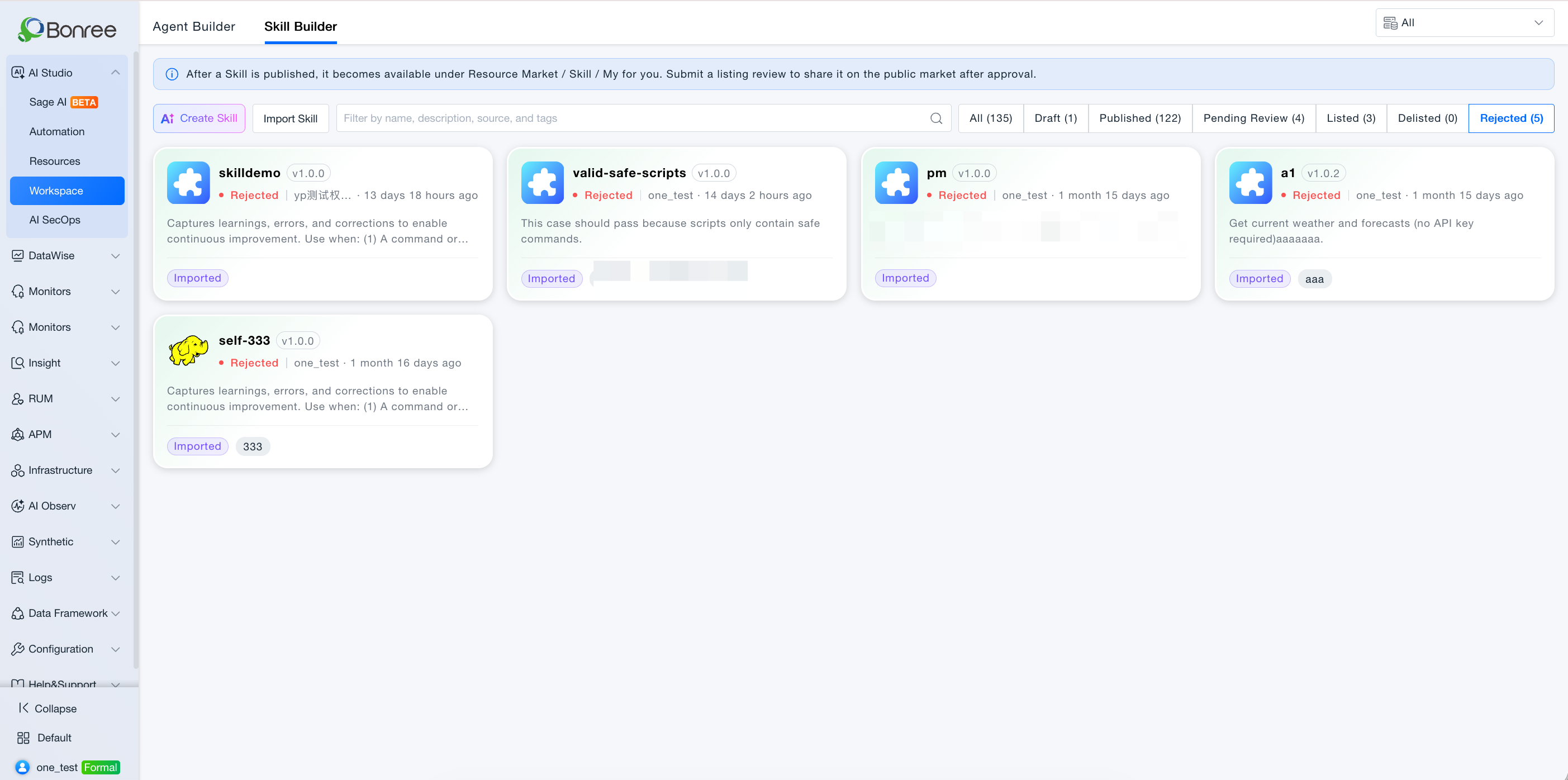
List quick classification and tags
Workspace provides status quick filters (AND with the search box): All, Draft, Published, Pending review, Listed, Delisted, Rejected. Each shows a count (including 0). Default is All. Switching a filter shows only matching cards, sorted by update time descending.
Tags are required on create/edit so Resources can filter by tags after listing.
Value
- Conversation-first creation: Describe ops scenarios in natural language.
- Import compatibility: Bring existing OpenClaw Skills into AI Studio.
- File-level editing: Inspect and adjust package files after generation.
- Sandbox debugging: Validate behavior before publish.
- Listable for teams: Request Public listing after publish.
Use Cases
Generate an alert notification Skill
- Approach: Skill Creation → describe P1 alert + log query + WeCom notify → review file tree → debug preview → Publish.
Import an existing Skill package
- Approach: Import Skill → upload
.skill/archive → edit → debug → publish.
Ship a new version
- Approach: Open Skill → note unpublished draft banner if any → edit → Publish (not just save) with semver increment.
Listing and reapply after rejection
- Published → Request listing → if Rejected, read comments → revise → publish → reapply; Withdraw while pending.
Operations
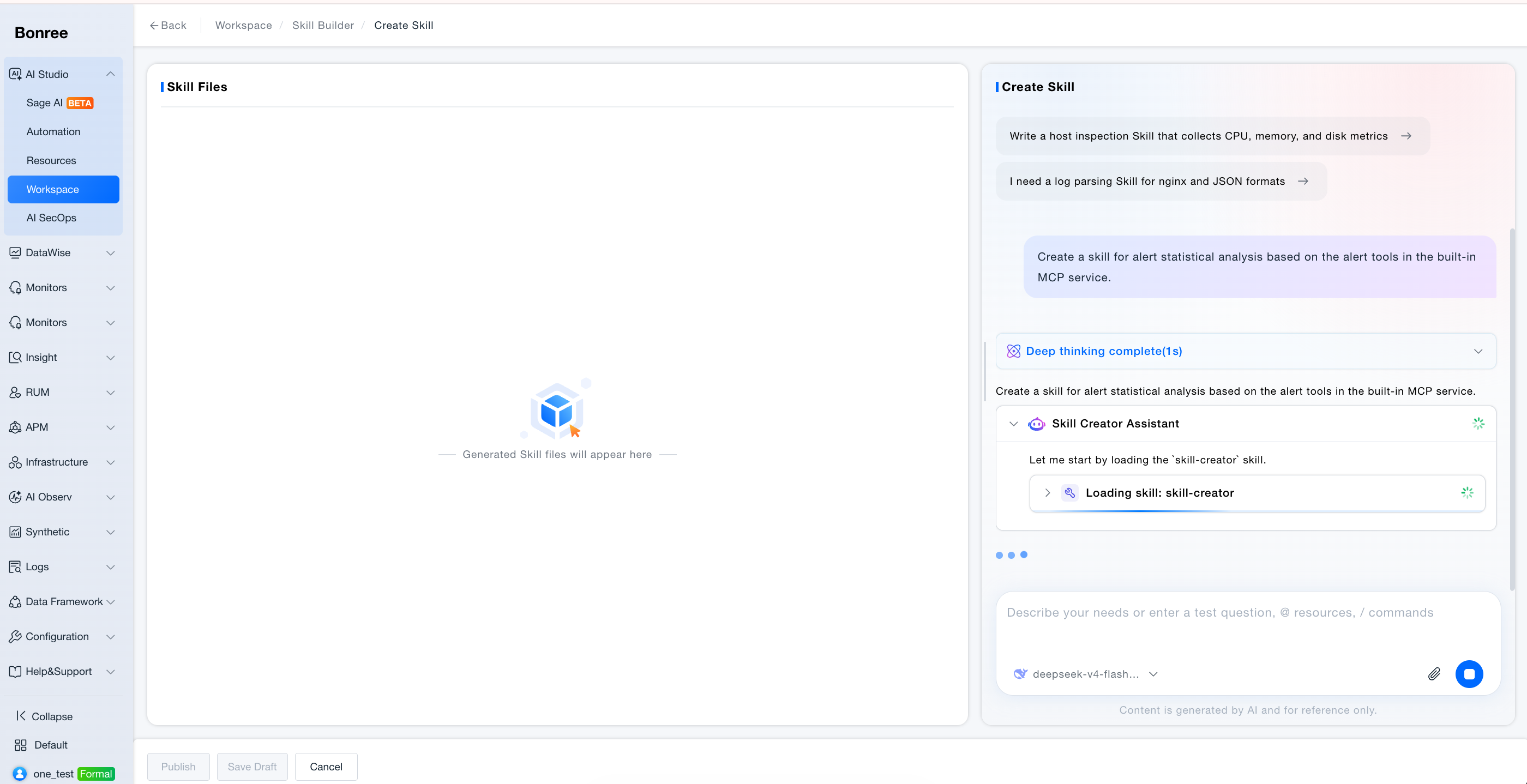
Skill Creation (conversation)
- Click Skill Creation.
- Guide text: describe needs; Sage AI generates a full Skill package; refine via chat or left-side file edits.
- Optional prompt chips for quick starters.
- After generation, Skill files tree appears; select files to view/edit.
- The Skill field shows the name mirrored from
skill.md(edit the name in the file area, not in this field). Duplicate / Vetter checks run after AI create or import; failures show under the Skill field. - Debug preview on the right (requires generated files).
- Save draft / Publish (full validation including content-security keywords runs again on save/publish).
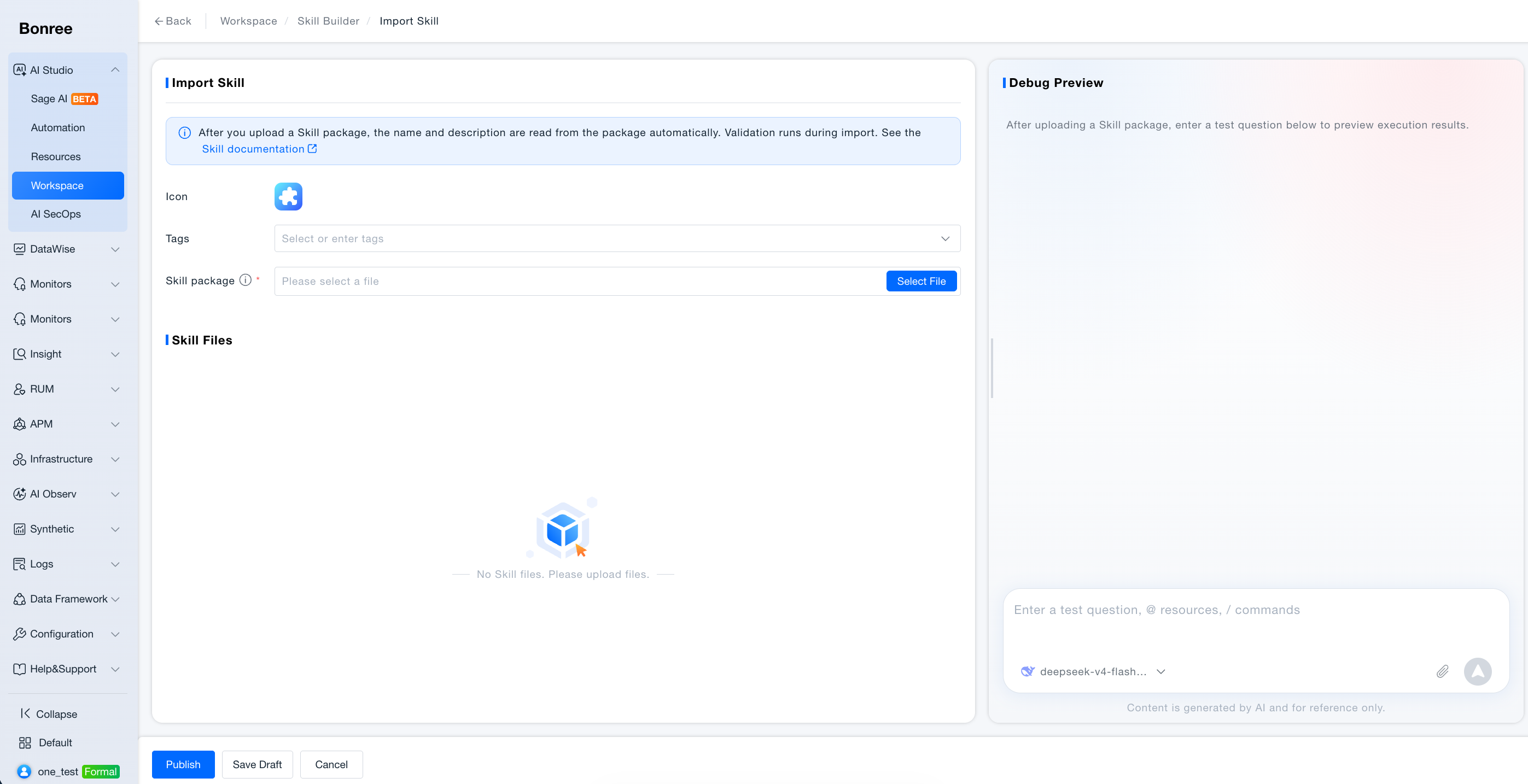
Import Skill
- Click Import Skill and upload a local Skill package (
.zip/.skill). - The platform validates the package against the Skill Validation Spec below (ZIP legitimacy, skill-vetter security review, and in-package file checks). If validation fails, the reason is shown so you can fix and re-upload.
- After a successful parse, review the file tree and metadata; the Skill name field is filled automatically.
- Verify in debug preview; edit files if needed.
- Save draft or Publish.
Note: Import validation requires at least one available LLM in the model list. If no model is configured, add one in Model Management before importing.
Export Skill
- List / card export covers the current Skill version (tags + package, no history). Export a historical version from Version management.
- Detail view can export the Skill package only. Full / version exports are offline; download from export records.
- Drafts export as drafts; published and later statuses export as published.
Edit existing Skill
- Unpublished draft banner: “You have unpublished changes; last published at vx.x.x”.
- Edit files; debug; save draft or publish.
Save draft
- Saves editor/chat state; no formal version.
Publish
- Content security validation;
- Version + change notes *;
- Version rules:
- Required;
- Semver format (e.g.
v1.0.0); - Must not duplicate history;
- Must not be lower than highest historical version.
- Status Published → Resources > My.
Version management
- History view; only Publish creates versions.
Listing / delisting / withdraw
| Action | From state | Notes |
|---|---|---|
| Request listing | Published | Uses last published version; publish drafts first |
| Withdraw | Pending review | Cancel active review |
| Request delisting | Listed | Notes required |
| After rejection | Rejected | Edit → publish → reapply |
Delete
- Removes from Workspace and Resources; breaks Agents/Automation references; listed Skills affect all users who added them.
Skill Files and Debugging
- Generated/imported Skills show as a file tree; click to view content.
- Debug preview accepts test prompts; some flows require files to exist first.
- Chat may indicate when Skill files are ready for editing.
Skill Validation Spec
When you Import Skill in Workspace, or upload an OpenClaw-compliant .zip / .skill package, the platform validates it against the rules below. If validation fails, the failure reason is shown so you can fix the package and upload again.
1. ZIP Legitimacy Checks
| Check | Description |
|---|---|
| Empty upload package | Blocked. Package contains no bytes. |
| Outer file name suffix | Blocked. Upload file name must end with .zip or .skill (outer package name only). |
| Outer package size | Blocked. Default max 10MB; config skill.import.max_package_mb. |
| Cannot open ZIP | Blocked. Not a valid ZIP file (BadZipFile). |
| No files in ZIP | Blocked. Archive contains no file entries. |
| Encrypted ZIP entries | Blocked. Encrypted compressed entries are not supported. |
| Absolute path | Blocked. Member paths must not start with / or be absolute. |
Path contains .. | Blocked. Path segments must not include ... |
| Directory depth exceeded | Blocked. Default max 5 levels after ZIP root; Nacos max_dir_depth. |
| Single file too large | Blocked. Default max uncompressed size per file 10MB; Nacos max_single_file_mb. |
| Compression ratio too high (ZIP bomb) | Blocked. Default max file_size/compress_size ratio 50×; Nacos max_compress_ratio. |
| Total uncompressed size exceeded | Blocked. Default max sum of uncompressed sizes 100MB; Nacos max_total_unzip_mb. |
2. skill-vetter Checks
Skill-Vetter uses an LLM and the built-in skill-vetter protocol to perform static security review of the upload. The gateway parses only VERDICT / NOTES from the final report body and allows install only when normalized to “installable”. Review is offline and static—it does not execute scripts inside the package.
2.1 Prerequisites and Runtime Conditions
| Check | Description |
|---|---|
| No available LLM for tenant | Blocked. |
| Vetter call timeout | Blocked. Default timeout 120 seconds per review. |
| Rate limit / context overflow with no fallback model | Blocked. May auto-switch to other LLMs and retry; fails when exhausted. |
| Other vetter call exceptions | Blocked. Non-retryable errors fail immediately. |
| Per-file prompt size limit | Not blocked. About 24,000 characters per file; excess is truncated and marked. |
| Total prompt character budget | Not blocked. About 120,000 characters for the whole package; excess files marked as omitted. |
| Ignored directories/files | Not scanned. Skips __pycache__ / .git / .svn / node_modules / .DS_Store / .pyc, etc. |
2.2 REJECT-level Red Flags (DO NOT INSTALL)
| Check | Description |
|---|---|
| curl/wget to unknown URL | Blocked. Includes downloads from unclear addresses. |
| Sending data to external servers | Blocked. Data exfiltration behavior. |
| Requesting credentials / token / API key | Blocked. Inducing secret collection. |
Reading /.ssh, /.aws, ~/.config without clear reason | Blocked. Sensitive directory access. |
| Accessing MEMORY.md / USER.md / SOUL.md / IDENTITY.md | Blocked. Agent private memory files. |
| Base64-decoding arbitrary content | Blocked. Common obfuscation / payload technique. |
eval() / exec() with external input | Blocked. Arbitrary code execution. |
| Modifying system files outside workspace | Blocked. Out-of-bound writes. |
| Installing undeclared dependencies | Blocked. Covert install behavior. |
| Network requests using IP instead of domain | Blocked. Suspicious C2 pattern. |
| Obfuscated code (minified / encoded to hide intent) | Blocked. |
| Requesting sudo / privilege escalation | Blocked. |
| Accessing browser cookies / sessions | Blocked. |
| Touching credential files | Blocked. e.g. id_rsa, .env, docker/config.json, kubeconfig. |
2.3 Extended High-risk Command Patterns (Full-package Scan)
| Check | Description |
|---|---|
| Destructive file operations | Blocked. rm -rf, del /f /s /q, Remove-Item -Recurse -Force, shred, etc. |
| Disk / filesystem operations | Blocked. dd if=, mkfs, fdisk, diskpart, format, etc. |
| Privilege escalation / persistence | Blocked. sudo, runas, crontab, schtasks, systemctl enable, reg add, etc. |
| Arbitrary code execution | Blocked. eval, exec, bash -c, powershell -Command, python -c (external input), etc. |
| Download and execute | Blocked. curl|sh, wget|sh, Invoke-WebRequest|iex, certutil download, etc. |
| Credential / secret harvesting | Blocked. Reading ~/.ssh/*, id_rsa, known_hosts, .env, etc. |
| Exfiltration channels | Blocked. nc / ncat / socat, scp / rsync to unknown hosts, anomalous webhooks, etc. |
| Firewall / network tampering | Blocked. iptables, ufw, netsh advfirewall, DNS/route tampering, etc. |
| Multiple similar commands | Blocked. Any REJECT hit rejects the package; all occurrences must be scanned. |
2.4 Source, Permissions, and OAuth Assessment
| Check | Description |
|---|---|
| Source trust assessment | Not blocked. Reviews source/author/repo/update time; ClawdHub official ≠ automatically safe. |
| Documented OAuth / SaaS | Not blocked. Docs ask users to create their own GOOGLE_ / AZURE_ credentials with least privilege → usually INSTALL WITH CAUTION. |
| Hardcoded secrets / inducing token paste | Blocked. Requires writing secrets into the repo or sending to untrusted endpoints. |
| Broad OAuth solely because authorization is needed | Not blocked. Broad OAuth such as Gmail/Drive defaults to MEDIUM–HIGH; clear docs → CAUTION rather than direct reject. |
curl|sh combined with OAuth docs | Blocked. Documented OAuth plus download-and-execute chain is high risk. |
3. In-ZIP File Checks
Before extracting to disk, entries inside the ZIP are validated by rules (not LLM).
3.1 SKILL.md Checks
| Check | Description |
|---|---|
| File name case | Blocked. Must be exactly SKILL.md; skill.md and similar do not match. |
| Main manifest required | Blocked. Must be at ZIP root SKILL.md, or top-level/SKILL.md under a single top-level directory; deeper SKILL.md cannot be the main manifest. |
Multiple SKILL.md | Uses the shallowest path as the main manifest (same depth: lexicographic path order); not reported as a separate error. |
| Flat package structure | When root has SKILL.md, multiple top-level items (e.g. scripts/, references/) are allowed; top-level folder name need not match slug. |
| Single-folder package structure | When root has no SKILL.md, all files must be under one top-level directory; multiple top-level directories are blocked. |
| Single-folder top-level directory name | Blocked. Top-level directory name must equal slug in SKILL.md (or name if slug is omitted). |
SKILL.md encoding | Blocked. Must be UTF-8. |
| YAML front matter | Blocked. Leading metadata such as name/description must be wrapped in --- --- and be valid YAML. |
| name | Blocked. Required; max 64 characters; regex ^[a-z0-9]+(?:-[a-z0-9]+)*$ (starts with lowercase letter or digit; lowercase letters / digits / - only; no leading/trailing or consecutive hyphens; must exactly match top-level folder name). |
| slug | If set, same rules as name; if omitted, slug=name automatically. |
| description | Blocked. Required; length 1–1024 characters. |
3.2 File Allowlist Checks
| Check | Description |
|---|---|
| Allowed extensions (default 31) | .cfg / .cjs / .conf / .css / .csv / .gif / .htm / .html / .ico / .ini / .jpeg / .jpg / .js / .json / .jsx / .md / .mjs / .png / .py / .rst / .sh / .sql / .svg / .toml / .ts / .tsv / .tsx / .txt / .webp / .yaml / .yml |
| Allowed extensionless files | license / copying / makefile / dockerfile / gemfile / rakefile / procfile / jenkinsfile (case-insensitive) |
| Allowed dot config files | .gitignore / .dockerignore / .editorconfig / .npmrc / .nvmrc (full file name match) |
SKILL.md | Exempt from extension allowlist, but must still satisfy all 3.1 rules. |
| Ignore list (not blocked; deleted after extract) | __MACOSX / __pycache__ / .git / .svn / .DS_Store / desktop.ini / Thumbs.db / ._* / .pyc / .pyo; skipped during validation and not treated as allowlisted types. |
| Double-suffix files | Only the last extension counts; e.g. archive.tar.gz is treated as .gz and blocked if not allowlisted. |
| Suffix not on allowlist | Blocked. e.g. .exe / .pdf / .zip / .ps1 / .env; extend via Nacos skill.import.allowed_suffix. |
3.3 Dangerous Script Content Scan (Rule Engine)
| Check | Description |
|---|---|
| Scan scope | Only .sh / .py / .js / .mjs / .cjs / .ts / .tsx / .jsx with size greater than 0; .md / .json and similar docs are not scanned. |
.sh scripts | Blocked. Patterns such as rm -rf, curl|sh, mkfs, dd, chattr. |
| Code files | Blocked. Patterns such as os.system, subprocess(shell=True), eval, exec, child_process. |
| Sensitive path / secret references | Blocked. e.g. /etc/shadow, ~/.ssh, PRIVATE KEY. |
3.4 Extract and Other Checks
| Check | Description |
|---|---|
| Extract path safety | Blocked. Absolute paths, .., and escaping the extract root are forbidden. |
Missing SKILL.md after extract | Blocked. Flattened skill directory must contain SKILL.md. |
| Duplicate slug in same environment | Blocked. slug must be unique under the same account_id + env_id. |
| Conflict with built-in skill | Blocked. name or slug must not duplicate a global built-in skill. |
| icon | Blocked. Empty passes; short strings without injection traits pass; otherwise must be a valid base64 image. |
| Auth dimensions | Blocked. Requires account_id, env_id, resource_zone_id. |
Notes
- Built-in vs. self-built: Built-in Skills are not listed in Workspace—use Resources > Public.
- Publish vs. save draft: Only publish syncs My and writes versions.
- Listing version: Listing uses published version; UI warns if drafts exist.
- Strict semver: Skill publish validates version format and ordering.
- Reference impact: New Skill versions auto-upgrade referencing Agents and Automation.
- Content security: Sensitive content blocked per Security Management.
- Import validation: Imported Skill packages must pass the Skill Validation Spec above; validation requires an available LLM—add a model first if the model list is empty.