Skill
Prerequisites
- Feature menu: Access to the AI Studio / Resources menu is required.
- Operation permission: Read-Write access is required to add, remove, and configure Skills; Read-Only access supports browsing and viewing details.
- Data permission: Access to at least one resource domain under an environment is required.
Overview
A Skill is a reusable standardized task capability with fixed execution logic, invokable directly by Agents or Sage AI. The Skill tab in Resources provides Public and My Resources views:
- Public: Built-in Skills and shared Skills listed by creators; cards offer Add to install into My Resources
- My Resources: Manage added or self-published Skills; supports open, remove, configure, and version update
Built-in Skills in Public are ready out of the box. After adding, open, remove, and configure them in My Resources. Public cards only support Add; open and settings require the Skill to be in My Resources.
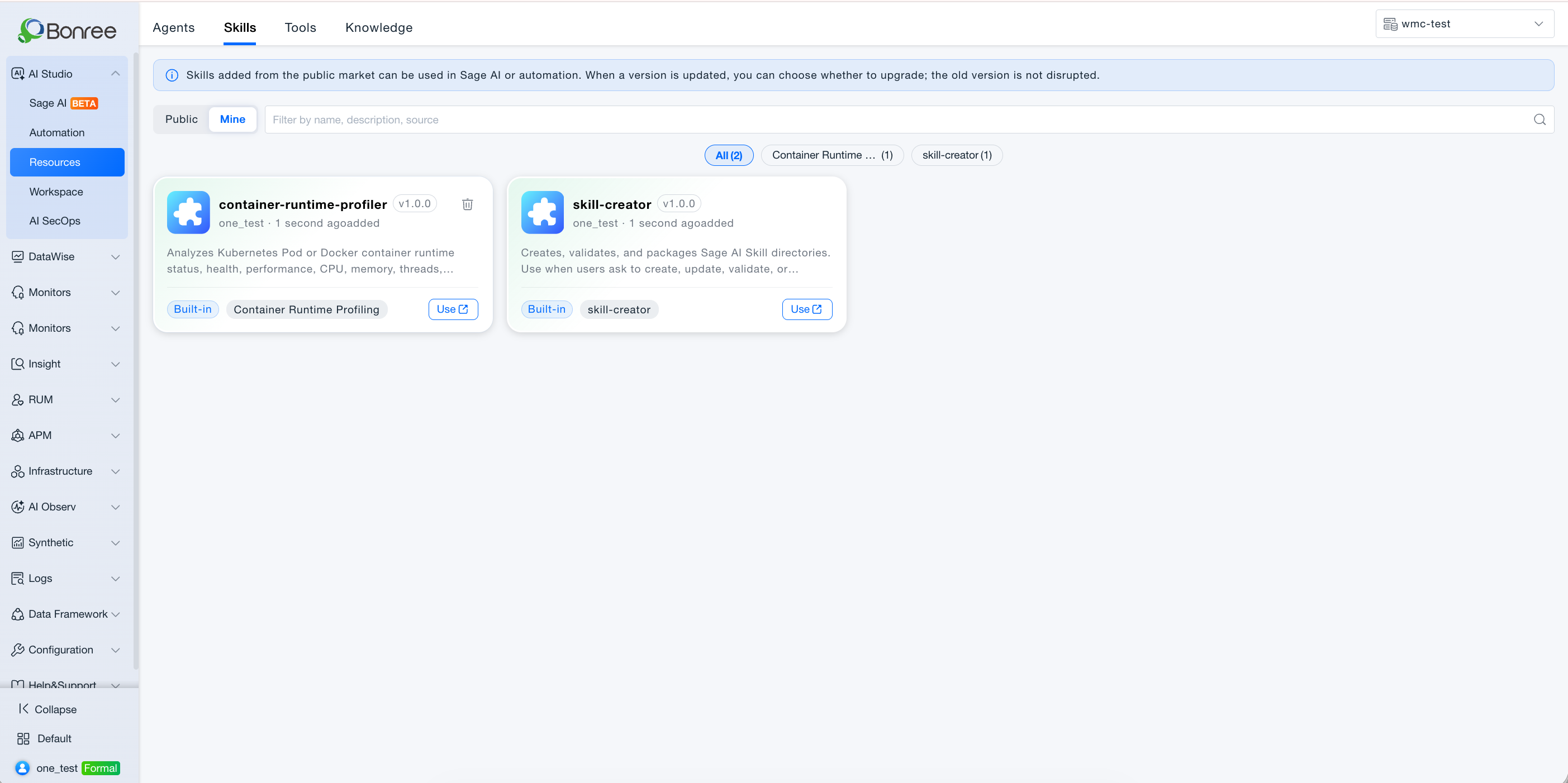
Public vs My Resources
The Skill tab provides a Public / My Resources toggle at the top left. The two views differ in scope and actions:
| Aspect | Public | My Resources |
|---|---|---|
| What you see | Built-in Skills and Skills publicly listed after listing review | Skills added in the current resource domain, plus Skills you published from Workspace |
| Source | Platform presets + resources approved for public listing by other creators | Local copies after adding from Public, or resources published from Workspace |
| Visibility | Browsable and addable by all permitted users in the resource domain | Instances added or published in the current resource domain only—isolated per domain |
| Card actions | Add: install the Skill into My Resources | Open (details and debug preview), Configure (environment parameters, etc.), Remove; Update when a new version is available |
| Configuration | Browse and add only—no environment configuration here | Complete required configuration after adding; Configured status shown when done |
| Details and debug | View Skill descriptions for selection | Open details in My Resources; use the read-only debug panel on the right |
| Version policy | Shows the latest listed public version; after adding, you choose whether to upgrade locally | Added Skills can independently follow or defer public version upgrades |
| Listing | Appears here after a creator’s listing request is approved | Self-published Skills appear here by default; they enter Public only after listing approval |
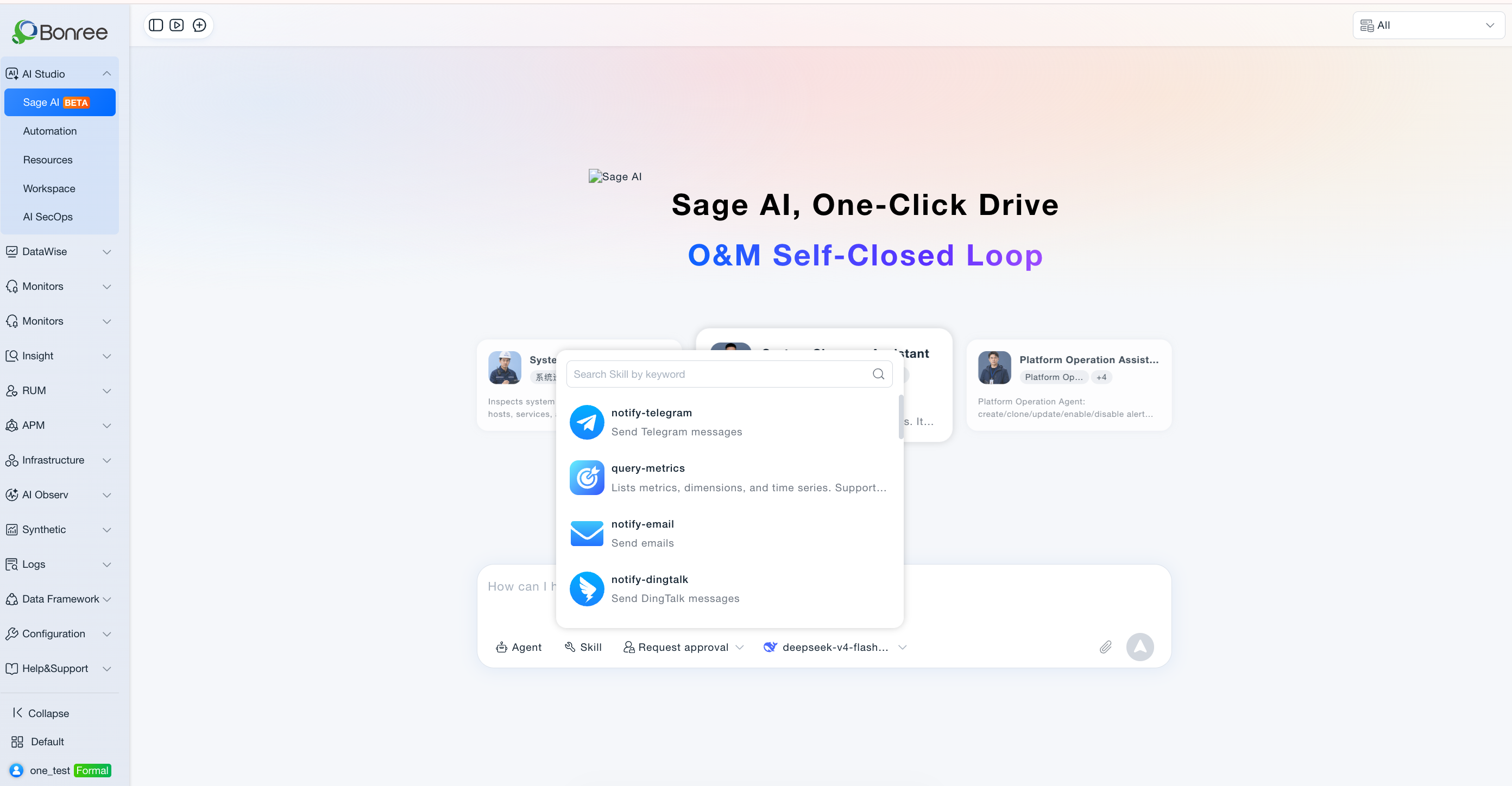
Typical flow: Add from Public → switch to My Resources to Open / Configure → invoke via / or @ in Sage AI. After removal, Sage AI and Agents or Automation tasks that reference the Skill may be affected.
Difference from Agents: Public Skills support Add only; Open, Configure, and Remove happen in My Resources. Agents provide Use to jump straight into Sage AI; Skills focus on standardized task execution and parameter setup.
Quick classification (by tag)
Under the search box, Resources provides tag tabs (AND with search). All is first (total resource count); then each tag with its count. One resource may appear under multiple tags. Untagged resources appear only under All. Tags with count 0 may be hidden.
Value
-
Standardized encapsulation, build once use everywhere
Encapsulate repetitive actions such as notifications, report generation, and external lookups for shared use across Agents and Sage AI. -
Built-in Skills with zero setup
Preset Skills can be added from Public and used immediately. -
Configurable after adding
Skills in My Resources support detail view and necessary configuration (e.g., Configured status indicator) for environment-specific parameters. -
Controlled versions
Similar to Agents—when a new public version is published, users who added the Skill can review notes before upgrading.
Use Cases
Add Built-in Skills and Invoke in Sage AI
- Who it's for: Operations staff using platform standard capabilities.
- Typical tasks: Add built-in Skills such as log parsing or host inspection; invoke via
/or @ in Sage AI. - Recommended approach:
- Resources > Skill > Public, find the target Skill;
- Click Add;
- Switch to My Resources, confirm Configured status (complete configuration if needed);
- In Sage AI, type
/or @ to reference the Skill.
- Expected outcome: The Skill is callable in conversations and Agent orchestration in the current resource domain.
Use Team-Shared Skills
- Who it's for: Business and platform operations teams.
- Typical tasks: Add listed Skills such as WeCom notification or ticket creation for team automation workflows.
- Recommended approach:
- Search in Public and review Skill details (description, version, tags);
- After adding, open details in My Resources and read usage notes;
- Reference in Sage AI or Agents.
- Expected outcome: Tasks run per the Skill's standardized flow.
Manage Skills in My Resources
- Who it's for: Resource domain admins or users with many added Skills.
- Typical tasks: Remove unused Skills; update Skills with new versions; verify configuration completeness.
- Recommended approach:
- Go to Skill > My Resources;
- Remove idle Skills (confirm impact on Sage AI, Automation, and Agents);
- Update Skills with version prompts after reading change notes;
- Open details and complete configuration for Skills requiring environment parameters.
- Expected outcome: My Resources stays lean, versions current, and configurations valid.
Creators: Publish Skills to Public
- Who it's for: Skill developers.
- Typical tasks: After developing in Workspace, make Skills available for users in other resource domains.
- Recommended approach:
- Publish in Workspace → appears automatically in My Resources;
- Self-test, then submit listing review;
- After approval, others see and add from Public.
- Expected outcome: Skill expands from team-internal use to platform-wide sharing.
Skill Version Upgrades and Downstream Impact
- Who it's for: Owners of Agents and automation tasks that reference the Skill.
- Typical tasks: After a Skill upgrade, verify behavior of referencing Agents and automation tasks.
- Recommended approach:
- Read update notes in My Resources;
- Confirm upgrade;
- Test in Sage AI and check automation task logs.
- Expected outcome: Skill, referencing Agents, and automation tasks use the new version (consistent with Resources version policy).
Operation Scenarios
-
Open the Skill list
- Resources > Skill tab.
- Switch Public / My Resources.
- Use scenario tags, More, or advanced filters.
-
Add a Skill (Public)
- Click Add on the card.
- After installation, the Skill appears in My Resources.
-
Open / Configure / Remove (My Resources)
- Open: Skill detail and debug preview.
- Configure: Complete required settings (UI-dependent); shows Configured when done.
- Remove: Uninstall after confirmation; referencing Agents and Automation may be affected.
-
Version update (My Resources)
- Click Update when a new version is available; read change notes before confirming.
-
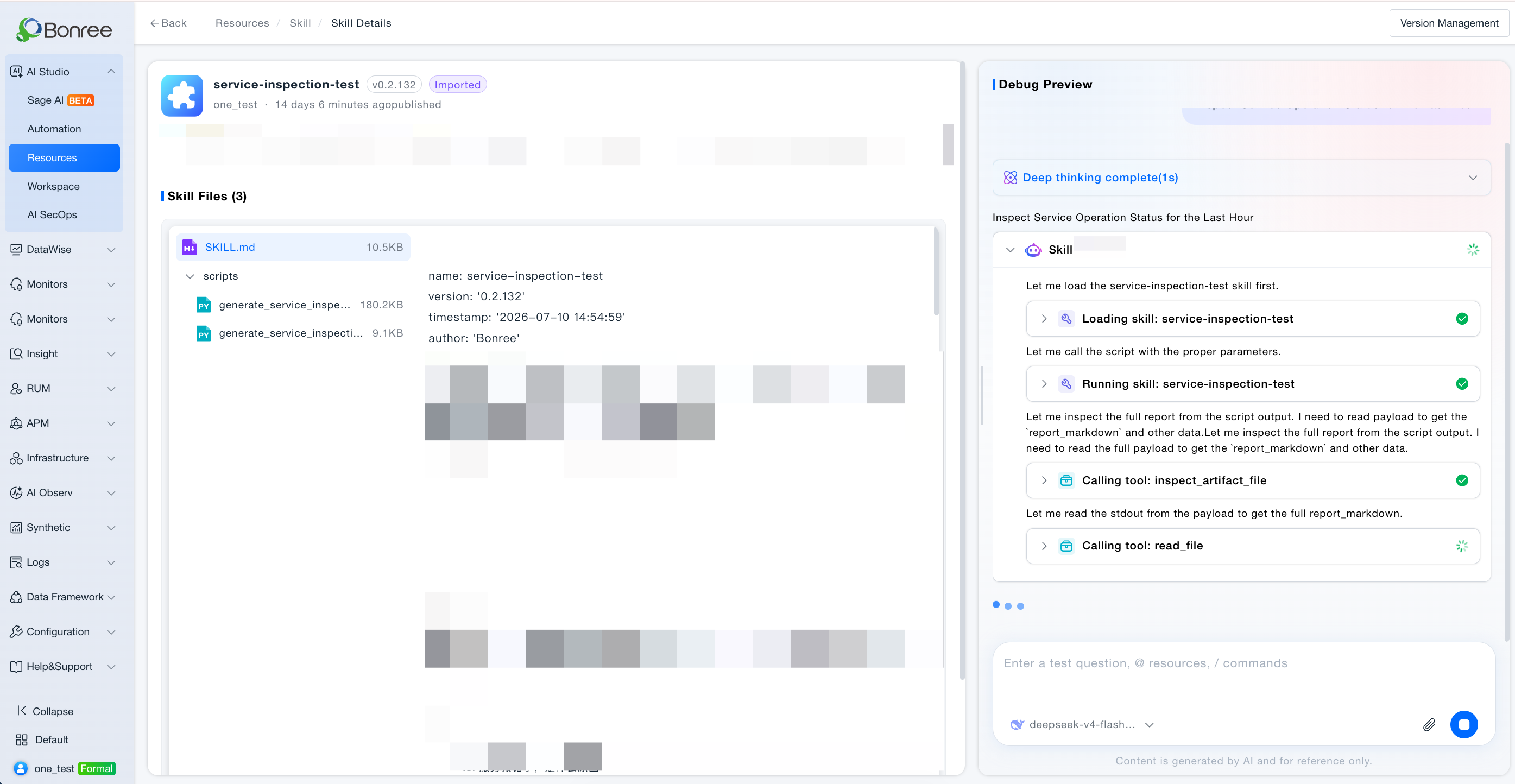
View Skill details
- Click the card body for the detail page.
- Left: Skill package content and description; right: debug preview (read-only testing, does not modify the Skill).
Getting Started
Add and Use a Built-in Skill
- Resources > Skill > Public, select target Skill, click Add.
- Switch to My Resources, click Open for details.
- Complete configuration if required.
- In Sage AI, type
/SkillNameor @ reference and send your task description.
Skill Details and Debug
- In My Resources, click the Skill card or Open.
- Read Skill description and structure on the left.
- Enter test commands in the debug panel on the right to preview execution (does not modify the Skill).
Skill Validation Spec
When you import a Skill in Workspace · Skill Authoring, the platform validates the package against the rules below. If validation fails, the failure reason is shown so you can fix the package and upload again.
1. ZIP Legitimacy Checks
| Check | Description |
|---|---|
| Empty upload package | Blocked. Package contains no bytes. |
| Outer file name suffix | Blocked. Upload file name must end with .zip or .skill (outer package name only). |
| Outer package size | Blocked. Default max 10MB; config skill.import.max_package_mb. |
| Cannot open ZIP | Blocked. Not a valid ZIP file (BadZipFile). |
| No files in ZIP | Blocked. Archive contains no file entries. |
| Encrypted ZIP entries | Blocked. Encrypted compressed entries are not supported. |
| Absolute path | Blocked. Member paths must not start with / or be absolute. |
Path contains .. | Blocked. Path segments must not include ... |
| Directory depth exceeded | Blocked. Default max 5 levels after ZIP root; Nacos max_dir_depth. |
| Single file too large | Blocked. Default max uncompressed size per file 10MB; Nacos max_single_file_mb. |
| Compression ratio too high (ZIP bomb) | Blocked. Default max file_size/compress_size ratio 50×; Nacos max_compress_ratio. |
| Total uncompressed size exceeded | Blocked. Default max sum of uncompressed sizes 100MB; Nacos max_total_unzip_mb. |
2. skill-vetter Checks
Skill-Vetter uses an LLM and the built-in skill-vetter protocol to perform static security review of the upload. The gateway parses only VERDICT / NOTES from the final report body and allows install only when normalized to “installable”. Review is offline and static—it does not execute scripts inside the package.
2.1 Prerequisites and Runtime Conditions
| Check | Description |
|---|---|
| No available LLM for tenant | Blocked. |
| Vetter call timeout | Blocked. Default timeout 120 seconds per review. |
| Rate limit / context overflow with no fallback model | Blocked. May auto-switch to other LLMs and retry; fails when exhausted. |
| Other vetter call exceptions | Blocked. Non-retryable errors fail immediately. |
| Per-file prompt size limit | Not blocked. About 24,000 characters per file; excess is truncated and marked. |
| Total prompt character budget | Not blocked. About 120,000 characters for the whole package; excess files marked as omitted. |
| Ignored directories/files | Not scanned. Skips __pycache__ / .git / .svn / node_modules / .DS_Store / .pyc, etc. |
2.2 REJECT-level Red Flags (DO NOT INSTALL)
| Check | Description |
|---|---|
| curl/wget to unknown URL | Blocked. Includes downloads from unclear addresses. |
| Sending data to external servers | Blocked. Data exfiltration behavior. |
| Requesting credentials / token / API key | Blocked. Inducing secret collection. |
Reading /.ssh, /.aws, ~/.config without clear reason | Blocked. Sensitive directory access. |
| Accessing MEMORY.md / USER.md / SOUL.md / IDENTITY.md | Blocked. Agent private memory files. |
| Base64-decoding arbitrary content | Blocked. Common obfuscation / payload technique. |
eval() / exec() with external input | Blocked. Arbitrary code execution. |
| Modifying system files outside workspace | Blocked. Out-of-bound writes. |
| Installing undeclared dependencies | Blocked. Covert install behavior. |
| Network requests using IP instead of domain | Blocked. Suspicious C2 pattern. |
| Obfuscated code (minified / encoded to hide intent) | Blocked. |
| Requesting sudo / privilege escalation | Blocked. |
| Accessing browser cookies / sessions | Blocked. |
| Touching credential files | Blocked. e.g. id_rsa, .env, docker/config.json, kubeconfig. |
2.3 Extended High-risk Command Patterns (Full-package Scan)
| Check | Description |
|---|---|
| Destructive file operations | Blocked. rm -rf, del /f /s /q, Remove-Item -Recurse -Force, shred, etc. |
| Disk / filesystem operations | Blocked. dd if=, mkfs, fdisk, diskpart, format, etc. |
| Privilege escalation / persistence | Blocked. sudo, runas, crontab, schtasks, systemctl enable, reg add, etc. |
| Arbitrary code execution | Blocked. eval, exec, bash -c, powershell -Command, python -c (external input), etc. |
| Download and execute | Blocked. curl|sh, wget|sh, Invoke-WebRequest|iex, certutil download, etc. |
| Credential / secret harvesting | Blocked. Reading ~/.ssh/*, id_rsa, known_hosts, .env, etc. |
| Exfiltration channels | Blocked. nc / ncat / socat, scp / rsync to unknown hosts, anomalous webhooks, etc. |
| Firewall / network tampering | Blocked. iptables, ufw, netsh advfirewall, DNS/route tampering, etc. |
| Multiple similar commands | Blocked. Any REJECT hit rejects the package; all occurrences must be scanned. |
2.4 Source, Permissions, and OAuth Assessment
| Check | Description |
|---|---|
| Source trust assessment | Not blocked. Reviews source/author/repo/update time; ClawdHub official ≠ automatically safe. |
| Documented OAuth / SaaS | Not blocked. Docs ask users to create their own GOOGLE_ / AZURE_ credentials with least privilege → usually INSTALL WITH CAUTION. |
| Hardcoded secrets / inducing token paste | Blocked. Requires writing secrets into the repo or sending to untrusted endpoints. |
| Broad OAuth solely because authorization is needed | Not blocked. Broad OAuth such as Gmail/Drive defaults to MEDIUM–HIGH; clear docs → CAUTION rather than direct reject. |
curl|sh combined with OAuth docs | Blocked. Documented OAuth plus download-and-execute chain is high risk. |
3. In-ZIP File Checks
Before extracting to disk, entries inside the ZIP are validated by rules (not LLM).
3.1 SKILL.md Checks
| Check | Description |
|---|---|
| File name case | Blocked. Must be exactly SKILL.md; skill.md and similar do not match. |
| Main manifest required | Blocked. Must be at ZIP root SKILL.md, or top-level/SKILL.md under a single top-level directory; deeper SKILL.md cannot be the main manifest. |
Multiple SKILL.md | Uses the shallowest path as the main manifest (same depth: lexicographic path order); not reported as a separate error. |
| Flat package structure | When root has SKILL.md, multiple top-level items (e.g. scripts/, references/) are allowed; top-level folder name need not match slug. |
| Single-folder package structure | When root has no SKILL.md, all files must be under one top-level directory; multiple top-level directories are blocked. |
| Single-folder top-level directory name | Blocked. Top-level directory name must equal slug in SKILL.md (or name if slug is omitted). |
SKILL.md encoding | Blocked. Must be UTF-8. |
| YAML front matter | Blocked. Leading metadata such as name/description must be wrapped in --- --- and be valid YAML. |
| name | Blocked. Required; max 64 characters; regex ^[a-z0-9]+(?:-[a-z0-9]+)*$ (starts with lowercase letter or digit; lowercase letters / digits / - only; no leading/trailing or consecutive hyphens; must exactly match top-level folder name). |
| slug | If set, same rules as name; if omitted, slug=name automatically. |
| description | Blocked. Required; length 1–1024 characters. |
3.2 File Allowlist Checks
| Check | Description |
|---|---|
| Allowed extensions (default 31) | .cfg / .cjs / .conf / .css / .csv / .gif / .htm / .html / .ico / .ini / .jpeg / .jpg / .js / .json / .jsx / .md / .mjs / .png / .py / .rst / .sh / .sql / .svg / .toml / .ts / .tsv / .tsx / .txt / .webp / .yaml / .yml |
| Allowed extensionless files | license / copying / makefile / dockerfile / gemfile / rakefile / procfile / jenkinsfile (case-insensitive) |
| Allowed dot config files | .gitignore / .dockerignore / .editorconfig / .npmrc / .nvmrc (full file name match) |
SKILL.md | Exempt from extension allowlist, but must still satisfy all 3.1 rules. |
| Ignore list (not blocked; deleted after extract) | __MACOSX / __pycache__ / .git / .svn / .DS_Store / desktop.ini / Thumbs.db / ._* / .pyc / .pyo; skipped during validation and not treated as allowlisted types. |
| Double-suffix files | Only the last extension counts; e.g. archive.tar.gz is treated as .gz and blocked if not allowlisted. |
| Suffix not on allowlist | Blocked. e.g. .exe / .pdf / .zip / .ps1 / .env; extend via Nacos skill.import.allowed_suffix. |
3.3 Dangerous Script Content Scan (Rule Engine)
| Check | Description |
|---|---|
| Scan scope | Only .sh / .py / .js / .mjs / .cjs / .ts / .tsx / .jsx with size greater than 0; .md / .json and similar docs are not scanned. |
.sh scripts | Blocked. Patterns such as rm -rf, curl|sh, mkfs, dd, chattr. |
| Code files | Blocked. Patterns such as os.system, subprocess(shell=True), eval, exec, child_process. |
| Sensitive path / secret references | Blocked. e.g. /etc/shadow, ~/.ssh, PRIVATE KEY. |
3.4 Extract and Other Checks
| Check | Description |
|---|---|
| Extract path safety | Blocked. Absolute paths, .., and escaping the extract root are forbidden. |
Missing SKILL.md after extract | Blocked. Flattened skill directory must contain SKILL.md. |
| Duplicate slug in same environment | Blocked. slug must be unique under the same account_id + env_id. |
| Conflict with built-in skill | Blocked. name or slug must not duplicate a global built-in skill. |
| icon | Blocked. Empty passes; short strings without injection traits pass; otherwise must be a valid base64 image. |
| Auth dimensions | Blocked. Requires account_id, env_id, resource_zone_id. |
Notes
- Public supports Add only; open, configure, and remove are in My Resources.
- After removing a Skill, Sage AI and Agents and automation tasks referencing it may fail.
- When a Skill publishes a new version, referencing Agents and automation tasks automatically use the new version—assess impact before upgrading.
- Built-in Skills are in Public; Skills published from Workspace appear in My Resources; after listing approval, they appear in Public.
- Skill detail debug is read-only; edit in Workspace · Skill Authoring.
- Imported Skill packages must pass the Skill Validation Spec above; validation requires an available LLM—add a model first if the model list is empty.