Data Parsing
Split raw strings (JSON, log lines, free text) into structured JSON fields so downstream components can use them.
Key Terms
| Term | Description |
|---|---|
| JSON parser | Built-in syntax for extracting keys from JSON payloads. |
| Grok parser | Regex-based syntax ideal for log parsing. |
| Structured | Data already arrives as clean key/value pairs. |
| Semi-structured | Has repeatable patterns that can be tokenized. |
| Unstructured | No reliable pattern; treated as a single blob. |
Prerequisites
- Decide which information you need and what the final structure should look like.
- Every raw payload is wrapped in
_Message;_Timestampis added automatically.
Getting Started
Choose the field to split
You can configure several rules, but each rule processes one field at a time.
Choose parser type
Supports JSON-format data splitting, custom text splitting, and Grok-parser splitting.
-
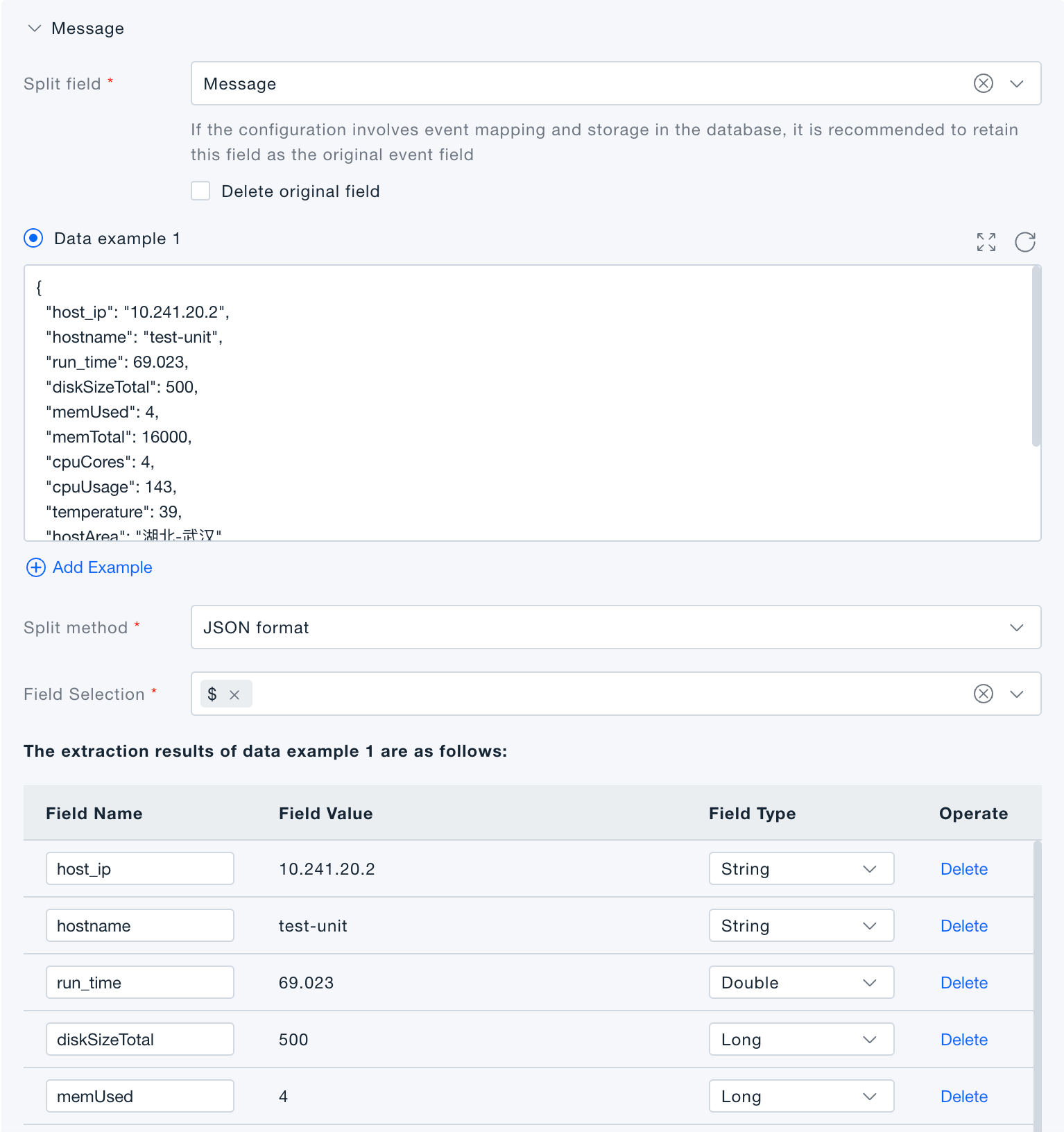
JSON-format split: when the target field is JSON, extract only the selected keys and convert them into top-level fields.
-
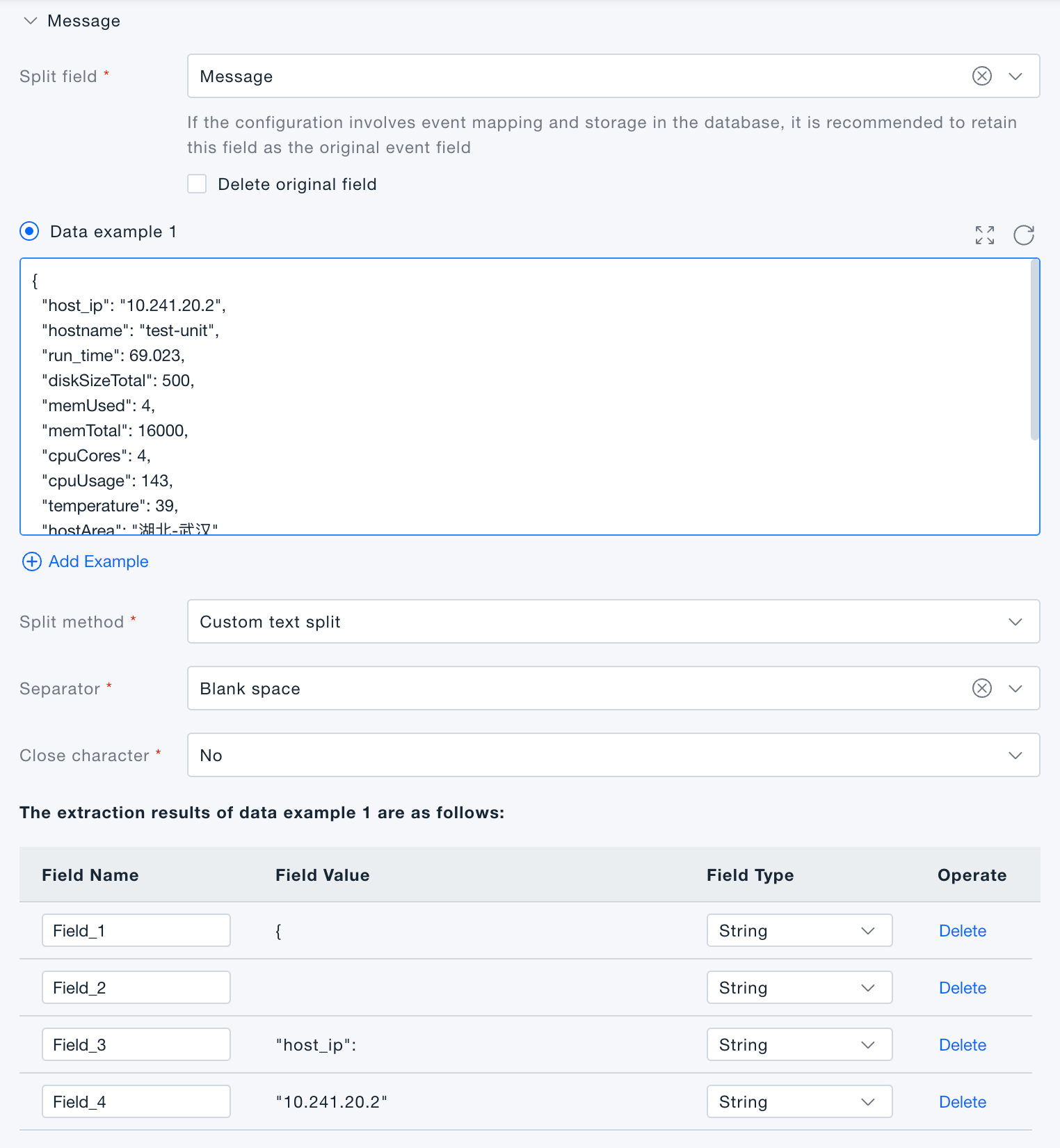
Custom text split: cut the data by a chosen delimiter; each resulting segment becomes an independent field.
-
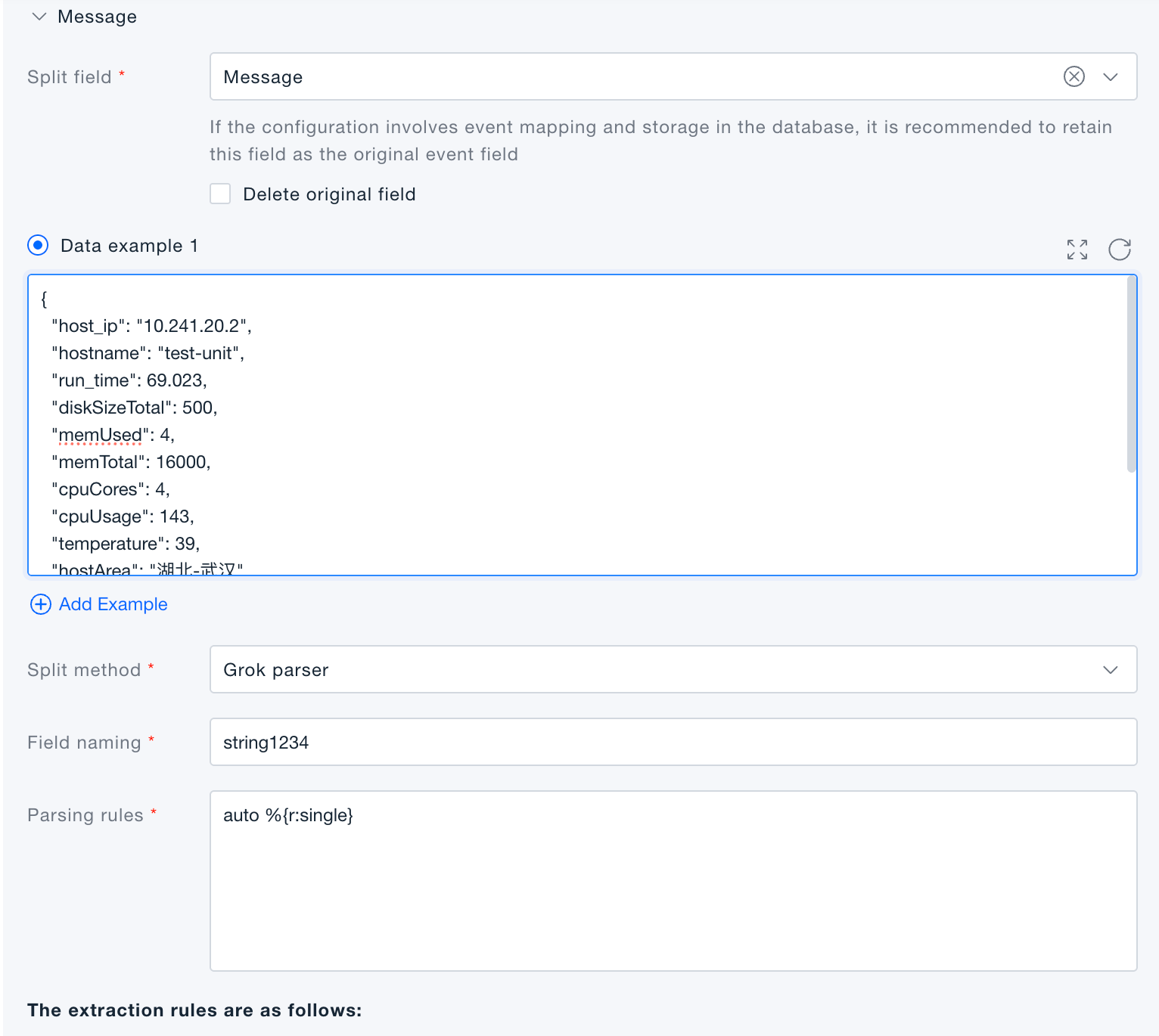
Grok parser: uses Grok syntax to split text data, ideal for parsing log text fields.
Verification
Click Execute Preview to review the results in the preview panel. (Preview simulates the transformation—no actual data is written to the platform.)
Grok Syntax Reference
0. Quick Reference
0.1 Grok Fragment Structure
| Structure | Purpose | Example |
|---|---|---|
%{matcher} | Matches only, outputs no field | %{word} |
%{matcher:field} | Matches and outputs a field | %{ipv4:clientIp} |
%{matcher:field:filter} | Matches, outputs, and applies filter | %{notSpace:status:integer} |
%{matcher::filter} | No field name, applies filter directly | %{data::json} |
%{helperRule} | References a helper rule for reuse | %{HTTP_REQ} |
0.2 Built-in Matchers
| Category | Matcher | Description |
|---|---|---|
| Network | ipv4, ipv6, ip, port, mac, hostname | IP, port, MAC, hostname |
| Generic text | word, notSpace, data | Word, non‑whitespace, arbitrary text |
| Identifiers | uuid, _traceid | UUID, 32‑character trace ID |
| Log content | _status, _class, _exception, _url | Log level, Java class, exception first line, URL |
0.3 Functional Matchers
| Function | Purpose | Example syntax |
|---|---|---|
date("format") | Match date format, convert to millisecond timestamp | %{date("yyyy-MM-dd HH:mm:ss"):timestamp} |
regex("pattern") | Match custom content with Java regex | %{regex("ORD\\d{12}"):orderNo} |
boolean("trueValue","falseValue") | Match a word and convert to boolean | %{boolean("Y","N"):enabled} |
number | Match integer or decimal, convert to number | %{number:cost} |
0.4 Supported Filter Functions
| Category | Filter | Example syntax | Output description |
|---|---|---|---|
| Type conversion | boolean | %{notSpace:success:boolean} | Converts to Boolean |
| Type conversion | integer | %{notSpace:status:integer} | Converts to Integer |
| Type conversion | long | %{notSpace:bytes:long} | Converts to Long |
| Type conversion | number | %{notSpace:cost:number} | Converts to Integer or Double |
| JSON parsing | json | %{data::json}, %{data:payload:json} | Flattens JSON into a Map |
| KV parsing | keyvalue | %{data:attrs:keyvalue("=", " ")} | Converts key‑value text to Map |
| String handling | lowercase | %{notSpace:level:lowercase} | Converts to lower case |
| String handling | uppercase | %{notSpace:method:uppercase} | Converts to upper case |
| Null handling | nullIf("value") | %{notSpace:user:nullIf("-")} | Returns null if value matches |
| URL parsing | url | %{_url:req:url} | Splits URL into scheme, host, port, path, queryString |
0.5 Regular Expression Quick Guide
| Scenario | Recommended approach | Example |
|---|---|---|
| Built‑in matcher available | Prefer built‑in matcher | %{ip:clientIp}, %{_url:url} |
| Custom local regex | Use regex("...") | %{regex("[A-Z]{3}\\d{4}"):bizCode} |
| Date pattern | Prefer date("...") | %{date("yyyy-MM-dd HH:mm:ss"):timestamp} |
| Trailing arbitrary text | Use data at the end | %{data:message} |
| Fixed text or separators | Write directly in the rule | level=%{_status:level}, [%{date("yyyy-MM-dd HH:mm:ss"):timestamp}] |
Note: If the rule is written inside a Java string, backslashes and double quotes must be escaped according to Java string rules.
1. Rule Format
One parsing rule per line, in the following format:
RuleName GrokExpression
Example:
nginxRule %{ipv4:clientIp} - %{notSpace:user} [%{date("dd/MMM/yyyy:HH:mm:ss Z"):timestamp}] "%{word:method} %{notSpace:path} HTTP/%{notSpace:httpVersion}" %{notSpace:status:integer} %{notSpace:bytes:long}
Rule names support letters, digits, underscores, and dots. For example:
app.access %{date("yyyy-MM-dd HH:mm:ss"):timestamp} %{_status:level} %{data:message}
Limits:
- Maximum 10 match rules.
- Maximum 100 helper rules.
- Helper rules can be referenced by match rules.
- Maximum Grok recursion depth is 100 levels (to avoid circular references).
- Rules are tried in order; the first matching rule is returned as the result.
2. Grok Expression Basic Syntax
Grok fragments are enclosed in %{...} and support the following forms:
%{matcher}
%{matcher:field}
%{matcher:field:filter}
%{matcher::filter}
Meaning:
matcher: The pattern used to match the input – can be a built‑in matcher, a functional matcher, or a helper rule.field: The output field name. If omitted, the fragment only participates in matching and does not produce an output field.filter: A transformation function applied after a successful match, e.g., converting to number, JSON, or case conversion.
Examples:
%{ipv4:clientIp}
%{notSpace:status:integer}
%{data:payload:json}
%{data::json}
Important:
%{data:json}means the field name isjson, not a JSON conversion.- JSON conversion should be written as
%{data::json}or%{data:payload:json}. - The entire log line must be fully matched; after compilation, the rule is equivalent to
^ruleRegex$.
3. Built-in Matchers
Generic Matchers
| Matcher | Description |
|---|---|
uuid | Standard UUID, e.g., 550e8400‑e29b‑41d4‑a716‑446655440000 |
mac | MAC address – supports 00:11:22:33:44:55, 00‑11‑22‑33‑44‑55, 0011.2233.4455 |
ipv4 | IPv4 address |
ipv6 | IPv6 address |
ip | IPv4 or IPv6 address |
port | Port number, range 1–65535 |
word | Word characters, equivalent to \b\w+\b |
notSpace | Non‑whitespace characters, equivalent to \S+ |
data | Any characters (including newlines), lazy match by default |
hostname | Hostname or domain name |
Examples:
%{ipv4:hostIp}:%{port:port}
%{hostname:host}
%{word:method}
%{notSpace:path}
%{data:message}
Log‑Specific Matchers
| Matcher | Description |
|---|---|
_url | HTTP/HTTPS URL |
_class | Java class name, e.g., com.demo.UserService |
_status | Log level – supports INFO/WARN/ERROR/DEBUG/FATAL/EMERGENCY/ALERT/CRITICAL/SEVERE and case variants |
_exception | First line of a Java exception |
_traceid | 32‑character hexadecimal trace ID |
Examples:
%{_status:level}
%{_class:className}
%{_url:url}
%{_traceid:traceId}
4. Functional Matchers
Functional matchers are placed in the matcher position of %{matcher:field}. They match and convert the original value.
date
Syntax:
%{date("dateFormat"):field}
Examples:
%{date("yyyy-MM-dd HH:mm:ss"):timestamp}
%{date("yyyy-MM-dd HH:mm:ss.SSS"):timestamp}
%{date("dd/MMM/yyyy:HH:mm:ss Z"):timestamp}
After successful matching, the field value is converted to a millisecond timestamp; the field pattern is set to the corresponding date format.
Supported date formats:
yyyy-MM-dd'T'HH:mm:ss.SSSZZ
yyyy-MM-dd'T'HH:mm:ss.SSSZ
yyyy-MM-dd HH:mm:ss.SSS z
EEE MMM dd HH:mm:ss yyyy
EEE MMM d HH:mm:ss yyyy
dd/MMM/yyyy:HH:mm:ss Z
dd/MMM/yyyy:HH:mm:ss.SSS
yyyy-MM-dd HH:mm:ss.SSS
yyyy-MM-dd'T'HH:mm:ss.SSSSSSZ
yyyy-MMM-dd HH:mm:ss.SSSSSS
dd MMM yyyy HH:mm:ss.SSS
yyyy-MM-dd HH:mm:ss,SSS
yyyy-MM-dd'T'HH:mm:ss,SSS
dd MMM HH:mm:ss.SSS
MM-dd HH:mm:ss.SSS
yyyy-MM-dd HH:mm:ss
yyyy-MM-dd  H:mm:ss
yyyy/MM/dd HH:mm:ss
yyMMdd HH:mm:ss
hh:mm:ss a
HH:mm:ss
dd/MM/yyyy
HH:mm:ss.SSS
Notes:
- Date formats without a year will use the current year.
- Time‑only formats will use the current date.
- Some English month and weekday formats use the English locale.
regex
Syntax:
%{regex("JavaRegexPattern"):field}
Examples:
%{regex("[A-Z]{3}\\d{4}"):bizCode}
%{regex("\\d+\\.\\d+"):cost}
Notes:
- The
regex("...")accepts a Java regular expression. - When used inside a Java string, backslashes must be escaped according to Java string rules.
- Complex regexes containing characters like
:,{,}that affect Grok fragment parsing should be simplified or placed in a helper rule.
boolean
Syntax:
%{boolean("trueValue","falseValue"):field}
Examples:
%{boolean("yes","no"):success}
%{boolean("Y","N"):enabled}
Notes:
- The matcher matches a single word.
- If the original text equals the first parameter, it returns
true; otherwisefalse.
number
Syntax:
%{number:field}
Example:
%{number:cost}
Notes:
- Matches integers or decimals.
- Returns
Doubleif it contains a decimal point; otherwiseInteger.
5. Filter Functions
Filters are placed in the third segment of a Grok fragment to transform the matcher’s result.
%{matcher:field:filter}
Type Conversion Filters
| Filter | Output |
|---|---|
boolean | Boolean |
integer | Integer |
long | Long |
number | Integer or Double |
Examples:
%{notSpace:success:boolean}
%{notSpace:status:integer}
%{notSpace:bytes:long}
%{notSpace:cost:number}
String Filters
| Filter | Description |
|---|---|
lowercase | Converts to lower case |
uppercase | Converts to upper case |
nullIf("value") | Returns null if the field equals the specified value |
Examples:
%{notSpace:level:lowercase}
%{notSpace:method:uppercase}
%{notSpace:user:nullIf("-")}
json
Syntax:
%{data::json}
%{data:payload:json}
Description:
- Flattens a JSON string into a Map.
- Without a field name, the JSON fields are output directly.
- With a field name, output fields are prefixed, e.g.,
payload.traceId. - Maximum flattening depth is 6.
Example:
jsonRule %{data:payload:json}
Input:
{"traceId":"abc","server":{"host":"node-1","port":8080}}
Output fields:
payload.traceId = abc
payload.server.host = node-1
payload.server.port = 8080
keyvalue
Syntax:
%{data::keyvalue}
%{data:attrs:keyvalue}
%{data:attrs:keyvalue("=")}
%{data:attrs:keyvalue("=", " ")}
Description:
keyvalue: Splits by=by default, one key‑value pair.keyvalue("="): Splits by the specified delimiter, using the last occurrence.keyvalue("=", " "): First splits into multiple segments by the second delimiter, then splits each segment by the first delimiter.- Supports values wrapped in single or double quotes; splitting tries to avoid breaking quoted content.
- With a field name prefix, output keys become
prefix.key.
Example:
kvRule %{data:attrs:keyvalue("=", " ")}
Input:
user=tom status=ok cost=12
Output fields:
attrs.user = tom
attrs.status = ok
attrs.cost = 12
url
Syntax:
%{_url:req:url}
Description:
- Parses a URL and outputs a Map.
- Output fields:
url,scheme,host,port,path,queryString. - With a field name prefix, fields become
req.url,req.scheme,req.host, etc.
Example:
%{_url:req:url}
6. Helper Rules
Helper rules are used to reuse Grok expressions. Match rules can reference helper rules.
Helper rule:
HTTP_REQUEST %{word:method} %{notSpace:path} HTTP/%{notSpace:httpVersion}
Match rule:
accessRule %{ipv4:clientIp} - %{notSpace:user} [%{date("dd/MMM/yyyy:HH:mm:ss Z"):timestamp}] "%{HTTP_REQUEST}" %{notSpace:status:integer} %{notSpace:bytes:long}
Notes:
- Helper rule names are referenced inside
%{helperName}. - Fields inside the helper are output.
- It is not recommended to add a field name or filter at the reference site itself.
7. Regular Expression Usage Suggestions
Writing Regex Directly in Grok
When you need to write a regex directly, use regex("..."):
%{regex("\\d{4}-\\d{2}-\\d{2}"):dateText}
%{regex("[A-Za-z0-9_-]+"):token}
Escaping Rules
If the rule is written in plain configuration text:
%{regex("\d+"):num}
If written inside a Java string, escape backslashes additionally:
"%{regex(\"\\d+\"):num}"
Recommended Practices
- Prefer built‑in matchers, e.g., use
%{ip:ip}for IP,%{_url:url}for URL. - For dates, prefer
date("...")– avoid writing complex date regexes manually. - For trailing arbitrary text, use
%{data:message}at the end. - Fixed structures that are not needed as output can omit the field name, e.g.,
%{word}only participates in matching. - Avoid overly complex nested regexes inside
regex("...")to prevent timeouts or parsing failures.
8. Common Examples
Generic Application Log
Log:
2026-06-25 10:20:30 INFO traceId=abcdef1234567890 user=tom login success
Rule:
appRule %{date("yyyy-MM-dd HH:mm:ss"):timestamp} %{_status:level} traceId=%{notSpace:traceId} user=%{notSpace:user} %{data:message}
Nginx Access Log
Log:
10.0.0.1 - tom [25/Jun/2026:10:20:30 +0800] "GET /api/users HTTP/1.1" 200 1234
Rule:
nginxRule %{ipv4:clientIp} - %{notSpace:user} [%{date("dd/MMM/yyyy:HH:mm:ss Z"):timestamp}] "%{word:method} %{notSpace:path} HTTP/%{notSpace:httpVersion}" %{notSpace:status:integer} %{notSpace:bytes:long}
JSON Log
Log:
{"traceId":"abc","success":true,"server":{"host":"node-1","port":8080}}
Rule:
jsonRule %{data::json}
Key‑Value Log
Log:
host=node-1 ip=10.0.0.1 port=8080 status=UP
Rule:
kvRule %{data:attrs:keyvalue("=", " ")}
9. Syntax Not Currently Supported or Recommended
The following names may appear in enumerations or class names but are not fully integrated into the Grok compilation path and are not recommended for user syntax:
numberStr
numberExt
numberExtStr
integer
integerStr
integerExt
integerExtStr
doubleQuotedString
singleQuotedString
quotedString
ipOrHost
For integers, decimals, strings, etc., use the recommended forms:
%{notSpace:field:integer}
%{notSpace:field:long}
%{notSpace:field:number}
%{data:field}
%{regex("..."):field}
10. More Ready‑to‑Use Examples
10.1 Fixed‑Delimiter Log
Log:
2026-06-25 10:20:30|INFO|order-service|create order success|cost=35
Rule:
pipeRule %{date("yyyy-MM-dd HH:mm:ss"):timestamp}|%{_status:level}|%{notSpace:service}|%{data:message}|cost=%{notSpace:cost:long}
10.2 Space‑Separated Log
Log:
2026-06-25 10:20:30 INFO payment-service 10.0.1.12 /pay/create 200 18.6
Rule:
spaceRule %{date("yyyy-MM-dd HH:mm:ss"):timestamp} %{_status:level} %{notSpace:service} %{ipv4:clientIp} %{notSpace:path} %{notSpace:status:integer} %{notSpace:cost:number}
10.3 Key‑Value Log
Log:
time=2026-06-25T10:20:30.123+0800 level=INFO host=node-1 ip=10.0.1.12 port=8080 success=true
Rule:
kvLineRule %{data:attrs:keyvalue("=", " ")}
Output fields:
attrs.time = 2026-06-25T10:20:30.123+0800
attrs.level = INFO
attrs.host = node-1
attrs.ip = 10.0.1.12
attrs.port = 8080
attrs.success = true
10.4 Full JSON Flattening
Log:
{"traceId":"abc-123","level":"INFO","server":{"host":"node-1","ip":"10.0.1.12"},"cost":18}
Rule:
jsonFlatRule %{data::json}
Output fields:
traceId = abc-123
level = INFO
server.host = node-1
server.ip = 10.0.1.12
cost = 18
10.5 URL Parsing
Log:
GET https://example.com:8443/api/search?q=grok&page=1 200
Rule:
urlRule %{word:method} %{_url:req:url} %{notSpace:status:integer}
Output fields:
method = GET
req.url = https://example.com:8443/api/search?q=grok&page=1
req.scheme = https
req.host = example.com
req.port = 8443
req.path = /api/search
req.queryString.q = grok
req.queryString.page = 1
status = 200
10.6 Custom Regex for Business ID
Log:
orderNo=ORD202606250001 status=SUCCESS cost=99.5
Rule:
regexRule orderNo=%{regex("ORD\\d{12}"):orderNo} status=%{word:status} cost=%{notSpace:cost:number}
Note: In plain configuration, use \d or \\d depending on the system's handling of backslashes; in Java strings, escape additionally.
10.7 Boolean Matcher
Log:
user=tom enabled=Y deleted=N
Rule:
boolMatcherRule user=%{notSpace:user} enabled=%{boolean("Y","N"):enabled} deleted=%{boolean("Y","N"):deleted}
Output fields:
user = tom
enabled = true
deleted = false
10.8 nullIf for Placeholder Handling
Log:
clientIp=10.0.1.12 user=- path=/api/order
Rule:
nullIfRule clientIp=%{ipv4:clientIp} user=%{notSpace:user:nullIf("-")} path=%{notSpace:path}
10.9 Java Application Log
Log:
2026-06-25 10:20:30 ERROR com.demo.order.OrderService create order failed
Rule:
javaLogRule %{date("yyyy-MM-dd HH:mm:ss"):timestamp} %{_status:level} %{_class:className} %{data:message}
10.10 Java Exception First Line
Log:
java.lang.RuntimeException: create order failed
Rule:
exceptionRule %{_exception:exception}
Note: _exception primarily matches the first line of an exception. For multi‑line stack traces, it is recommended to merge them upstream or use %{data:stack} as a fallback.
10.11 traceId Extraction
Log:
traceId=4bf92f3577b34da6a3ce929d0e0e4736 spanId=00f067aa0ba902b7
Rule:
traceRule traceId=%{_traceid:traceId} spanId=%{notSpace:spanId}
10.12 IP and Port
Log:
remote=10.0.1.12:443 local=172.16.1.2:8080
Rule:
ipPortRule remote=%{ipv4:remoteIp}:%{port:remotePort:integer} local=%{ipv4:localIp}:%{port:localPort:integer}
10.13 Helper Rule for HTTP Request
Helper rule:
HTTP_REQ %{word:method} %{notSpace:path} HTTP/%{notSpace:httpVersion}
Match rule:
accessWithHelper %{ipv4:clientIp} "%{HTTP_REQ}" %{notSpace:status:integer} %{notSpace:bytes:long}
Log:
10.0.1.12 "POST /api/order HTTP/1.1" 201 456
10.14 Helper Rule for Log Prefix
Helper rule:
LOG_PREFIX %{date("yyyy-MM-dd HH:mm:ss.SSS"):timestamp} %{_status:level} %{_traceid:traceId}
Match rule:
appWithPrefix %{LOG_PREFIX} %{_class:className} - %{data:message}
Log:
2026-06-25 10:20:30.123 INFO 4bf92f3577b34da6a3ce929d0e0e4736 com.demo.OrderService - create order success
10.15 Bracket‑Delimited Log
Log:
[2026-06-25 10:20:30] [INFO] [order-service] create order success
Rule:
bracketRule [%{date("yyyy-MM-dd HH:mm:ss"):timestamp}] [%{_status:level}] [%{notSpace:service}] %{data:message}
10.16 CSV‑Style Log
Log:
2026-06-25 10:20:30,INFO,order-service,10.0.1.12,200,35
Rule:
csvRule %{date("yyyy-MM-dd HH:mm:ss"):timestamp},%{_status:level},%{notSpace:service},%{ipv4:clientIp},%{notSpace:status:integer},%{notSpace:cost:long}
10.17 data at the End as Fallback
Log:
2026-06-25 10:20:30 WARN disk usage high: /data 91%
Rule:
tailDataRule %{date("yyyy-MM-dd HH:mm:ss"):timestamp} %{_status:level} %{data:message}
Note: %{data:message} at the end consumes the remaining content. If placed in the middle, ensure a stable delimiter follows to avoid over‑matching.
10.18 Multiple Match Rules
Match rules:
jsonRule %{data::json}
textRule %{date("yyyy-MM-dd HH:mm:ss"):timestamp} %{_status:level} %{data:message}
Note: The parser tries rules in order of definition; the first matching rule is returned. If JSON and text logs are mixed, put the more specific rule first.