Server Log Integration
The platform provides SmartAgent-based log collection capabilities, supporting mainstream host devices such as Linux, Windows, and ARM, to meet the log collection requirements of different host types.
Prerequisites
If SmartAgent is not installed, you need to install it as prompted.
Getting Started
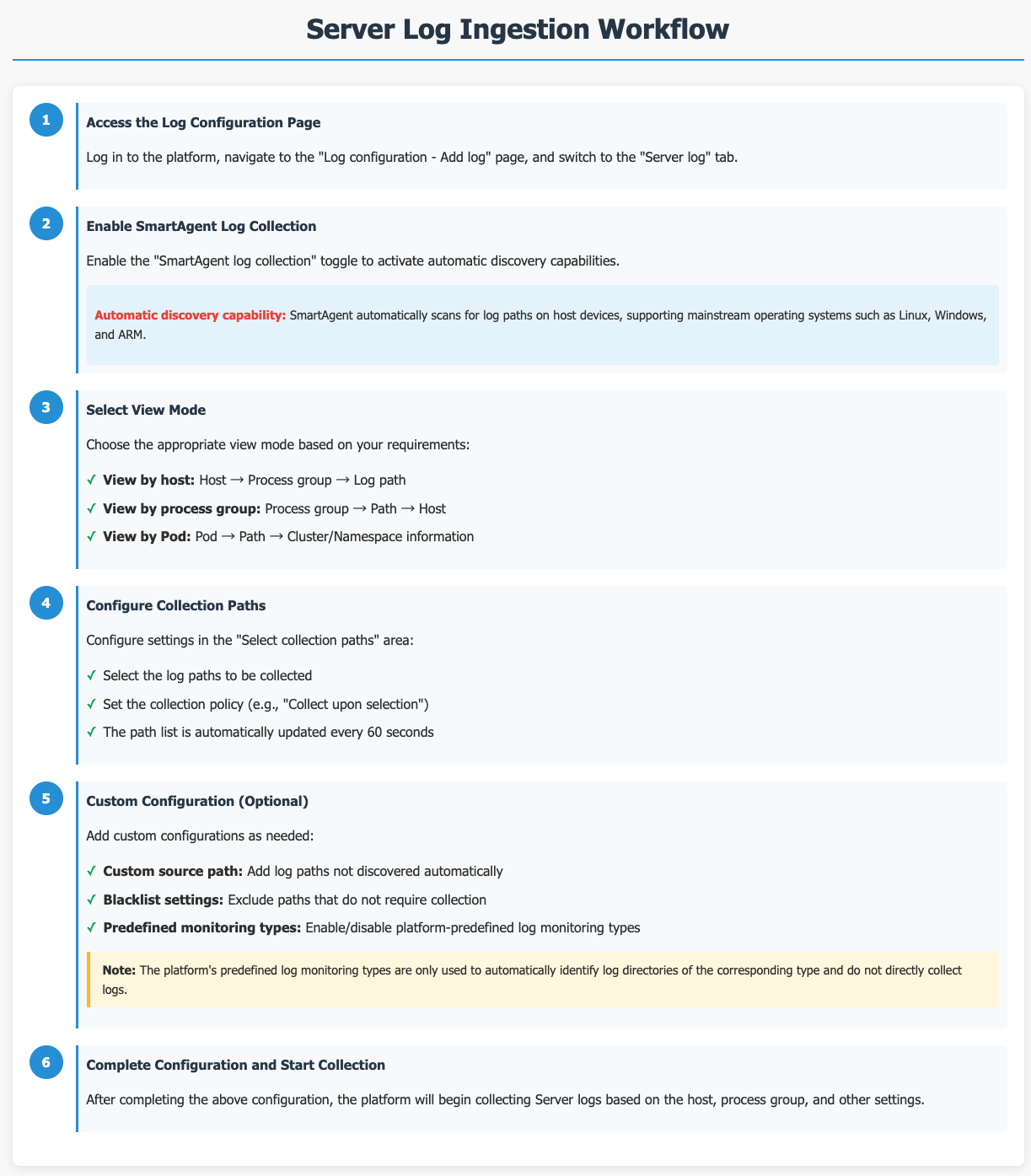
Navigate to the Log Configuration > Add Log page and switch to the Server-Side Logs tab.
Once the SmartAgent Log Collection toggle is enabled, the SmartAgent gains the ability to automatically discover logs. Paths not discovered automatically can be added via Custom Source Paths . Paths that do not require collection can be specified using the Blacklist .
In the Select Collection Paths section, select the host paths from which logs need to be collected. The system automatically updates the list of available paths every 60 seconds. You can set a collection strategy (e.g., "Collect upon selection") and choose the viewing perspective (by Host, Process Group, or Pod). Upon completion, logs will be collected based on the configuration for the selected hosts or process groups.
Log Collection Methods
SmartAgent supports two log collection methods: Precise Collection and Conditional Collection.
Key principle: The collection method only controls how logs are ultimately collected. You can configure a path list or define collection rules independently — the active Collection Method setting determines which configuration takes effect.
Precise Collection
Use this method when you need to explicitly specify which log paths to collect. You can select or deselect individual paths from a list of all discovered log paths.
To configure Precise Collection:
- Select Precise Collection as the collection method.
- The Precise Collection list appears, showing all discovered log paths along with their associated process groups or containers.
- Use the checkboxes to include or exclude individual paths. Changes are saved automatically.
Collect All (Select All)
When Collect All is selected:
- All log paths are displayed, but individual checkboxes are hidden — you cannot manually include or exclude specific paths.
- The Auto-collect newly discovered hosts and Auto-collect newly discovered containers toggles are automatically enabled and locked to ensure any new paths are included automatically.
- This prevents configuration drift when new hosts or containers are added to your environment.
Each time you switch to Collect All, the above behavior is applied automatically.
Viewing Options
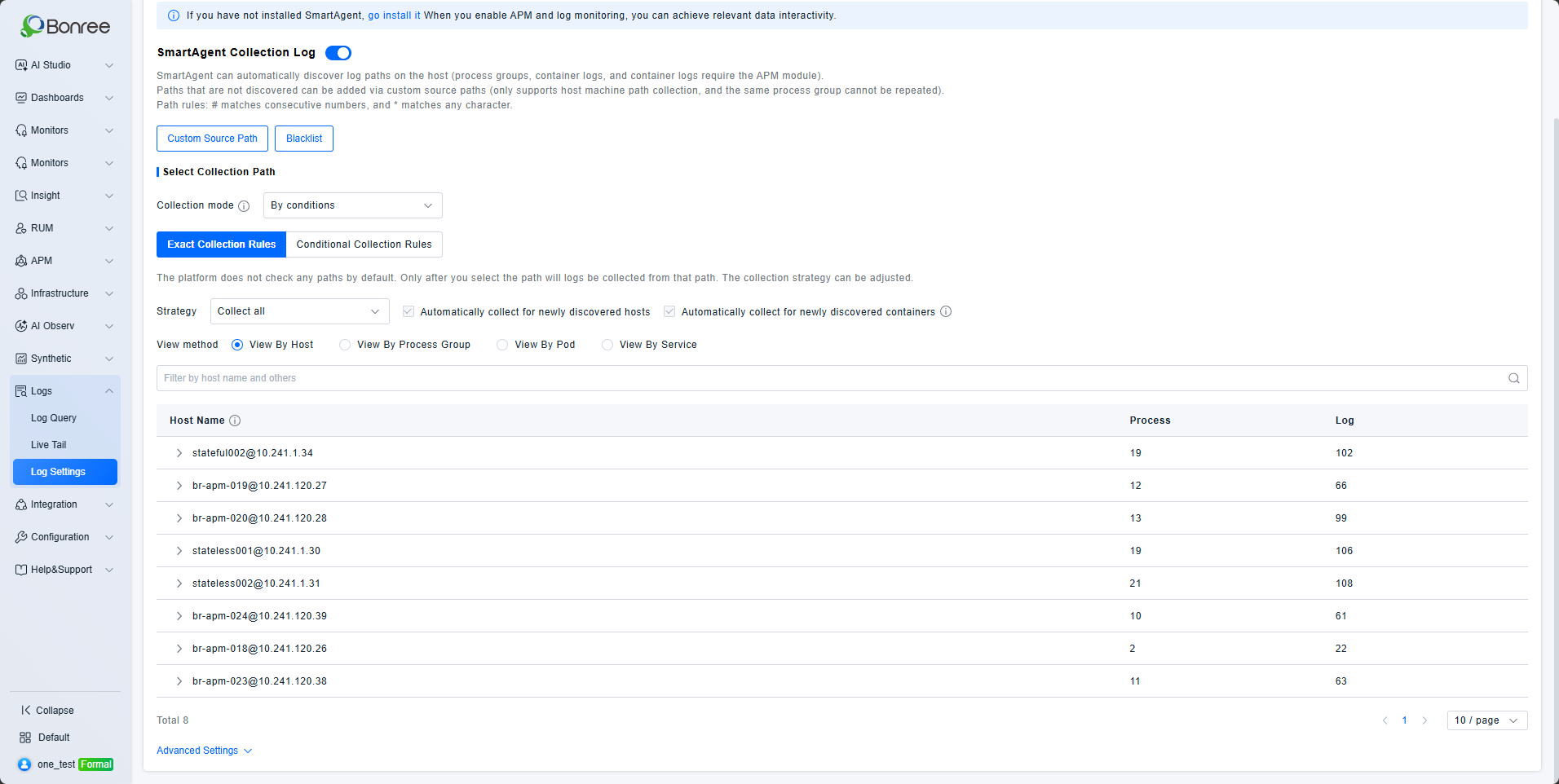
You can browse the log path list in three views:
By Host — Expand a host to see its process groups, then expand a process group to see its log paths.
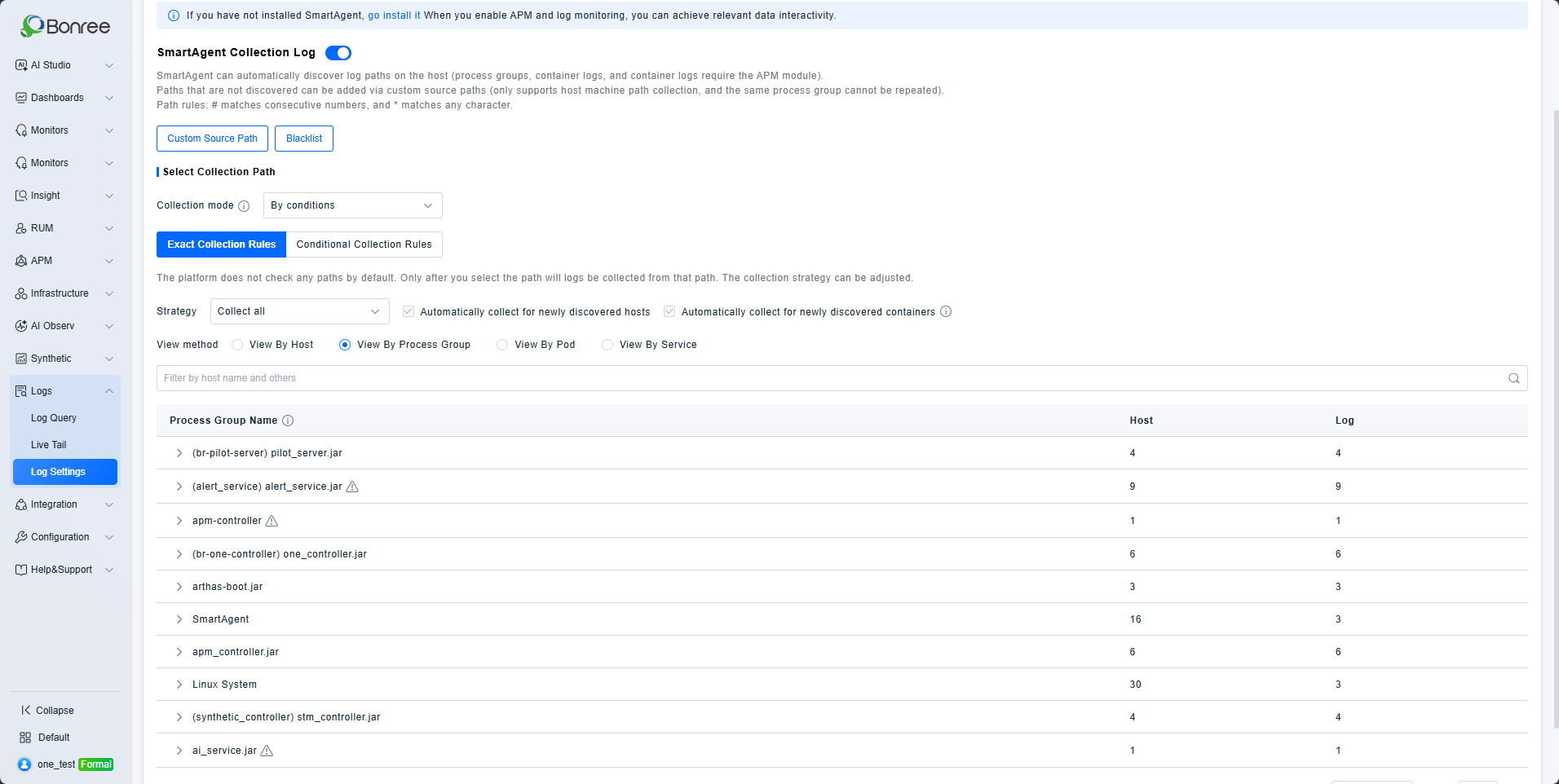
By Process Group — Expand a process group to see its log paths, then expand a path to see the associated hosts.
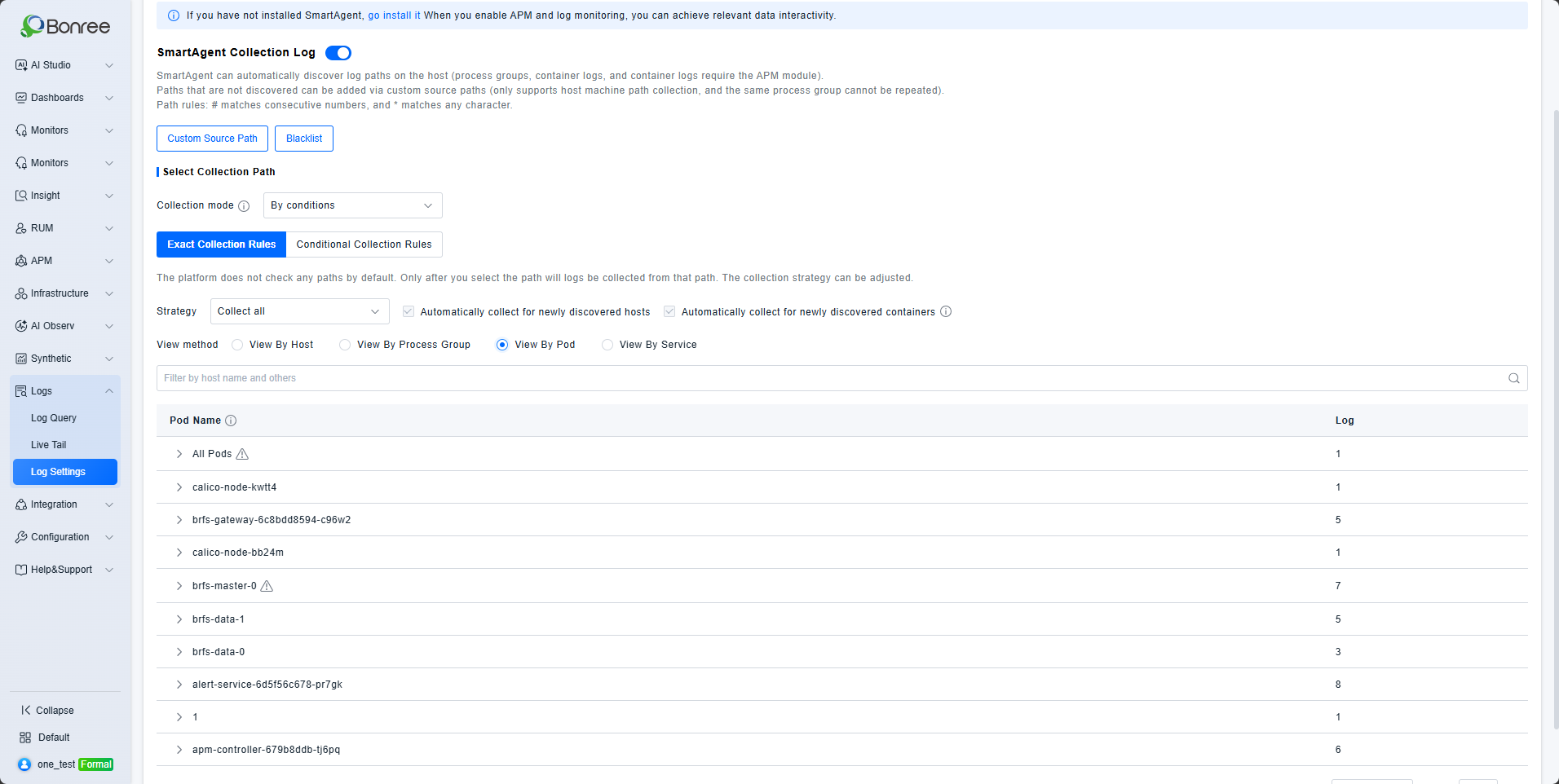
By Pod — Expand a Pod to see its Kubernetes log path details, including the cluster and namespace it belongs to.
Disabled Paths and Hosts
- If a log type or host is disabled in the monitoring configuration, any previously discovered paths or hosts are shown as grayed out and non-selectable.
- Once a log type is disabled, the agent stops scanning for new paths of that type.
- Previously discovered paths that have passed their retention window are automatically removed from the list.
Conditional Collection
Use this method when you need to dynamically determine the collection scope based on rules — for example, by log type, Kubernetes namespace, or pod label.
Rules are evaluated from highest to lowest priority. Each log path is matched against only the first rule it satisfies; subsequent rules are not applied.
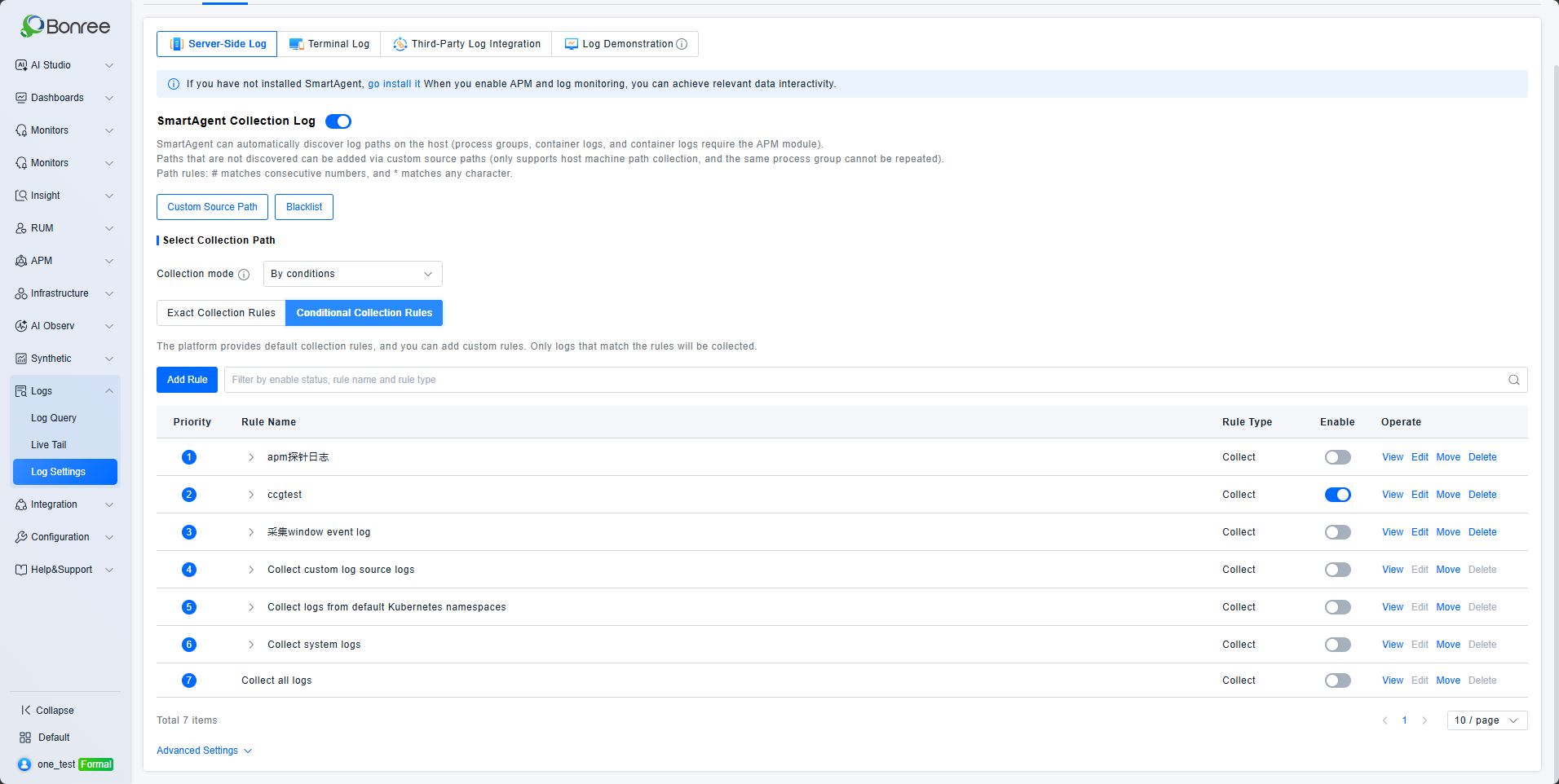
Rule List
The rule list displays the following columns:
| Column | Description |
|---|---|
| Priority | Lower numbers indicate higher priority. Drag rows to reorder. |
| Rule Name | Click to expand and view the conditions defined in the rule. |
| Rule Type | Collect or Do Not Collect. |
| Enabled | Toggle to activate or deactivate a rule without deleting it. |
| Actions | Custom rules supportView, Edit, and Delete. These actions are disabled for built-in default rules. |
Filtering the Rule List
Filter rules using the following criteria:
- Rule Name — Fuzzy string match.
- Rule Type — Dropdown: Collect / Do Not Collect.
- Status — Dropdown: Enabled / Disabled.
Built-in Default Rules
The following rules are included by default and cannot be edited or deleted.
| Rule Name | Condition | Default State | Notes |
|---|---|---|---|
| Collect custom log source logs | Log monitor type = Customer-defined | Enabled | Collects user-defined log sources |
| Collect K8s default namespace logs | K8s namespace ∈{default, bonree-agent, kube-node-lease, kube-public, kube-system} | Disabled | Requires agent support |
| Collect system logs | Log monitor type = System log | Disabled | Requires agent support |
| Collect all logs | No conditions (catch-all) | Enabled | Lowest priority — serves as a fallback rule |
Note: Some default rules may require a minimum agent version. Verify compatibility with your environment before enabling them.
Custom Rules
Click Add Rule to open the rule configuration panel.
Rule settings:
| Setting | Description |
|---|---|
| Rule Name | Required. Maximum 20 characters. Must be unique across all rules. |
| Rule Type | Collect or Do Not Collect. Defaults to Collect. |
| Condition Logic | ChooseAND (all conditions must match) or OR (any condition must match). |
| Conditions | Up to 10 filter conditions per rule. Each condition specifies a field, operator, value, and optional case sensitivity. |
Newly created rules are inserted at the top of the list with the highest priority. You can drag rows to reorder priorities at any time.
Supported Fields and Operators
| Field | Supported Operators | Value Input |
|---|---|---|
| Log path | Equals, Does not equal, Contains, Does not contain, Starts with, Ends with | Text input. Separate multiple values with commas. Chinese commas (,) are automatically converted to ASCII commas (,). |
| Log monitor type | Equals, Does not equal | Multi-select dropdown: System log, SmartAgent log, Container stdout/stderr logs, Host process logs, In-container process logs, Customer-defined |
| Executable name | Equals, Does not equal, Contains, Does not contain, Starts with, Ends with | Text input |
| Process group name | Equals, Does not equal, Contains, Does not contain, Starts with, Ends with | Text input |
| Container name | Equals, Does not equal, Contains, Does not contain, Starts with, Ends with | Text input |
| Kubernetes container name | Equals, Does not equal, Contains, Does not contain, Starts with, Ends with | Text input |
| Kubernetes namespace | Equals, Does not equal, Contains, Does not contain, Starts with, Ends with | Text input |
| Kubernetes pod label | Equals, Contains | Select a labelkey (single-select), then specify the value: equals supports multi-select; contains uses a text input with comma-separated values. |
Multi-value logic:
- Equals / Contains / Starts with / Ends with — multiple values are evaluated with OR logic (any value matches).
- Does not equal / Does not contain — multiple values are evaluated with AND logic (all values must not match).
Custom Source Paths (Optional)
The platform provides both pre-configured log monitoring types and custom log source paths, with support for enabling or disabling them. Once enabled, the agent will identify log directories of the corresponding type. Note that the platform does not immediately start collecting these logs; it only automatically discovers the paths for these log types. Custom source paths support search, deletion, and editing.
Automatic discovery requires that log files meet the following criteria:
- The log file must belong to a critical process and be in an open state to be discoverable.
- The log file must have existed for at least longer than 1 minute.
- The log must have a supported character encoding. By default, the supported encoding is UTF-8. Other supported types include UTF-8 with BOM, and if the file contains a Byte Order Mark (BOM), UTF-16LE and UTF-16BE.
- The log file must be at least larger than 0.5 KB in size.
- The log file must have been updated within the last 7 days.
- The log file must be located in an actual log folder or its subfolder.
Valid path examples:
c:\log\log_file.txt
c:\logs\NewFolder\log_file.txt

Invalid path example:
c:\log\NewFolder\NewFolder\log_file.txt
Or, the log filename must contain the string log, which must be immediately preceded or followed by a period (.) or underscore (_) character.
Valid filename examples:
c:\NewFolder\abc.log
c:\NewFolder\0865842.log.txt

Invalid filename example: (No _ or . immediately before or after log)
c:\NewFolder\logfile.txt
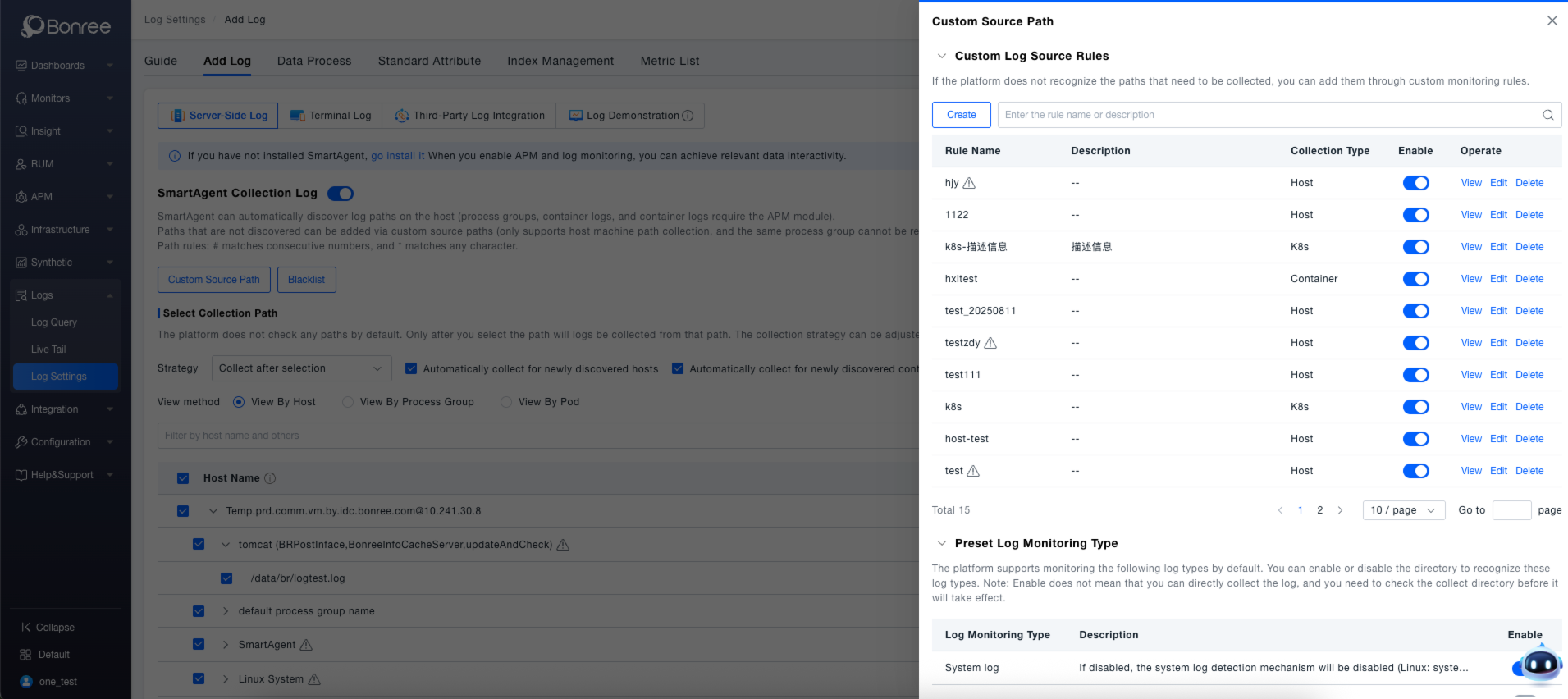
The custom log source configuration provides the capability to add log sources manually that were not auto-detected.
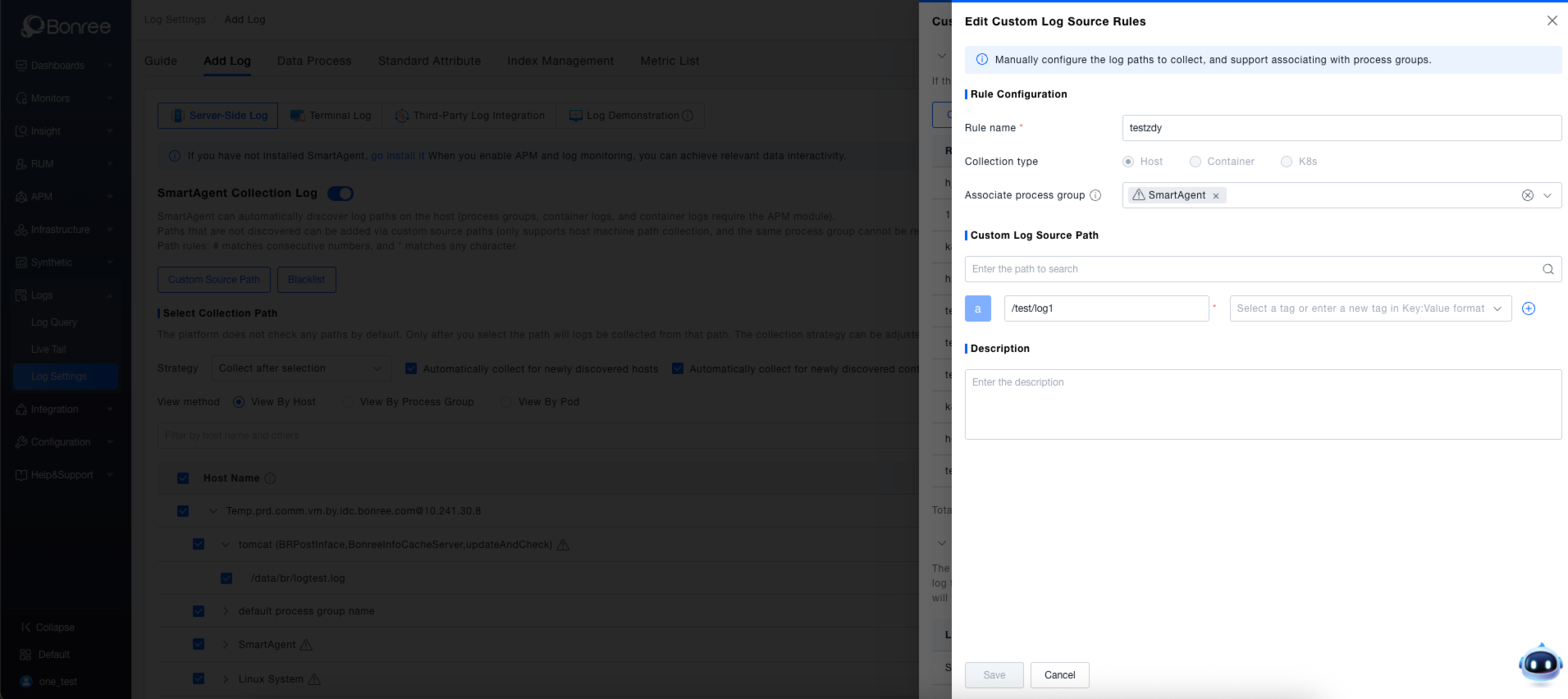
Source Definition (Custom log source configuration, supporting global configuration based on hosts or environments.)
- Allows defining log sources without a Process Group context (adding a Process Group is optional). A maximum of three Process Groups can be added to each log source. If no Process Group is needed, it must be placed in the virtual group:
default process group name. If configured this way, this virtual group will exist on every host. - Multiple path rules can be added within a single Process Group. Custom paths must be absolute paths; relative paths are not supported.
- Paths must be unique within the same Process Group but can be duplicated across different Process Groups.
- Paths support configurable tags, which are predefined attributes within the platform's definition.
- Wildcards are supported in directories. Custom log sources can include wildcards:
#replaces a single digit character, and*replaces any string of characters except a forward slash (/) or backslash (). Note:#can only be used within filenames.
Security Restrictions
- The log path must not be located in any of the following:
/etc,/boot,/dev,/bin,/sbin,/usr. - The log path cannot be
/usr, with the exception of/usr/local. - The log path must not contain
.ssh. - The log path must not have a
.pemextension. - The log path must not be within a directory whose name begins with a
.(e.g.,/.hidden). - The filename or path must meet one of the following requirements:
- The log filename must have a
logextension, separated by a.,-, or_(which may be followed by another extension using the same set of separators). - The log path must reside at the first or second level within a log directory.
- The log path must be at any level within the
/var/logdirectory. - The log path must have the filename
catalina.out.
- The log filename must have a
Advanced Settings (Optional)
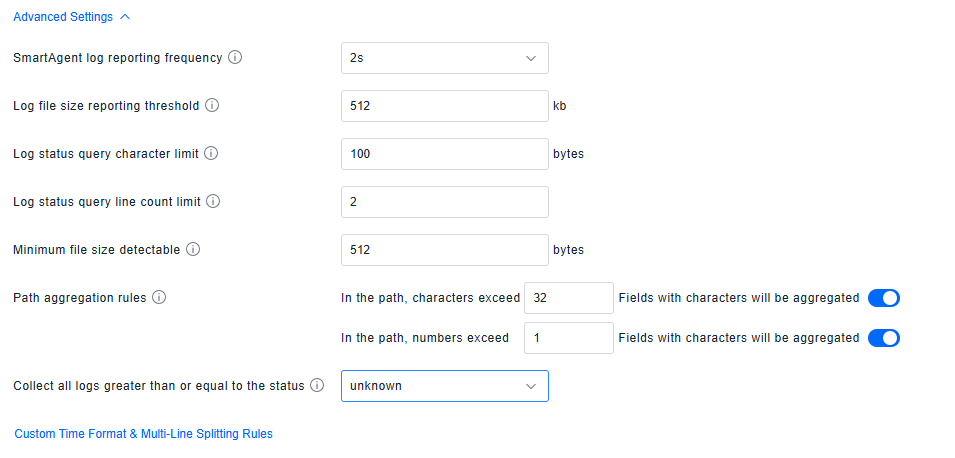
This interface provides advanced configuration for log collection and management, allowing fine-tuned control over the following core parameters:
- Data Reporting Policy : Configure the SmartAgent log reporting frequency and the file size threshold for reporting, balancing data real-time requirements with transfer efficiency.
- File Detection Rules : Define the minimum file size threshold for detection, ensuring only log files meeting the specification are effectively recognized.
- Path Aggregation Mechanism : Set rules for aggregating character and numeric fields in paths when they exceed a specified length, optimizing the storage and retrieval efficiency for path-based data.
All configuration changes take effect after clicking Save , enabling precise control over the entire log lifecycle (collection, transmission, querying, storage).
Custom Time Format & Multi-line Segmentation Guide
Logsagent has implemented the following built-in processing logic for log time
 Since 1.0.0+
- ISO 8601 format: %Y-%m-%d %H:%M:%S[.%f]
  Example: 2022-04-17 11:25:12.345

- RFC 3339 format: %Y-%m-%dT%H:%M:%S[.%f]
  Example: 2022-04-17T11:25:12.345

- Unix Epoch format, providing the number of milliseconds that have elapsed since January 1, 1970 Example: 1652088888997
  (v1.3.1+ 弃用。这种时间格式不易读,客户较少使用,容易误匹配。)

- RFC 3164 format: %b %d %H:%M:%S[.%f]
  Example: Apr 17 11:25:12

- Db2 (IBM database 2) format: %Y-%m-%d-%H.%M.%S[.%f]
  Example: 2022-05-17-11.25.12.114000-300

- IIS format: %m/%d/%Y, %H:%M:%S[.%f]
  Example: 04/17/2022, 11:25:12.345

- W3C (World Wide Web Consortium) format: %Y-%m-%d %H:%M:%S[.%f]
  Example: 2022-04-17 11:25:12.345 specified in the UTC timezone

- Klog and Golang/glog format: [IWEF]%m%d %H:%M:%S(.%f) Example: I0408 06:40:02.634162

- Other common formats:
    %Y %b %d %H:%M:%S[.%f] (example: 2022 Apr 17 11:25:12.345)
    %Y-%b-%d %H:%M:%S[.%f] (example: 2022-Apr-17 11:25:12.345)
    %Y/%b/%d %H:%M:%S[.%f] (example: 2022/Apr/17 11:25:12.345)
    %d %b %Y %H:%M:%S[.%f] (example: 17 Apr 2022 11:25:12.345)
    %d/%b/%Y:%H:%M:%S[.%f] (example: 17/Apr/2022:11:25:12.345)

    Tomcat_1 英文日期格式如: May 22, 2023 6:08:32 PM
    Tomcat_1 中文日期格式如: 五月 11, 2023 6:12:32 下午
    WebLogic 日志:May 17, 2023, 3:49:29,726 PM CST
    Resin_1:[10:57:26.617] Resin started in 2548ms
    Log4j 日志 HH:mm:ss:SSS :[18:07:59:584] [INFO] - test method

 Since 1.1.0+
    Resin_2: [2023/05/23 14:01:54.984] stopping Resin

 Since 1.2.0+
    tomcat_2  14-Sep-2023 13:56:09.118
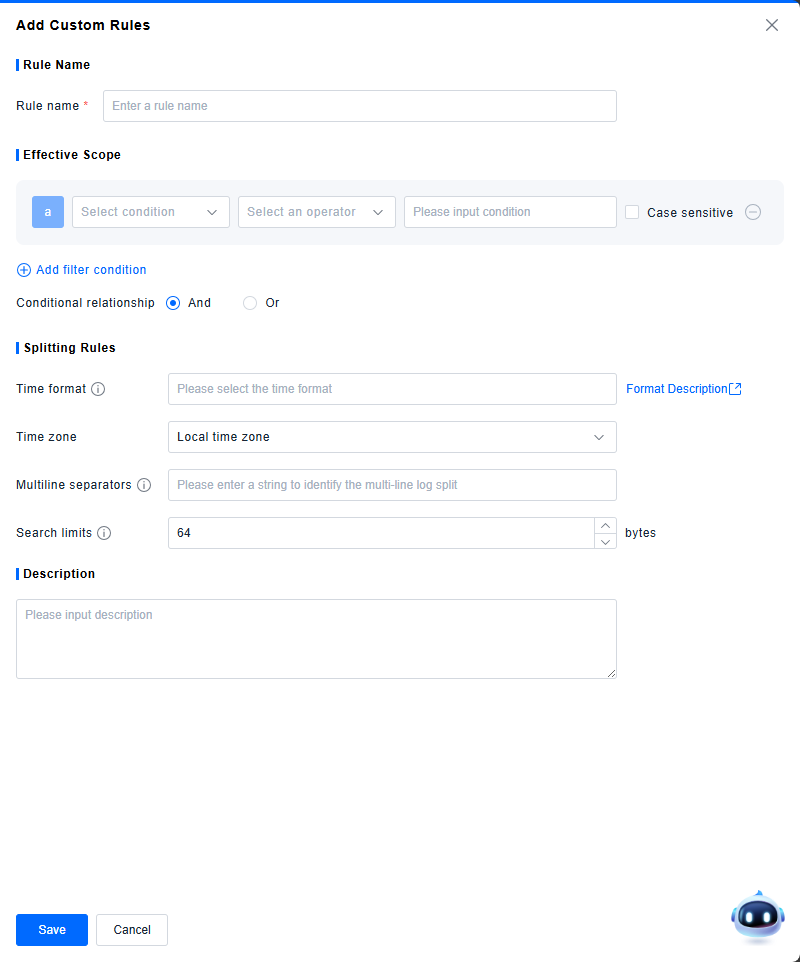
By defining custom time formats and multi-line segmentation rules, multi-line logs can be split into individual entries for analysis in log queries.
-
Rule Name: (Required) Set a rule name, not exceeding twenty characters. Rule names must be unique.
-
Applicable Scope: (Required) Define the conditions under which the rule applies to logs. Multiple conditions can be combined using AND or OR logic.
-
Time Format: (Optional) Define the timestamp format. It must specify at least month, day, hour, minute, and second. For details, refer to Time Format Specification.
-
Time Zone: The time zone in which the original logs were generated.
-
Multi-line Delimiter: (Optional) Define a string pattern to serve as the delimiter for splitting log entries.
-
Search Limit: Set the byte range (default: 64 bytes) for searching time information and the delimiter. When set to 0, it indicates plain text logs where every line not starting with a space is considered the start of a new log record and is automatically assigned a timestamp (the time the probe read the log entry).
-
Description: A description is automatically generated based on the rule configuration.
-
Validation Logic for Saving:
- In addition to required fields, at least one of Time Format or Multi-line Delimiter must be configured to save the rule.
-
Logic for Logs Matching Multiple Rules:
- Multi-line delimiter evaluation takes precedence over timestamp evaluation.
- When a log entry contains one or more timestamps, timestamps are evaluated based on rule priority, starting from the first rule in the list. If a timestamp in the entry matches a rule, the probe uses that timestamp as the start of the log entry and stops evaluating other conditions.
- Logs that do not satisfy any custom rule are all split according to the default rule. The default rule only supports modifying the time zone and search limit configuration.

Time Format Specification
- The time format dropdown supports the following common formats:
| Time Format |
|---|
| %Y-%m-%d %H:%M:%S |
| %Y-%m-%d %H:%M:%S.%f |
| %d-%b-%y %H:%M:%S |
| %d %b %Y %H:%M:%S |
| %Y%m-%dT%H:%M:%S |
| %Y-%m-%dT%H:%M:%S |
- In addition to the provided options, you can also define a custom time format based on the time information in your logs. Supported format specifiers include:
| Format Specifier | Description | Example |
|---|---|---|
| %b | Abbreviated month name. | Jan |
| %B | Full month name. | January |
| %d | Day of the month as a zero-padded decimal number (01-31). | 07, 31 |
| %f | Fractional seconds (milliseconds, microseconds, or nanoseconds). | 123 |
| %h | Abbreviated month name (same as**%b**). | Jan |
| %H | Hour (24-hour clock) as a zero-padded decimal number (00-23). | 22 |
| %I | Hour (12-hour clock) as a zero-padded decimal number (01-12). | 11 |
| %m | Month as a zero-padded decimal number (01-12). | 08 |
| %M | Minute as a zero-padded decimal number (00-59). | 59 |
| %p | Locale’s equivalent of either AM or PM. | AM, PM |
| %r | 12-hour clock time, equivalent to**%I:%M:%S %p**. | 11:59:59 AM |
| %R | Hour and minute, equivalent to**%H:%M**. | 23:59 |
| %S | Second as a zero-padded decimal number (00-59). | 59 |
| %t | Tab character. | N/A |
| %y | Year without century as a zero-padded decimal number (00-99). | 04, 98 |
| %Y | Year with century as a decimal number. | 2004, 1998 |
| %C | Century as a zero-padded decimal number (00-99). | 16 |
| %e | Day of the month as a space-padded decimal number ( 1-31). | 7, 31 |
| %j | Day of the year as a zero-padded decimal number (001-366). | 365 |
| %c | Standard date and time representation. Equivalent to %b %e %H:%M:%S %Y. | Nov 20 14:12:58 2020 |
| %x | Standard date representation (without time). Equivalent to %b %e %Y. | Nov 20 2020 |
| %X | Standard time representation (without date). | 11:59:59 |
- Time formats must satisfy the following validation conditions:
- Mutual Exclusion Rules:
- Using the same time format specifier multiple times (e.g.,
%Y%Yor%S%S) is invalid. - Month specifiers are mutually exclusive: Only one of
%m,%b/%h, or%Bcan appear. - Day-of-month specifiers are mutually exclusive: Only one of
%dor%ecan appear. - Hour specifiers are mutually exclusive: Only one of
%Hor%Ican appear. - Year specifiers are mutually exclusive:
%Yand%Ccannot appear together.%Yand%ycannot appear together.
- Day-of-year (
%j) is mutually exclusive with month and day-of-month:%jand month specifiers (%m,%b/%h,%B) are mutually exclusive.%jand day-of-month specifiers (%d,%e) are mutually exclusive.
- Using the same time format specifier multiple times (e.g.,
- Mandatory Components: The format must include "month, day, hour, minute, and second".
- Date (Month & Day). Satisfy one of the following:
- Condition A: Include month (
%m/%b/%h/%B) + day-of-month (%d/%e). - Condition B: Include day-of-year (
%j).
- Condition A: Include month (
- Time (Hour, Minute, Second).
- Must include:
%Hor%I(Hour). - Must include:
%M(Minute). - Must include:
%S(Second).
- Must include:
- Date (Month & Day). Satisfy one of the following:
- Other Rules:
- If
%Iis used,%pmust also be present. If%pis used,%Imust also be present. - The
%character is special:- A
%not followed by a valid format specifier is invalid. %%is invalid.
- A
- If
- Mutual Exclusion Rules: