Alert Response Strategy
Prerequisites
Functional Menu: Includes the alert response policy function menu
Operational Permissions: Includes create, read/write, and read-only permissions for alert configuration
Data Permissions: Has access to at least one resource domain within an environment
Data Prerequisites: The alarm rules are configured to match response policies, and alert triggering conditions are effective.
Overview
The alert response policy is used to configure alert notifications, specifically defining how alerts generated by alarm detection rules trigger response policies and produce notifications.
This policy allows for the definition of alert scope, notification conditions, notification methods, effective time, and more. It can be quickly selected and reused when creating alert rules, thereby improving configuration efficiency and consistency.
Value
-
Improve Response Efficiency By predefining notification rules and automating trigger mechanisms, alerts are accurately delivered to the relevant personnel immediately, significantly reducing the Mean Time to Acknowledge (MTTA) and minimizing delays caused by manual intervention.
-
Enhance Operational Coordination and Control Policies can be flexibly configured based on dimensions such as alert severity and status, clarifying responsibility boundaries to prevent notification chaos or omissions. Standardized processes also improve the consistency and traceability of alert handling.
-
Optimize Resource Allocation and Noise Reduction Intelligently filter low-priority or duplicate alerts, triggering notifications only for qualified events. This effectively reduces alert fatigue, allowing operational teams to focus on high-priority issues and improving resource utilization efficiency.
Use Cases
-
Tiered Handling Route alerts to different teams based on severity and status (e.g., critical alerts to DBAs, warnings to application groups), enabling precise division of responsibilities.
-
24/7 Automated Response Combine working/non-working hour policies and trigger different notification methods based on alert types to achieve round-the-clock unattended response.
-
Multi-System Management Configure differentiated notification policies for different resource systems (e.g., payment/query systems) to reduce noise and ensure high reliability of critical business functions.
Operational Scenario
-
Search
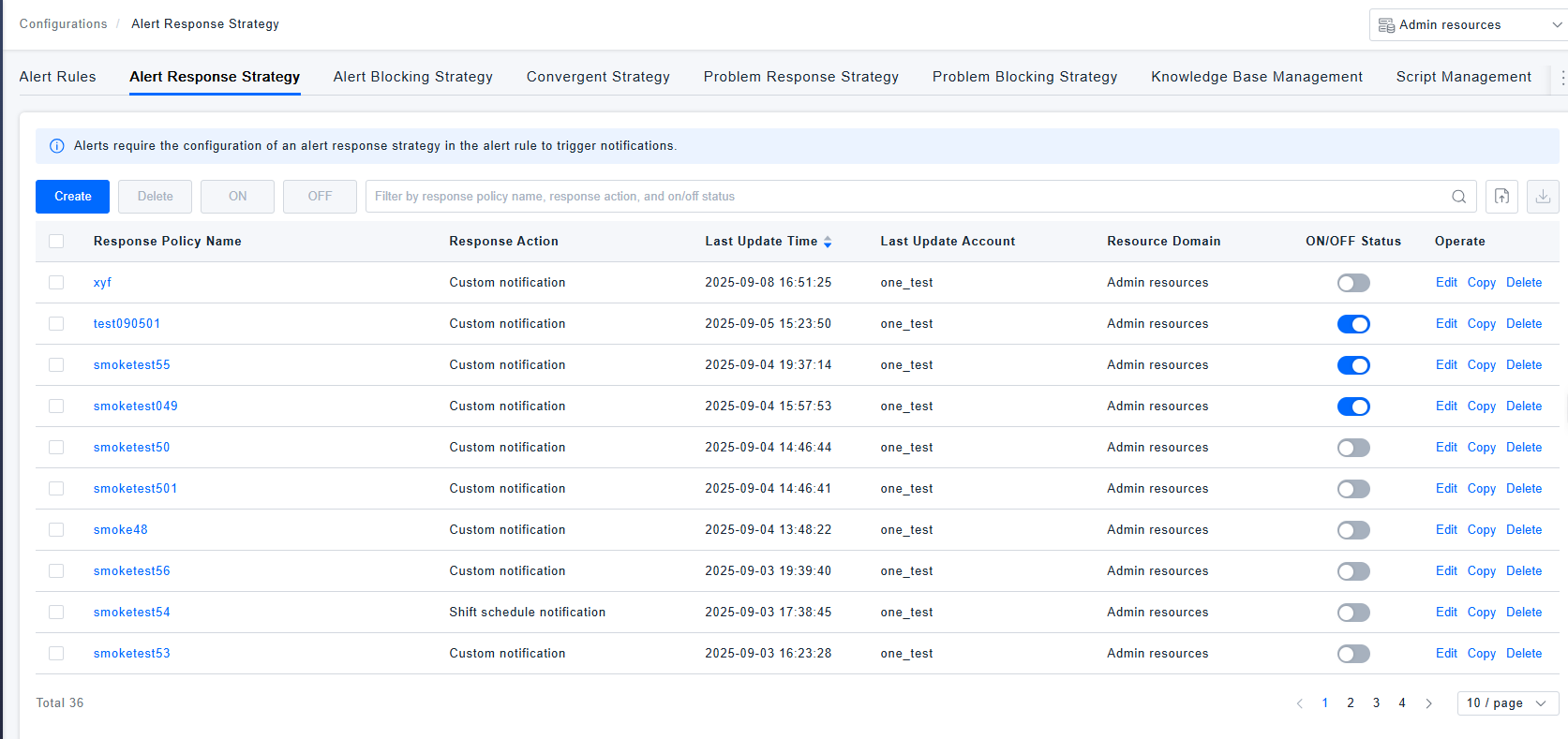
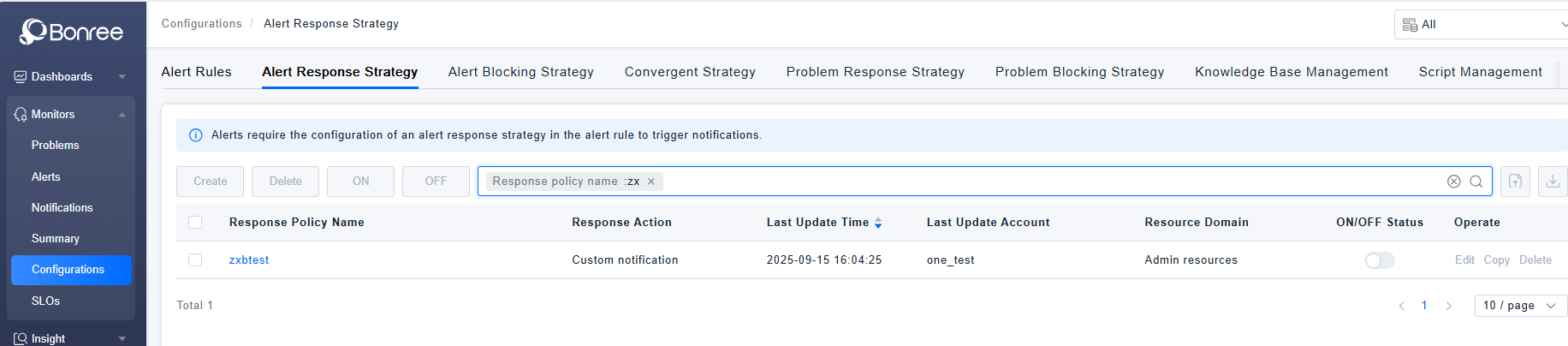
When users need to search for records in the alert response policy list, they can filter results in the search box based on policy name, response action, or enable/disable status.
-
Create
When users need to define alarm notifications, they can click the 【Create】 button to create a new alert response policy.
-
Delete If certain alarm response policies are no longer applicable, users can click the 【Delete】 button in the action column or select multiple policies and click the 【Delete】 button above the list to remove them.
-
Copy When users need to define alert notifications based on an existing policy, they can click the 【Copy】 button to duplicate and modify it.
-
Edit When users need to adjust alert notifications, they can locate the existing policy and click the 【Edit】 button to modify its configuration.
-
Enable/Disable To activate a created alert response policy, click the 【Enable】 button. To deactivate it, click the 【Disable】 button.
-
Export When users need to export alert response policies locally, they can batch-select data and click the 【Export】 button to generate a JSON file for quick processing or reuse.
-
Import If users have locally organized alert response policies in the required format, they can click the 【Import】 button to upload them. Successful imports will display the policies in the list, while failed imports will provide error details for adjustments before retrying.
Get Started
- Log in to Bonree ONE.
- Navigate to Intelligent Alerting > Alert Configuration > Alert Response Policies.
- The system supports querying, creating, editing, copying, enabling, disabling, deleting, importing, and exporting alert response policies.
- The list provides the following fields: Response Policy Name, Response Action, Last Updated Time, Last Updated Account, Associated Resource Domain, Enable/Disable Status, and Action Column.
Alert Response Policy Details
-
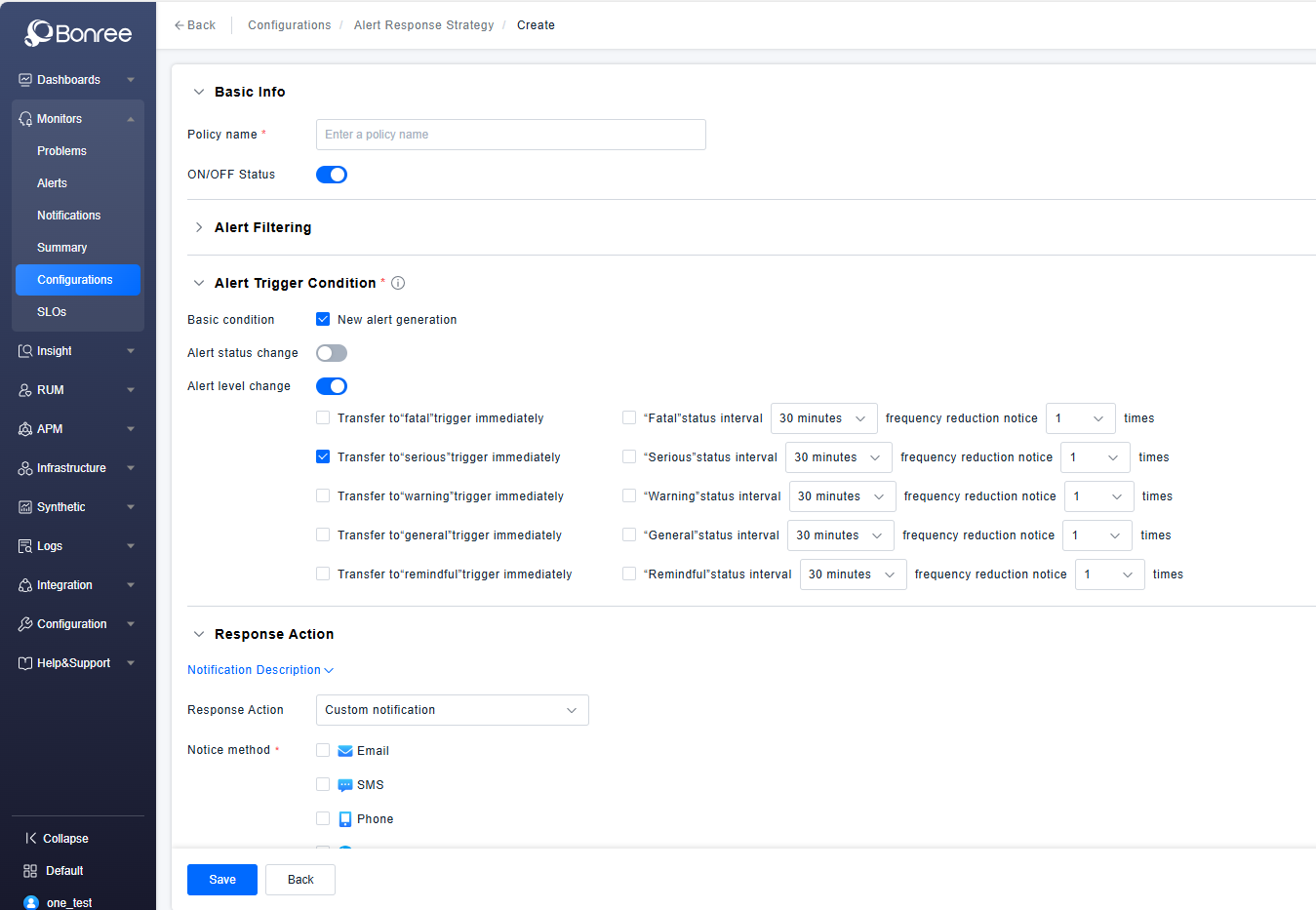
Click Create / Edit / Copy Alert Response Policy to configure the details of an alert response policy.
-
The detailed configuration includes four sections: Basic Information, Alert Filtering, Response Actions, and Notification Timing.
-
Basic Information includes filling in the policy name and an enable/disable toggle (enabled by default).
-
Alert Filtering supports filtering based on alert-related fields and entity attributes. It allows adding multiple filter conditions and defining operators between them.
-
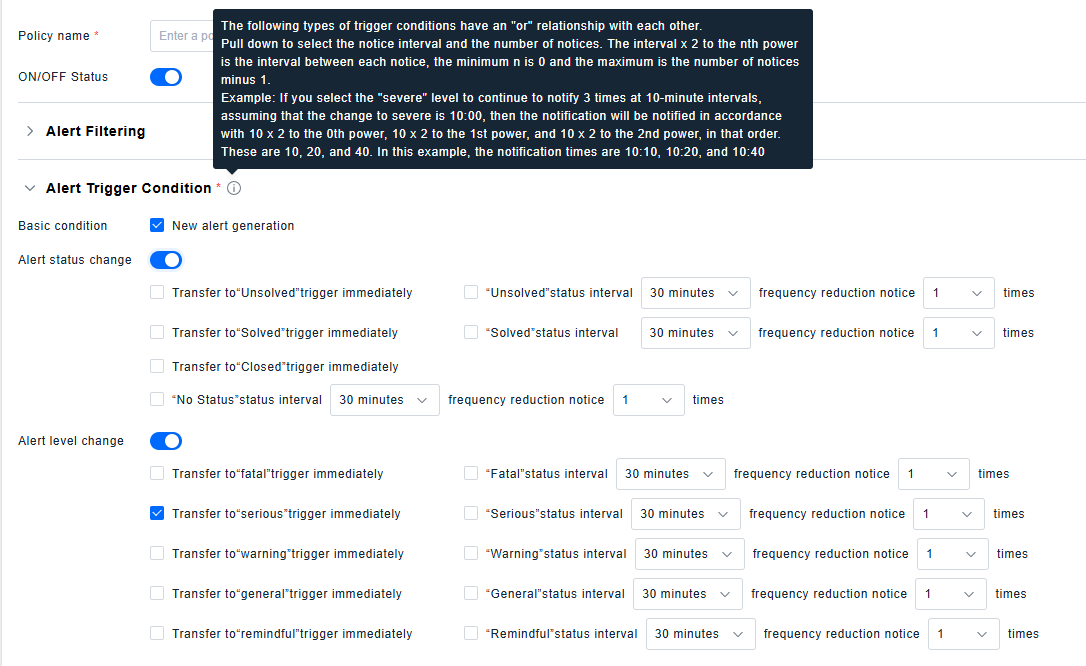
Alert trigger conditions include: new alert generation, alert status changes, and alert severity level changes. By default, new alert generation and escalation to "Critical" severity are enabled for immediate triggering. Alert status changes and severity level changes each trigger a notification when the alert status or severity level changes respectively. Debounce notification means sending another notification if the status or severity level remains unchanged for N consecutive minutes.
-
Response Actions
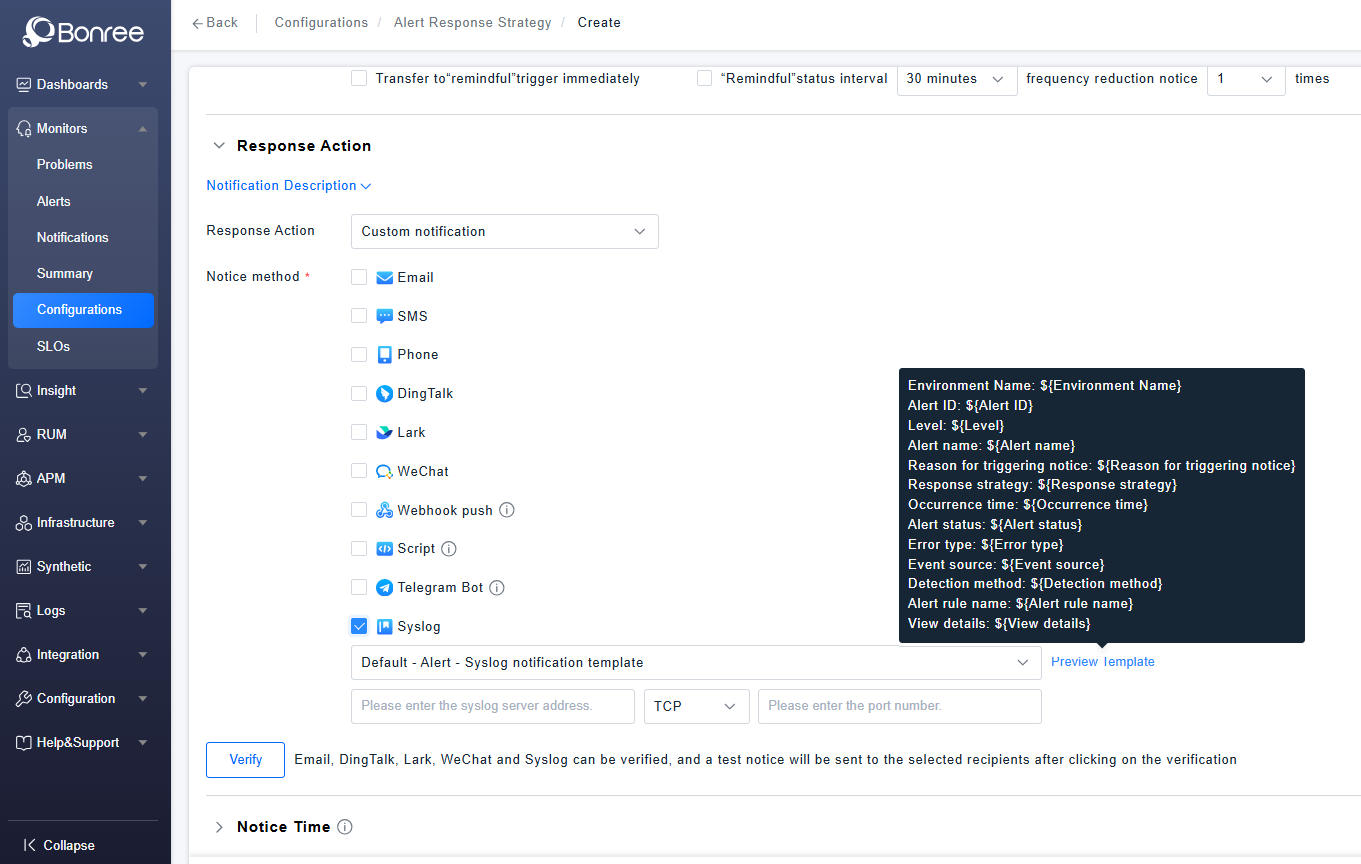
The system supports both Custom Notifications and On-Call Notifications.
- Custom Notification: Allows configuration based on provided notification methods, including selecting recipients, notification templates, etc.
- The syslog notification method has been added. You can configure the server address, network protocol type, and port number, edit the notification content, and trigger the notification.
- Script notifications have been decommissioned on the public cloud. For private deployments, the script configuration method has been moved to the backend. Please refer to the on-page instructions for specific steps.
- The webhook custom notification feature now also supports selecting and using customized notification templates.
-
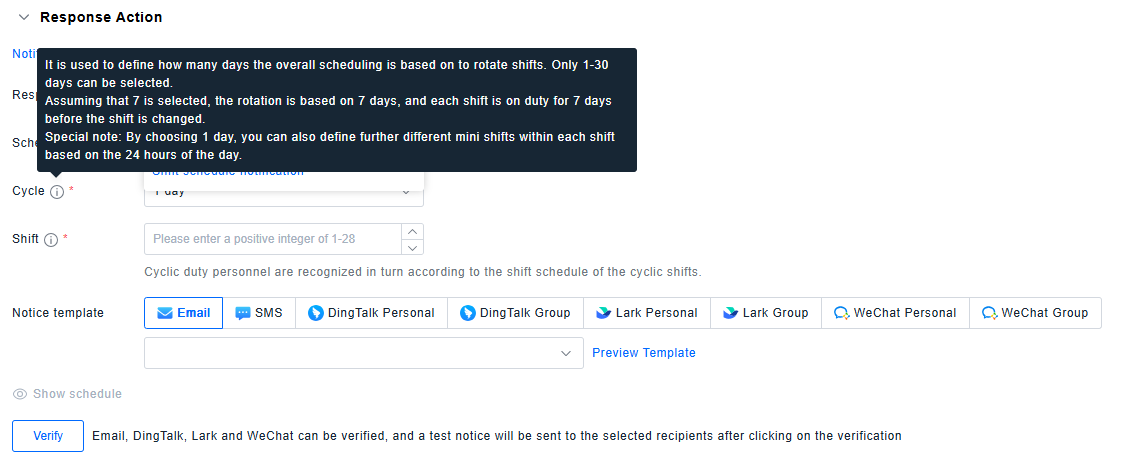
On-Call Notification: Refers to rotating notification recipients by shift according to user-defined overall on-call policies.
-
Notification Timing
All Hours: 7×24 uninterrupted coverage.
All Hours Excluding Special Dates: Supports excluding pre-defined special dates (i.e., deducting pre-configured time templates) from the "All Hours" schedule.
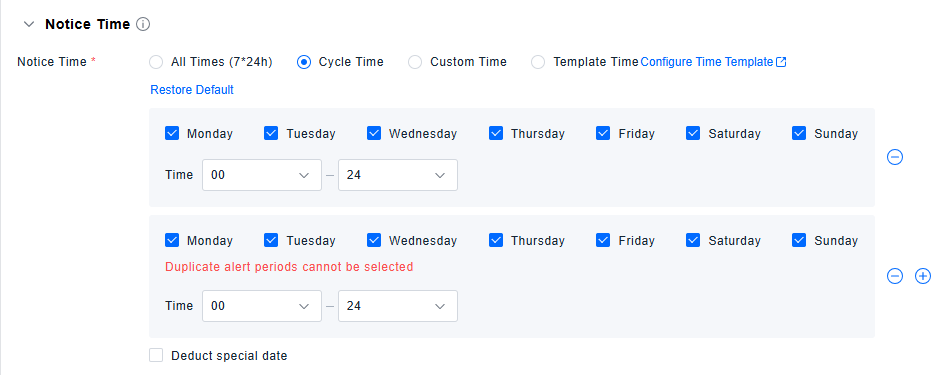
Cyclical Time: Operates on a weekly cycle, allowing selection of specific times for each day of the week. Also supports excluding special dates (i.e., time templates).
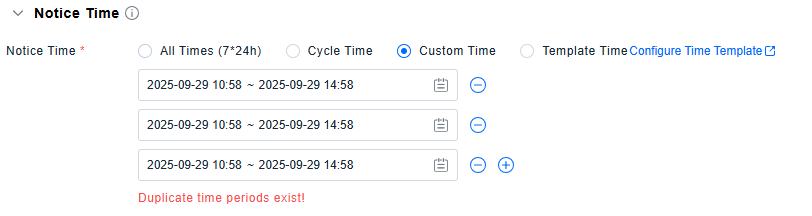
Custom Time: Enables defining one or multiple specific time periods for this policy.
Template Time: Directly uses special dates defined in the Time Template list.