Install SmartAgent on Linux as root User
Overview
This document describes how to install SmartAgent on a Linux system as the root user.
If you do not have root privileges, please refer to the Non-root Installation.
Prerequisites
Before installation, make sure the following conditions are met:
- You have root user privileges, or can escalate with
sudo - The network can access the
SmartAgentdownload source - Required system tools are installed (e.g.,
wget,tar) - Technology Support Matrix
- Host Resource Requirements
Installation & Upgrade
-
Log in to the
Bonree ONEplatform, go to Configuration > Agent Installation, and select Host Mode as the deployment mode.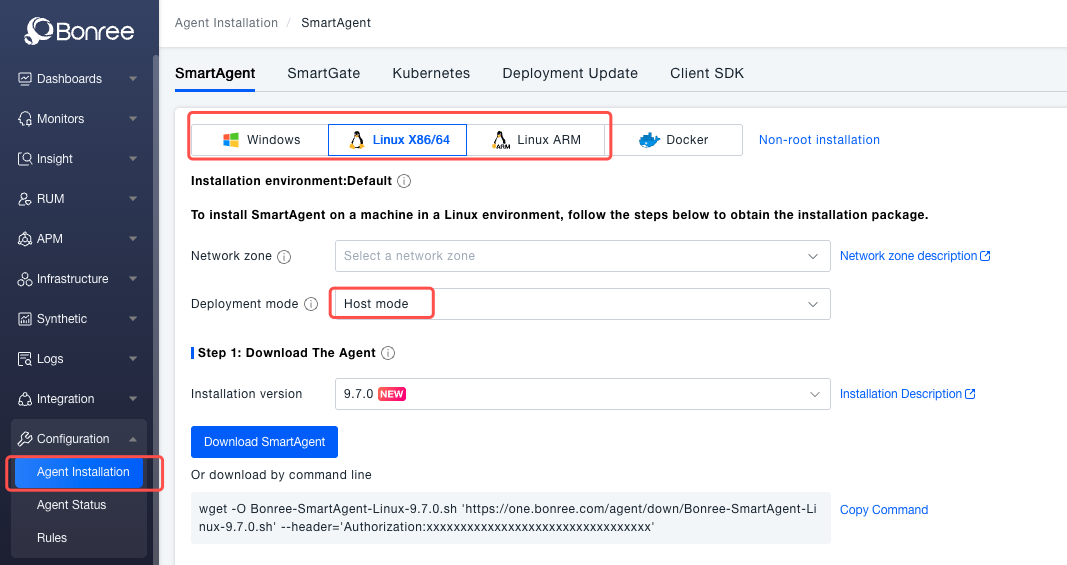
-
Download the latest SmartAgent-Linux installation package for your CPU architecture:
wget -O Bonree-SmartAgent-Linux-<version>.sh \
'https://one.bonree.com/agent/down/Bonree-SmartAgent-Linux-<version>.sh' \
--header='Authorization:<token>' -
Run the installation command and set parameters as needed (detailed installation parameters):
/bin/sh Bonree-SmartAgent-Linux-<version>.sh config \
  -a "<accountGUID>" \
  -u "https://oneupload.bonree.com/APM" \
  -t "java,php,go,dotnet" \
  -l "https://oneupload.bonree.com/controller/logs" \
  --set-env-id "default"
Verify Installation
-
Check whether the process started successfully:
ps -ef | grep bonree/apm -
Confirm communication with the platform via logs:
tail -f /opt/bonree/apm/logs/machine/machine.log -
Restart the applications to be monitored to ensure the agent takes effect.
Service Management
-
CentOS 7+ (Systemd)
# Start
systemctl start bonree-agent
# Stop
systemctl stop bonree-agent
# Restart
systemctl restart bonree-agent -
CentOS 6 and below (SysV)
# Start
service bonree-agent start
# Stop
service bonree-agent stop
# Restart
service bonree-agent restart -
Non-root User
If installed with Non-root Run Mode, you can manage the agent service with the specified user:
# Start
/opt/bonree/apm/bin/agentconfig --start-service
# Stop
/opt/bonree/apm/bin/agentconfig --stop-service
# Restart
/opt/bonree/apm/bin/agentconfig --restart-service
Uninstallation
sudo bash /opt/bonree/apm/scripts/uninstall.sh
After uninstallation, do not immediately delete the agent directory until all monitored applications or containers have been restarted, otherwise business issues may occur.