Serverless
Overview
This article introduces the usage of the SmartAgent Serverless agent. The Serverless agent only supports application performance data collection and is suitable for restricted permission environments.
When using Bonree Operator to monitor applications only, the Serverless agent will be deployed automatically. It is recommended to deploy using Bonree Operator on Kubernetes.
Prerequisites
Installation
-
Log in to the
Bonree ONEplatform, go to the Configuration > Agent Installation page, and select Serverless Mode as the deployment mode.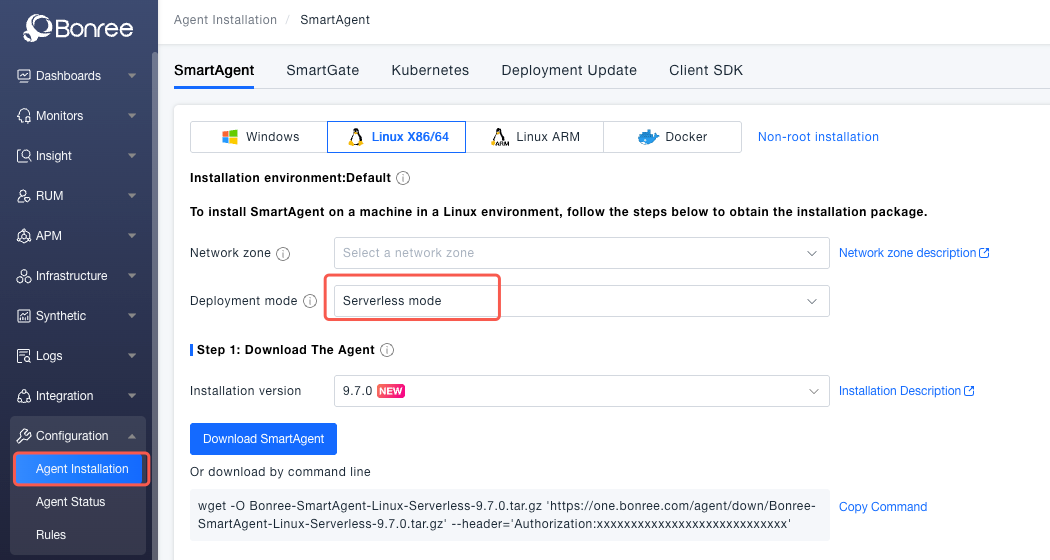
-
Download the latest SmartAgent-Serverless installation package corresponding to your operating system and CPU architecture.
-
Extract the package to a suitable location (ensure that all applications to be monitored have read/write permissions to this directory).
-
When starting your application, add additional environment variables or startup parameters.
infoIn the code blocks, highlighted parts indicate the additional environment variables or startup parameters required for using the SmartAgent-Serverless agent.
- Linux
- Windows
Automatically inject the agent via LD_PRELOADLD_PRELOAD="{installation_path}/lib64/libagentloader.so" \
BR_DEPLOYMENT_METADATA="mode=serverless" \
BR_APM_CONTROLLER_URL="https://oneupload.bonree.com/APM" \
BR_ACCOUNT_GUID="<accountGUID>" \
BR_APM_ENV_ID="default" \
BR_APM_MACHINE_GUID="{unique_host_identifier, optional}" \
BR_APM_CLUSTER_NAME="{cluster_name_set_in_platform, optional}" \
BR_APM_PROCESS_GROUP_NAME="{process_group_name, optional}" \
BR_APM_AGENT_NAME="{agent_name, optional}" \
java -jar {path/to/your/app.jar}Inject javaagent via Java startup parametersjava -javaagent:"{installation_path}/agent/java/current/bonree.jar" \
-Dbonree.deploymentMetaData="mode=serverless" \
-Dbonree.controllerUrl="https://oneupload.bonree.com/APM" \
-Dbonree.accountGUID="<accountGUID>" \
-Dbonree.envId="default" \
-Dbonree.machineGUID="{unique_host_identifier, optional}" \
-Dbonree.clusterName="{cluster_name_set_in_platform, optional}" \
-Dbonree.processGroupName="{process_group_name, optional}" \
-Dbonree.agentName="{agent_name, optional}" \
-jar {path/to/your/app.jar}Inject javaagent via Java startup parametersjava -javaagent:"{installation_path}\agent\java\current\bonree.jar" ^
-Dbonree.deploymentMetaData="mode=serverless" ^
-Dbonree.controllerUrl="https://oneupload.bonree.com/APM" ^
-Dbonree.accountGUID="<accountGUID>" ^
-Dbonree.envId="default" ^
-Dbonree.machineGUID="{unique_host_identifier, optional}" ^
-Dbonree.clusterName="{cluster_name_set_in_platform, optional}" ^
-Dbonree.processGroupName="{process_group_name, optional}" ^
-Dbonree.agentName="{agent_name, optional}" ^
-jar {path\to\your\app.jar}