Full-Stack Monitoring
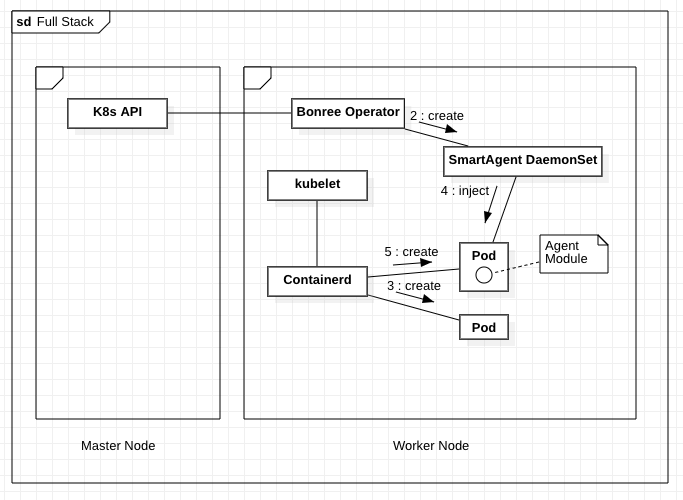
In this mode, the SmartAgent DaemonSet will be automatically deployed on Kubernetes worker nodes, monitoring container creation in real time and dynamically injecting agent modules.
Supported Scope
- Provides host infrastructure monitoring such as disk, CPU, and memory
- Enables automatic recognition and intelligent injection of application agents
- Supports automatic update feature
- Custom configuration items take effect automatically
- Technology Support Matrix
- Host Resource Requirements
Kubernetes Resource Objects Required to Create Smart Operator
# Create Kubernetes namespace
kubectl create namespace bonree-agent

# Deploy smartagent-operator
kubectl apply -f kubernetes.yaml

# View deployment logs
kubectl -n bonree-agent logs -f deployment/smartagent-operator
Create Secret to Store PaaSToken
Source of PaaSToken
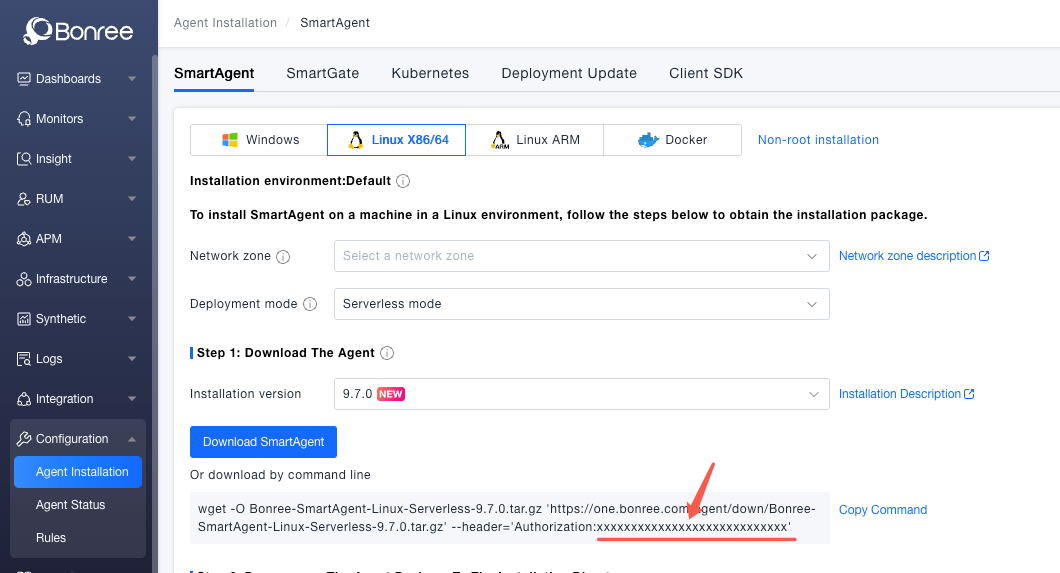
PaaSToken needs to be obtained from the platform (replace <Token> in the following command with the value of PaaSToken from Bonree One platform under Configuration -> Agent Installation -> SmartAgent deployment command). This Token is used to download agents and access related APIs.
kubectl -n bonree-agent create secret generic smartkube --from-literal="PaaSToken=<Token>"
Create SmartKube CRD
SmartKube CRD (Custom Resource Definition) is the core configuration object of Bonree SmartAgent Operator, used to define and manage parameters related to application monitoring. The following configuration file example shows how to configure the full-stack monitoring mode, including agent download address, connection info, monitoring types, and other configurations.
kubectl apply -f smartkube.yaml
apiVersion: bonree.com/v1alpha1
kind: SmartKube
metadata:
  name: smartkube
  namespace: bonree-agent
    # annotations:
    # Mark SmartAgent daemonset pod to run with privileged mode
    # By default, the permission set is restricted via allowedCapabilities
  # feature.bonree.com/smartagent-privileged: "true"
spec:
  # bonree apm base api url
  apiUrl: https://one.bonree.com/rest/apm/agentDown

  # Agent connection-related configuration
  controllerInfo:
    controllerUrl: https://oneupload.bonree.com/APM
    logControllerUrl: https://onelog.joinbr.com/controller/logs
    accountGUID: xxx-xxx-xxx-xxxx-xxxxxx

  # Enable agent types
  # In full-stack monitoring mode, this is the default value, do not modify
  # In application-only monitoring mode, default value: "java,php,dotnet,python,nodejs,nginx,go,apache"
  agentTypes: "java,php,dotnet,python,nodejs,nginx,go,apache"

  # [Optional] Specify network zone
  # Default: not set
  # networkZone: default

  # [Optional] Specify cluster name
  # Default: not set
  # clusterName: default

  # [Optional] Specify environment id
  # Default: not set
  # envId: default

  # [Optional]: Specify the name of the secret storing tokens
  # Default: smartkube
  # tokens: ""

  # [Optional]: Skip certificate verification when downloading packages or making API requests
  # Default: false
  # skipCertCheck: false

  # [1.1.0+] [SmartAgent 9.1.0+] [Optional]: Specify host attributes (data center)
  # Default: not set
  # Format: "k=v,k1=v1"
  # hostAttributes: ""

  # [1.1.0+] [SmartAgent 9.1.0+] [Optional]: Specify host tags
  # Default: not set
  # Format: "k=v,k1=v1"
  # hostTags: ""

  # When enabling full-stack installation, configure smartagent image and auto-upgrade
  smartAgent:
  # [Optional]: Custom SmartAgent container image name.
  # Default: docker.bonree.com/agent/smartagent:latest
  #
  # image: ""

  # [Optional]: Automatically restart SmartAgent pod instances to update versions when SmartAgent version changes (checks every 15 minutes)
  # Default: true
  # autoUpdate: true

  # Full-stack monitoring
  classicFullStack:
    # Enable full-stack installation
    enabled: true

    # [Optional]: SmartAgent node selection constraints.
    # See: https://kubernetes.io/docs/concepts/scheduling-eviction/assign-pod-node/
    # nodeSelector: {}

    # [Optional]: SmartAgent node affinity constraints.
    # See: https://kubernetes.io/docs/concepts/scheduling-eviction/taint-and-toleration/
    tolerations:
      - effect: NoSchedule
        key: node-role.kubernetes.io/master
        operator: Exists
      - effect: NoSchedule
        key: node-role.kubernetes.io/control-plane
        operator: Exists

    # [Optional]: SmartAgent container instance resource limits.
    # See: https://kubernetes.io/docs/concepts/configuration/manage-resources-containers/
    resources:
      requests:
        cpu: 100m
        memory: 512Mi
      limits:
        cpu: 800m
        memory: 1.5Gi

    # [Optional]: SmartAgent installation parameters.
    # args: []

    # [Optional]: Add extra environment variables to SmartAgent Pods
    #
    # env: []

    # [Optional]: Set SmartAgent Pods priority. Default: not set.
    # See: https://kubernetes.io/docs/concepts/scheduling-eviction/pod-priority-preemption/
    #
    # priorityClassName: priority-class

    # [Optional]: SmartAgent pods DNS Policy. Default: ClusterFirstWithHostNet.
    # See: https://kubernetes.io/docs/concepts/services-networking/dns-pod-service/
    #
    # dnsPolicy: "ClusterFirstWithHostNet"

    # [Optional]: Add extra labels to SmartAgent Pods
    #
    # labels:
    #   custom: label