Application-Only Monitoring
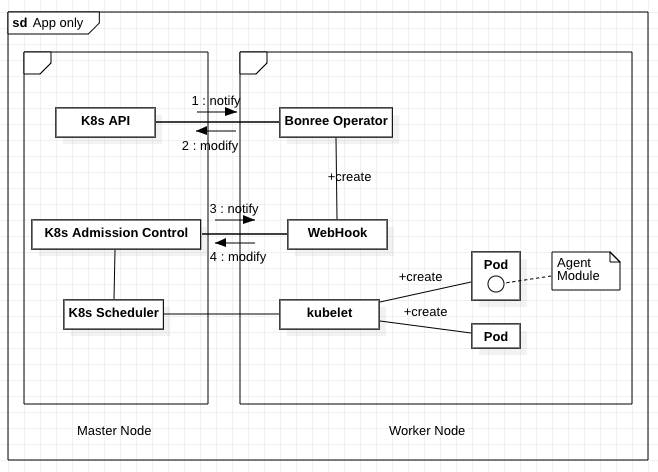
In this mode, the Operator does not deploy the SmartAgent DaemonSet, so it does not collect host-level metrics. This solution leverages Kubernetes Admission Control to monitor the Pod creation process and dynamically modify Pod resource configurations.
Specifically, the Operator adds an Init Container to the target Pod.
This Init Container is responsible for deploying the agent module and automatically injecting it into the application container by configuring the LD_PRELOAD environment variable, thereby enabling application monitoring.
Supported Scope
- Supports automatic recognition and injection of application agents
- Supports controlling monitoring granularity via Kubernetes Annotations/Labels
- Does not support advanced monitoring rules for processes/containers (can be controlled via Kubernetes Annotations)
- Does not support custom process group identification rules
- Process group name (service name) defaults to the format:
(<namespace>) <container-name> <process-name> - Process group instance name (agent name) defaults to the format:
<process-group-name>-<pod-name-suffix>-<process-id> - You can set a custom process group name by adding the BR_APM_PROCESS_GROUP_NAME environment variable to the application container. For details, see: Deployment YAML example
- Process group name (service name) defaults to the format:
- Technology Support Matrix
- Host Resource Requirements
Create the Kubernetes Resource Objects Required for Smart Operator
- Full deployment, can switch to full-stack monitoring mode anytime
- Deploy webhook only, minimal permissions
The certificates required for the webhook are automatically generated by the smartagent-operator container.
See Update Webhook Certificates for details.
# Create Kubernetes namespace
kubectl create namespace bonree-agent
# Deploy smartagent-operator and bonree-webhook
kubectl apply -f kubernetes.yaml
# [Optional] In application-only monitoring scenarios, if you need to enable the CSI driver to cache the smartagent serverless agent on each node, apply the following configuration
kubectl apply -f kubernetes-csi.yaml
# View deployment logs
kubectl -n bonree-agent logs -f deployment/smartagent-operator
The default YAML file includes a certificate valid for 10 years (only for the bonree-agent namespace).
To use it in other namespaces, you must manually create certificates. See Update Webhook Certificates for details.
For more information about permissions, see Permission Description.
# Create Kubernetes namespace
kubectl create namespace bonree-agent
# Deploy bonree-webhook
kubectl apply -f kubernetes-webhook-only.yaml
# [Optional] In application-only monitoring scenarios, if you need to enable the CSI driver to cache the smartagent serverless agent on each node, apply the following configuration
kubectl apply -f kubernetes-csi.yaml
# View deployment logs
kubectl -n bonree-agent logs -f deployment/bonree-webhook
Create Secret for PaaSToken
PaaSToken Source
PaaSToken must be obtained from the platform (replace <Token> in the following command with the value from Bonree One platform under Configuration -> Agent Installation -> SmartAgent).
This token is used to download agents and access related APIs.
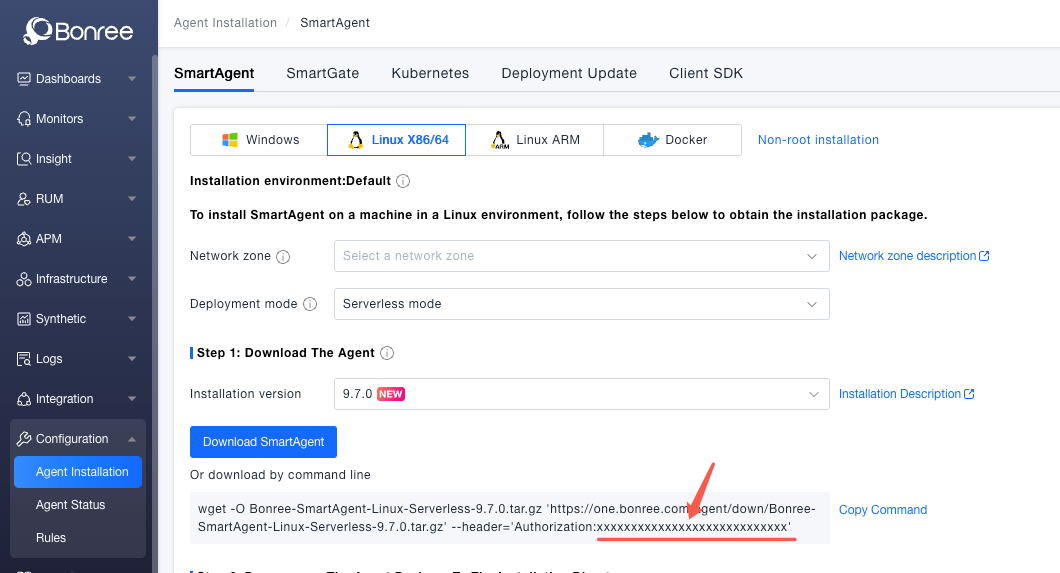
kubectl -n bonree-agent create secret generic smartkube --from-literal="PaaSToken=<Token>"
Create SmartKube CRD
SmartKube CRD (Custom Resource Definition) is the core configuration object of Bonree SmartAgent Operator, used to define and manage parameters for application monitoring. The following configuration file demonstrates how to configure application-only mode, including agent download URL, connection info, monitoring types, and Init Container configuration.
kubectl apply -f smartkube.yaml
smartkube.yaml Application-Only Monitoring
apiVersion: bonree.com/v1alpha1
kind: SmartKube
metadata:
  name: smartkube
  namespace: bonree-agent
spec:
  # bonree apm base api url
  apiUrl: https://one.bonree.com/rest/apm/agentDown

  # Agent connection configuration
  controllerInfo:
    controllerUrl: https://oneupload.bonree.com/APM
    accountGUID: xxx-xxx-xxx-xxxx-xxxxxx

  # Enabled agent types
  # In full-stack monitoring mode, default values should not be modified
  # In application-only monitoring mode, default: "java,php,dotnet,python,nodejs,nginx,go,apache"
  agentTypes: "java,php,dotnet,python,nodejs,nginx,go,apache"

  # [Optional] Specify network zone
  # Default: not set
  # networkZone: default

  # [Optional] Specify cluster name
  # Default: not set
  # clusterName: default

  # [Optional] Specify environment ID
  # Default: not set
  # envId: default

  # [Optional]: Specify the name of the secret that stores tokens
  # Default: smartkube
  # tokens: ""

  # [Optional]: Skip certificate verification when downloading packages or making API requests
  # Default: false
  # skipCertCheck: false

  # [1.1.0+] [SmartAgent 9.1.0+] [Optional]: Specify host attributes (e.g., data center)
  # Default: not set
  # Format: "k=v,k1=v1"
  # hostAttributes: ""

  # [1.1.0+] [SmartAgent 9.1.0+] [Optional]: Specify host tags
  # Default: not set
  # Format: "k=v,k1=v1"
  # hostTags: ""

  # Application-only monitoring configuration
  agentModules:
    # Enable application-only installation mode
    enabled: true

    # [Optional]: Kubernetes Init Container resource limits. Adjust as needed.
    # See: https://kubernetes.io/docs/concepts/configuration/manage-resources-containers/
    # resources:
    #   requests:
    #     cpu: 30m
    #     memory: 30Mi
    #   limits:
    #     cpu: 100m
    #     memory: 60Mi

    # [Optional]: Enable CSI driver to cache smartagent agent on each node
    # Default: false
    #
    # Container Storage Interface (CSI) defines the interface between plugins and storage systems for orchestrators like Kubernetes,
    # enabling dynamic mount/unmount of storage volumes.
    # Agent packages are cached in each node at: /var/lib/kubelet/plugins/csi.smartagent.bonree.com/data
    # true: Use SmartAgent CSI volumes to cache agents on each node (manage agent versions and updates)
    #       See: https://github.com/kubernetes-csi/node-driver-registrar
    # false: Download SmartAgent serverless agent each time an application Pod starts
    #
    # If your Kubernetes nodes do not support CSIDriver, set UseCSIDriver to false.
    useCSIDriver: true

    # [1.1.0+] [Optional] Use a serverless agent image as the Init Container image
    # Default: empty
    #
    # When set, the agent package is directly taken from the image instead of CSI cache or runtime download.
    # Image source: docker.bonree.com/agent/smartagent-serverless:<version>
    image: ""

    # [1.1.0+] [Optional] Set Init Container image pull policy
    # Default: IfNotPresent
    # imagePullPolicy: IfNotPresent
Specify SmartKube CRD for Monitored Namespaces
In application-only monitoring mode, all Pods in namespaces with the label smartagent.bonree.com/instance will automatically be injected with the agent module.
You can control monitoring granularity using Kubernetes Annotations or Labels.
Smart Operator monitors all Pods in namespaces labeled smartagent.bonree.com/instance.
The value of this label should match the metadata.name of the corresponding SmartKube CRD (see smartkube.yaml).
Each monitored namespace must be associated with a corresponding SmartKube CRD configuration. This enables fine-grained monitoring management, such as gray testing agent versions across namespaces.
# Label default namespace with SmartKube CRD configuration named smartkube
# smartkube refers to metadata.name defined in smartkube.yaml
kubectl label namespace default smartagent.bonree.com/instance=smartkube

# Remove monitoring label from default namespace, disabling monitoring
kubectl label namespace default smartagent.bonree.com/instance-
Customize Monitoring Granularity [Optional]
Use Kubernetes Annotations to control monitoring granularity.
The control functions of the following annotations only take effect in namespaces where the smartagent.bonree.com/instance label has been set.
Namespace-Level Annotation
smartagent.bonree.com/inject:"true"or"false"- Controls whether Pods in this namespace require agent injection
- When a namespace has the
smartagent.bonree.com/instancelabel but this annotation is not set, all Pods in that namespace are monitored by default - Example:
# Disable agent injection for Pods in namespace <your-ns-name>
kubectl annotate namespace <your-ns-name> smartagent.bonree.com/inject=false
Pod-Level Annotation Configuration
The following Pod annotations allow customization of agent installation path, download URL, and allowed agent types:
| Annotation | Values | Description | Default Value |
|---|---|---|---|
smartagent.bonree.com/inject | "true" or "false" | Controls whether the current Pod requires agent injection | true |
smartagent.bonree.com/install-path | "path" | Custom agent installation path | /opt/bonree/apm-serverless |
smartagent.bonree.com/installer-url | "url" | Effective only if useCSIDriver is false and image-based agents are not used; custom download link for the agent | Downloaded from apiUrl in SmartKube config |
smartagent.bonree.com/agent-types | "java,..." | Custom allowed agent types | See agentTypes config |
apiVersion: apps/v1
kind: Deployment
metadata:
  name: some-app
spec:
  selector:
    matchLabels:
      app: some-app
  strategy:
    type: Recreate
  template:
    metadata:
      annotations:
        smartagent.bonree.com/agent-types: "java,nginx"
        smartagent.bonree.com/inject: "true"
        smartagent.bonree.com/install-path: "/opt/bonree/apm-serverless"
        smartagent.bonree.com/installer-url: "https://my-custom-url/route/smartagent-serverless.tar.gz"
      labels:
        app: sample-app
    spec:
      containers:
      - command: [ "java", "-jar", "/app/app.jar" ]
        image: "my-image"
        name: "xxx"
        env:
          # [Optional] Setting the process group name (service name)
          - name: BR_APM_PROCESS_GROUP_NAME
            value: "my-service"