全栈监控
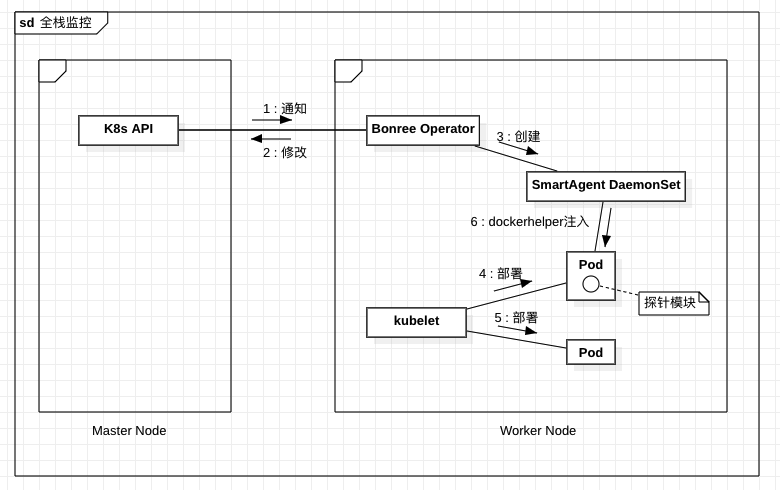
在此模式下,SmartAgent DaemonSet 将自动部署到 Kubernetes 工作节点上,实时监控容器创建并动态注入探针模块。
支持范围
创建 Smart Operator 所需的 kubernetes 资源对象
# 创建 Kubernetes 命名空间
kubectl create namespace bonree-agent

# 部署 smartagent-operator
kubectl apply -f kubernetes.yaml

# 查看部署日志
kubectl -n bonree-agent logs -f deployment/smartagent-operator
创建存储 PaaSToken 的 Secret
PaaSToken来源
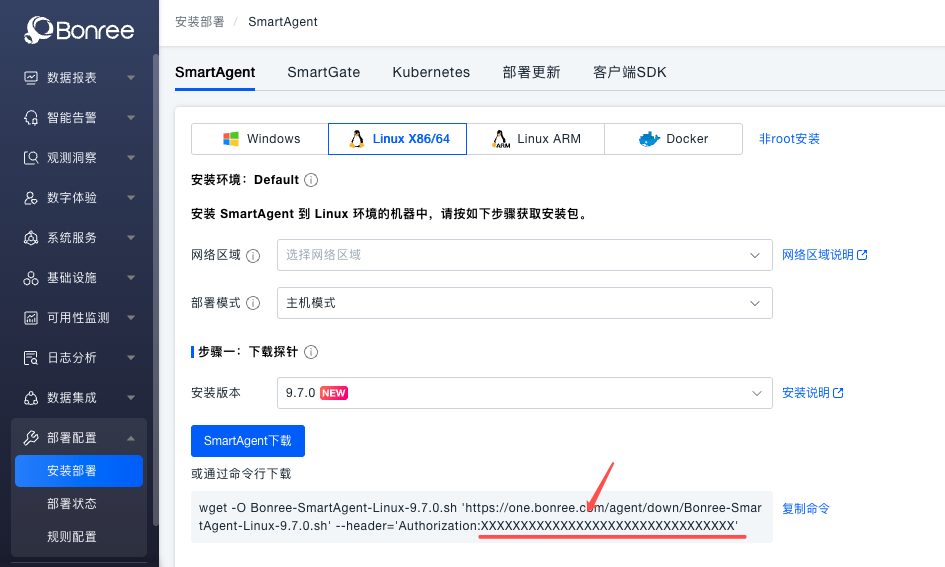
PaaSToken 需要从平台获取(请将下面命令中的 <Token> 替换为 Bonree One 平台 部署配置 -> 安装部署 -> SmartAgent 中部署命令里的 PaaSToken 值),该 Token 用于下载探针及相关接口的访问。
创建 secret
kubectl -n bonree-agent create secret generic smartkube --from-literal="PaaSToken=<Token>"
创建 SmartKube CRD
SmartKube CRD(Custom Resource Definition)是 Bonree SmartAgent Operator 的核心配置对象,用于定义和管理应用监控的相关参数。 以下配置文件示例展示了如何配置全栈监控模式,包括探针下载地址、连接信息、监控类型等相关配置。
kubectl apply -f smartkube.yaml
smartkube.yaml
apiVersion: bonree.com/v1alpha1
kind: SmartKube
metadata:
  name: smartkube
  namespace: bonree-agent
  # annotations:
    # 标记 SmartAgent daemonset pod 使用 privileged 运行
    # 默认通过 allowedCapabilities 限制权限集
    # feature.bonree.com/smartagent-privileged: "true"
spec:
  # bonree apm base api url
  apiUrl: https://one.bonree.com/rest/apm/agentDown

  # 探针连接相关配置
  controllerInfo:
    controllerUrl: https://oneupload.bonree.com/APM
    logControllerUrl: https://onelog.joinbr.com/controller/logs
    accountGUID: xxx-xxx-xxx-xxxx-xxxxxx

  # 启用探针类型
  # 全栈监控模式下,默认值,不修改
  # 仅监控应用模式下,默认值:"java,php,dotnet,python,nodejs,nginx,go,apache"
  agentTypes: "java,php,dotnet,python,nodejs,nginx,go,apache"

  # [可选] 指定网络区域
  # 默认:不设置
  # networkZone: default

  # [可选] 指定集群名
  # 默认:不设置
  # clusterName: default

  # [可选] 指定环境id
  # 默认:不设置
  # envId: default

  # [可选]: 指定存储 token 的 secret 名称
  # 默认值为 smartkube
  # tokens: ""

  # [可选]: 下载安装包或api请求时,跳过证书验证
  # 默认:false
  # skipCertCheck: false

  # [1.1.0+] [SmartAgent 9.1.0+] [可选]:指定主机属性(数据中心)
  # 默认:不设置
  # 格式:"k=v,k1=v1"
  # hostAttributes: ""

  # [1.1.0+] [SmartAgent 9.1.0+] [可选]:指定主机标签
  # 默认:不设置
  # 格式:"k=v,k1=v1"
  # hostTags: ""

  # 开启全栈安装时,配置smartagent镜像与自动升级
  smartAgent:
  # [可选]: 自定义 SmartAgent 容器镜像名.
  # 默认值: docker.bonree.com/agent/smartagent:latest
  #
  # image: ""

  # [可选]: 当 SmartAgent 版本有变更时,自动重启 SmartAgent pod实例更新版本(每隔15分钟检查一次)
  # 默认值: true
  # autoUpdate: true

  # 全栈监控
  classicFullStack:
    # 开启全栈安装
    enabled: true

    # [可选]: SmartAgent 部署节点选择约束.
    # 详细见:https://kubernetes.io/zh/docs/concepts/scheduling-eviction/assign-pod-node/
    # nodeSelector: {}

    # [可选]: SmartAgent 部署节点亲和性约束.
    # 详细见:https://kubernetes.io/zh/docs/concepts/scheduling-eviction/taint-and-toleration/
    tolerations:
      - effect: NoSchedule
        key: node-role.kubernetes.io/master
        operator: Exists
      - effect: NoSchedule
        key: node-role.kubernetes.io/control-plane
        operator: Exists

    # [可选]: SmartAgent 容器实例资源限制。
    # 详细见:https://kubernetes.io/zh/docs/concepts/configuration/manage-resources-containers/
    resources:
      requests:
        cpu: 100m
        memory: 512Mi
      limits:
        cpu: 800m
        memory: 1.5Gi

    # [可选]: SmartAgent安装参数.
    # args: []

    # [可选]: 为 SmartAgent Pods,增加额外环境变量
    #
    # env: []

    # [可选]: 设置 SmartAgent Pods 优先级. 默认不设置.
    # 详细见: https://kubernetes.io/zh/docs/concepts/scheduling-eviction/pod-priority-preemption/
    #
    # priorityClassName: priority-class

    # [可选]: SmartAgent pods DNS Policy. 默认值:ClusterFirstWithHostNet.
    # 详细见: https://kubernetes.io/zh/docs/concepts/services-networking/dns-pod-service/
    #
    # dnsPolicy: "ClusterFirstWithHostNet"

    # [可选]: 给 SmartAgent Pods 增加额外标签
    #
    # labels:
    #   custom: label