Network Zone
This document introduces the function description and usage steps of network zones.
When the network zone is set to "default," node information will not be distributed to SmartAgent, and functionalities such as data forwarding and memory dump storage cannot be implemented.
What is a Network Zone
Network zones identify resources within the same network structure, helping you efficiently route agent traffic, compress upload traffic, and save bandwidth resources.
Within a network zone, multiple SmartGates can be installed. SmartAgents within the same network zone will prioritize selecting the SmartGate with lower load as the agent data reporting exit according to dynamic link balancing strategies.
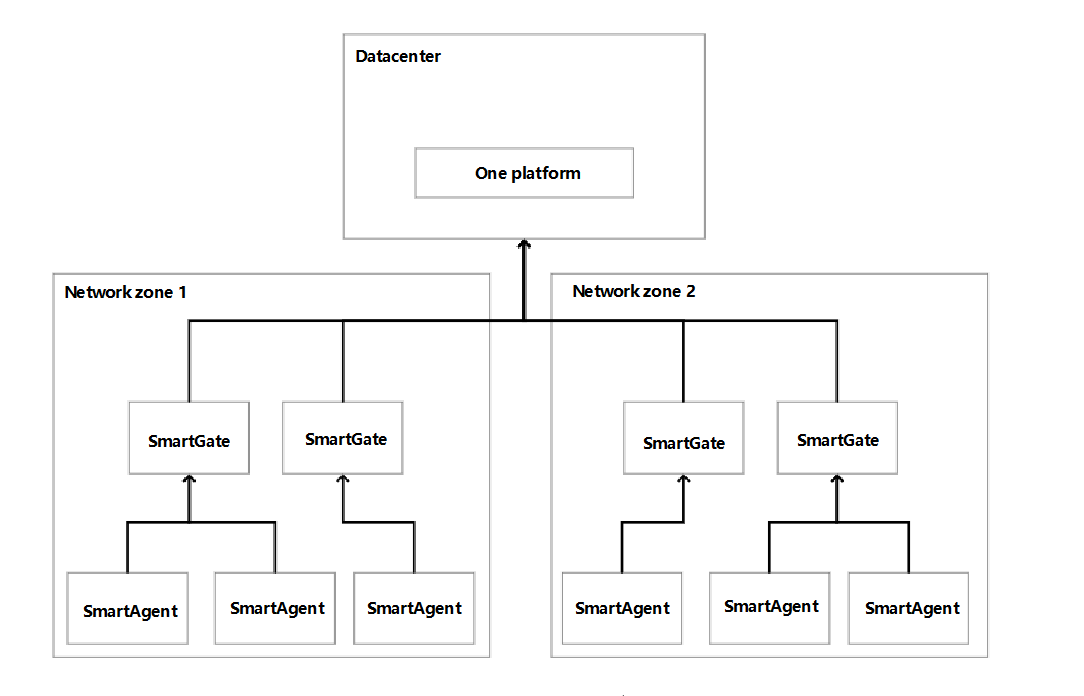
Deploying Network Zones
Follow the steps below to start using network zones in the following scenarios.
Initial Installation
When you first introduce the ONE platform to your system, we recommend adding a network zone other than "default":
-
Review your system's network architecture documentation (typically a Configuration Management Database (CMDB) or network architecture diagram).
-
Divide your system network into zones, deploying at least one SmartGate in each zone, which any SmartAgent in that zone can access.
-
When planning the number of SmartAgents, evaluate the number of SmartGates you need.
-
Install SmartGate by following the SmartGate installation documentation.
Use
--set-network-zone=<name>to specify the network zone installation parameter:# Example
bash Bonree-SmartGate-linux-amd64-1.1.0.sh config --set-network-zone server@sjhl.beijing.dongcheng -
Install SmartAgent by following the SmartAgent installation documentation.
# --set-network-zone Network Zone, not set by default
sudo bash Bonree-SmartAgent-Linux-6.6.0-alpha5.sh config -a xxxxxxxx-xxxx-xxxx-xxxx-xxxxxxxxxxxx -u "https://xxx.xxx" --set-network-zone myZone
Note: When the network zone is set to "default," node information will not be distributed to SmartAgent, and functionalities such as data forwarding and memory dump storage cannot be implemented.
Deleting Network Zones
- Stop all SmartAgent and SmartGate processes under that network zone.
- Log in to the ONE platform and delete the network zone under Configuration -> Agent Status -> Network Zone.