Application
Calling any SDK API on TaskPool, Worker, or native threads created via NAPI/C++ is currently not supported.
Integration
I. Pre-configure Bonree SDK Environment
Copy the bonree_sdk-signed.har file to the hars folder in the project root directory.
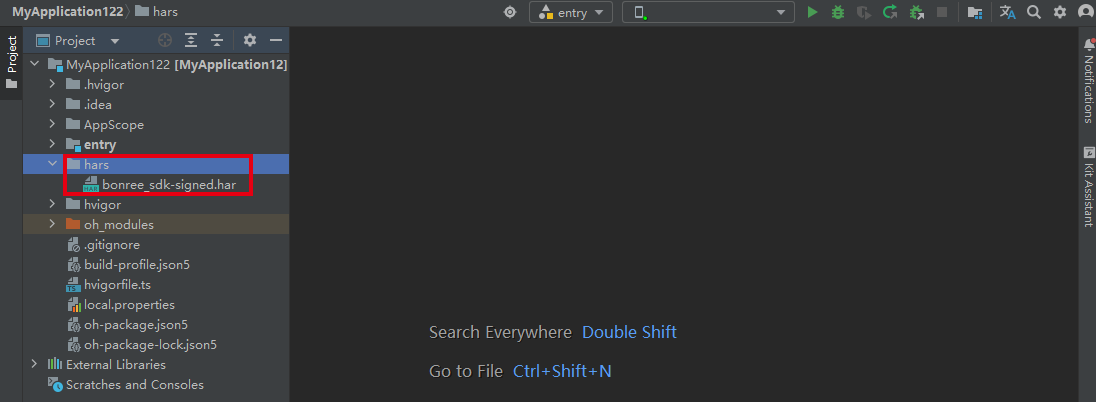
II. Add bonree_sdk-signed.har
2.1 Add the har package dependency to the dependencies field in the project's oh-package.json5: "@bonree/agent": "file:./hars/bonree_sdk-signed.har"
Example configuration:
{
  "modelVersion": "5.0.0",
  "description": "Please describe the basic information.",
  "dependencies": {
    "@bonree/agent": "file:./hars/bonree_sdk-signed.har" // Add this configuration to reference the SDK
  },
  "devDependencies": {
    "@ohos/hypium": "1.0.18",
    "@ohos/hamock": "1.0.0"
  }
}

2.2 Use the new ohmurl concatenation and parsing method
Modify the useNormalizedOHMUrl in the project-level build-profile.json5 to true. If this configuration item does not exist, please add it manually.
{
  "app": {
    "products": [
      {
         "buildOption": {
           "strictMode": {
             "useNormalizedOHMUrl": true
           }
         }
      }
    ]
  }
}
III. Sync & Rebuild Project
Step 1:
Click [Sync Now] in the upper right corner.
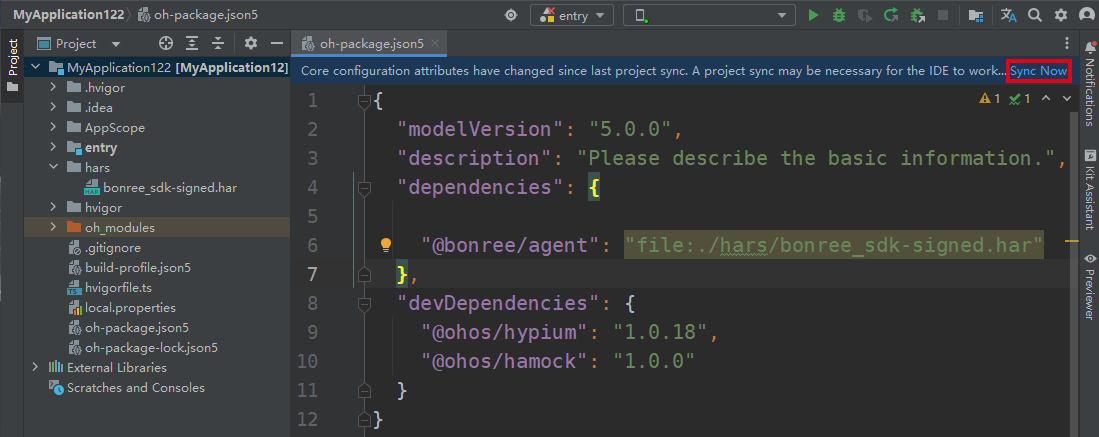
If it doesn't appear, you can use the DevEco Studio shortcut: select Run 'ohpm install'
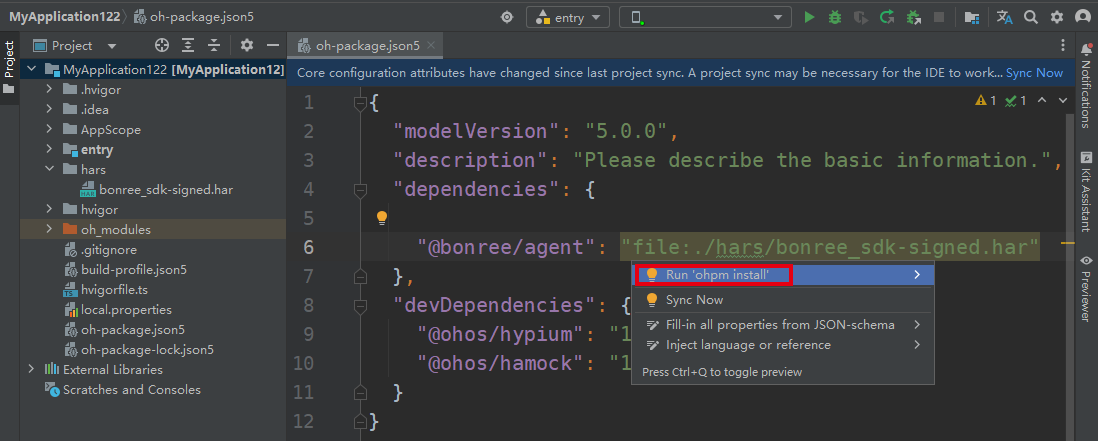
Step 2:
Rebuild the project to ensure the configuration takes effect.

Access
I. Configure Authorization Information
Check the application's module.json5 configuration file and ensure the following permissions are included as much as possible:
// The following permissions are necessary. For details, refer to the permission description section in the "Privacy Policy":
ohos.permission.INTERNET	        Send network data
ohos.permission.GET_NETWORK_INFO	Get network status information
II. Initialize SDK
Please obtain <#Config Address#> and <#AppID#> from the platform. For the method to obtain them, refer to How to Query AppID and Config Address?. Please contact technical support if you have any questions.
Please add the following code in the onCreate function of the custom AbilityStage in the entry module:
Bonree.withAppID("<#AppID#>")
   .withConfigAddress("<#Config Address#>")
   .start(this.context.getApplicationContext());
Sample Code:
import { Bonree } from '@bonree/agent'
import AbilityStage from '@ohos.app.ability.AbilityStage'

export default class EntryAbilityStage extends AbilityStage {

  onCreate() {
    this.initBonreeSdk();
  }

  private initBonreeSdk() {
    Bonree.withAppID("<#AppID#>")
      .withConfigAddress("<#Config Address#>")
      .start(this.context.getApplicationContext());
  }
}
III. Web Data Collection
3.1 Native Application Collection
3.1.1 Collect Web Performance Data
Add BonreeTrace.Web.getScriptItem(controller) and BonreeTrace.Web.onControllerAttachedHilt(controller) in javaScriptOnDocumentStart and onControllerAttached respectively.
import { BonreeTrace } from '@bonree/agent';

Web()
  .javaScriptOnDocumentStart([BonreeTrace.Web.getScriptItem(this.controller)]) // this.controller: Must be the WebviewController bound to the current Web
  .onControllerAttached(() => {
    BonreeTrace.Web.onControllerAttachedHilt(this.controller); // this.controller: Must be the WebviewController bound to the current Web
  })
3.1.2 Collect Web Exception Data
Add the corresponding methods in onErrorReceive, onHttpErrorReceive, and onSslErrorEventReceive.
import { BonreeTrace } from '@bonree/agent';

Web()
  .onErrorReceive((event) => {
    if (!event) {
      return;
    }
    BonreeTrace.Web.onErrorReceive(event.request, event.error, this.controller.getWebId()); // this.controller: Must be the WebviewController bound to the current Web
  })
  .onHttpErrorReceive((event) => {
    if (!event) {
      return;
    }
    BonreeTrace.Web.onHttpErrorReceive(event.request, event.response, this.controller.getWebId()); // this.controller: Must be the WebviewController bound to the current Web
  })
  .onSslErrorEventReceive((event) => {
    BonreeTrace.Web.onSslErrorEventReceive(event.error, this.controller.getWebId()); // this.controller: Must be the WebviewController bound to the current Web
  })
3.2 mPaaS Application Collection
3.2.1 Collect Web Performance Data and Exception Data
- To collect Web performance data and exception data, you need to initialize the Bonree SDK when the application starts and implement the
H5WebClientProviderinterface. When calling the interface for registration, you can refer to the exampleExampleWebclientProviderImplclass. In actual use, fill in your own implemented class. The example registration code is:HRiver.setProvider(H5WebClientProvider.name, new ExampleWebclientProviderImpl()) - To collect Web performance data, you need to add the corresponding method calls in the
onPageBeginandonControllerAttachedmethods:BonreeTrace.Web.getScriptItem(controller)andBonreeTrace.Web.onControllerAttachedHilt(controller). - To collect Web exception data, you need to add the corresponding handling methods in the
onErrorReceive,onHttpErrorReceive, andonSslErrorEventReceivemethods:BonreeTrace.Web.onErrorReceive(request, error, controller.getWebId()),BonreeTrace.Web.onHttpErrorReceive(request, response, controller.getWebId()), andBonreeTrace.Web.onSslErrorEventReceive(error, controller.getWebId()).
import { BonreeTrace } from "@bonree/agent";
import { H5WebClientProvider, Page } from "@mpaas/hriver";

export class ExampleWebclientProviderImpl extends H5WebClientProvider {
  onHttpErrorReceive(page: Page | undefined, request: WebResourceRequest | undefined,
    response: WebResourceResponse | undefined): void {
    const controller = page?.webcontroller;
    if (request && response && controller) {
      try {
        BonreeTrace.Web.onHttpErrorReceive(request, response, controller.getWebId());
      } catch (error) {
      }
    }
  }

  onSslErrorEventReceive(page: Page | undefined, handler: SslErrorHandler, error: SslError): void {
    const controller = page?.webcontroller;
    try {
      if (error && controller) {
        BonreeTrace.Web.onSslErrorEventReceive(error, controller.getWebId());
      }
    } catch (error) {
    }
  }

  onErrorReceive(page: Page | undefined, request: WebResourceRequest | undefined,
    error: WebResourceError | undefined): boolean {
    const controller = page?.webcontroller;
    if (request && error && controller) {
      try {
        BonreeTrace.Web.onErrorReceive(request, error, controller.getWebId());
      } catch (error) {
      }
    }
    return false;
  }

  onPageBegin(page: Page | undefined, url: string | undefined): void {
    const controller = page?.webcontroller;
    if (controller) {
      page.webcontroller?.runJavaScript(BonreeTrace.Web.getScriptItem(controller).script)
    }
  }

  onControllerAttached(page: Page | undefined): void {
    const controller = page?.webcontroller;
    if (controller) {
      BonreeTrace.Web.onControllerAttachedHilt(controller);
    }
  }
}
IV. View/Launch Data Collection
Important Notes:
View data collection in child windows is temporarily not supported. Please ignore this step for views in child windows.
When using
uiObserver.off()andUIObserver.off()series interfaces, you must pass thecallback. Ifcallbackis not passed when callingoff, all registrations will be canceled, causing abnormal SDK data collection.
4.1 Ability Data Collection
Add the @BonreeTrace.InjectAbility decorator to the subclass declaration of UIAbility.
import { BonreeTrace } from '@bonree/agent';

@BonreeTrace.InjectAbility
export default class EntryAbility extends UIAbility {
  onCreate(want: Want, launchParam: AbilityConstant.LaunchParam): void {

  }

  onWindowStageCreate(windowStage: window.WindowStage): void {

  }

  onForeground(): void {

  }

  onBackground(): void {

  }

  onWindowStageDestroy(): void {

  }

  onDestroy() {

  }
}
4.2 AbilityStage Data Collection
Add the @BonreeTrace.InjectStage decorator to the subclass declaration of AbilityStage.
import { BonreeTrace } from '@bonree/agent';

@BonreeTrace.InjectStage
export default class EntryAbilityStage extends AbilityStage {

  onCreate() {
  }

  onMemoryLevel(level: AbilityConstant.MemoryLevel): void {
  }
}
4.3 UI Page/Page Data Collection
Add the BonreeTrace.InjectPage(Index) interface call below all custom components decorated with @Entry and pass the current structure. The Page lifecycle functions (aboutToAppear, onPageShow, onPageHide, aboutToDisappear) should be overridden as much as possible; otherwise, it may affect snapshot data collection and performance accuracy.
import { BonreeTrace } from '@bonree/agent';

@Entry
@Component
struct Index {
  build() {
  }

  aboutToAppear(): void {
  }

  onPageShow(): void {
  }

  onPageHide(): void {
  }

  aboutToDisappear(): void {
  }
}

BonreeTrace.InjectPage(Index)
V. Network Collection
Currently supports collection for the frameworks: hms.collaboration.rcp, ohos.net.http, ohos.net.webSocket, ohos.net.socket.TCPSocket, ohos/axios, mPaaS/rpc. When collecting for the corresponding network framework, you need to use BonreeTrace to reference these framework classes. The API usage for each network framework is the same as the official documentation. Below are examples for each network collection.
5.1 'hms.collaboration.rcp'
Important Note: There are two mutually exclusive schemes for rcp. When integrating, you can only choose one.
Scheme One:
Only need to add the BonreeTrace prefix reference before the rcp.createSession API.
import { rcp } from '@kit.RemoteCommunicationKit';
import { BonreeTrace } from '@bonree/agent';

// Example 1: No parameters passed
let session1 = BonreeTrace.rcp.createSession(); // Add BonreeTrace prefix reference here

// Example 2: With parameters passed
let session = BonreeTrace.rcp.createSession({}); // Add BonreeTrace prefix reference here
Scheme Two:
Need to add the interceptor AgentRcpInterceptor to sessionConfiguration.interceptors in the call to rcp.createSession(sessionConfiguration).
import { rcp } from '@kit.RemoteCommunicationKit';
import { BonreeTrace } from '@bonree/agent';

// Example
const sessionConfig: rcp.SessionConfiguration = {
    // Add the BonreeTrace.rcp.AgentRcpInterceptor interceptor here
	interceptors: [new BonreeTrace.rcp.AgentRcpInterceptor()]
};
let session = rcp.createSession(sessionConfig);
5.2 'ohos.net.http'
Important Note: There are two mutually exclusive schemes for http. When integrating, you can only choose one.
Scheme One (Recommended):
Only need to add the BonreeTrace prefix reference before the http.createHttp API.
import { http } from '@kit.NetworkKit';
import { BusinessError } from '@kit.BasicServicesKit';
import { BonreeTrace } from '@bonree/agent';

let httpRequest = BonreeTrace.http.createHttp(); // Add BonreeTrace prefix reference here
let options: http.HttpRequestOptions = {};
let promise = httpRequest.request(
   'request url', options
);
promise.then((responseData: http.HttpResponse) => {
}).catch((err: BusinessError) => {
})
Scheme Two:
Step 1 (Optional configuration): For end-to-end full link tracking, you need to insert Bonree's custom business request headers. If you don't need full link business, you can skip this step.
Important API Note: The custom business request header is returned based on URL rules. Each network request's custom header needs to be obtained and assigned separately. It is strictly forbidden to reuse the API call results for different
requestUrlcalls!
function getInsertHeaderMap(requestUrl: string): Map<string, string> | undefined
| Parameter | Description | Parameter Constraints | Failure Result |
|---|---|---|---|
| requestUrl | Request URL (Required) | string type. Valid request address | Current fetch is invalid |
import http from '@ohos.net.http'
import { BonreeTrace } from '@bonree/agent'

let httpRequest = http.createHttp();
let customHeaders: Record<string, string> = {};
// Add: Get end-to-end request headers here. If you don't have end-to-end business, you can skip this.
BonreeTrace.http.getInsertHeaderMap("Current request URL")?.forEach((value, key) => {
  customHeaders[key] = value;
})
let options: http.HttpRequestOptions = {
  header: customHeaders,
};
let promise = httpRequest.request("Current request URL", options);
Step 2 (Required configuration): Collect normal/abnormal network data
function handleSuccess(requestUrl: string, method: string, responseCode: number, requestDataSizeByte: number,
      downloadSizeByte: number, timing: OhosHttp.PerformanceTiming, remoteAddressIP?: string,
      requestHeader?: Record<string, Object>, responseHeader?: Record<string, Object>, resourceType?: string,
      optionsUsingProtocol?: string, requestBody?: string)
| Parameter | Description | Parameter Constraints | Failure Result |
|---|---|---|---|
| requestUrl | Request URL (Required) | string type. Valid request address | Current network event not collected |
| method | Request method (Required) | string type. For non-http request methods, pass an empty string | Current network event not collected |
| responseCode | Response code (Required) | number type | Current network event not collected |
| requestDataSizeByte | Request upload data size (Required) | number type (Unit: Byte) | Current network event not collected |
| downloadSizeByte | Download size (Required) | number type (Unit: Byte) | Current network event not collected |
| timing | Time spent in each stage of the HTTP request (Required) | http.PerformanceTiming type | Current network event not collected |
| remoteAddressIP | Target address IP | string type | Current network event missing related field |
| requestHeader | Request header | Record<string, Object> type | Current network event missing related field |
| responseHeader | Response header | Record<string, Object> type | Current network event missing related field |
| resourceType | Resource type | string type. Follows the Content-Type field of MIME type | Current network event missing related field |
| optionsUsingProtocol | Protocol type | string type. Example: http.HttpProtocol.HTTP2.toString() | If value is invalid, it will be automatically obtained based on the URL |
| requestBody | Request content | string type | Current network event missing related field |
function handleError(requestUrl: string, method: string, requestDataSizeByte: number, errorParam: Error,
      requestHeader?: Record<string, Object>)
| Parameter | Description | Parameter Constraints | Failure Result |
|---|---|---|---|
| requestUrl | Request URL (Required) | string type. Valid request address | Current network event not collected |
| method | Request method (Required) | string type. For non-http request methods, pass an empty string | Current network event not collected |
| requestDataSizeByte | Request upload data size (Required) | number type (Unit: Byte) | Current network event not collected |
| errorParam | Network Error (Required) | BusinessError type | Current network event not collected |
| requestHeader | Request header | Record<string, Object> type | Current network event missing related field |
Example:
promise.then((responseData: http.HttpResponse) => {
  BonreeTrace.http.handleSuccess("Current request URL", "GET", responseData.responseCode, requestDataSize, downloadSize, responseData.performanceTiming);
}).catch((err: BusinessError) => {
  BonreeTrace.http.handleError("Current request URL", "GET", 0, err);
});
5.3 'ohos.net.webSocket'
Only need to add the BonreeTrace prefix reference before the webSocket.createWebSocket API.
import { webSocket } from '@kit.NetworkKit';
import { BonreeTrace } from '@bonree/agent';

let webSocketInstance: webSocket.WebSocket = BonreeTrace.webSocket.createWebSocket(); // Add BonreeTrace prefix reference here
5.4 'ohos.net.socket.TCPSocket'
Only need to add the BonreeTrace prefix reference before the call to the socket.constructTCPSocketInstance API.
import { socket } from '@kit.NetworkKit';
import { BonreeTrace } from '@bonree/agent';

let tcpSocketInstance: BonreeTrace.socket.TCPSocket = BonreeTrace.socket.constructTCPSocketInstance(); // Add BonreeTrace prefix reference here
5.5 'ohos/axios'
Only supports versions >=2.2.1
Step 1 (Optional configuration): For end-to-end full link tracking, you need to insert Bonree's custom business request headers. If you don't need full link business, you can skip this step.
Important API Note: The custom business request header is returned based on URL rules. Each network request's custom header needs to be obtained and assigned separately. It is strictly forbidden to reuse the API call results for different
requestUrlcalls!
function getInsertHeaderMap(requestUrl: string): Map<string, string> | undefined
| Parameter | Description | Parameter Constraints | Failure Result |
|---|---|---|---|
| requestUrl | Request URL (Required) | string type. Valid request address | Current fetch is invalid |
// Example: Insert request headers via `AxiosRequestConfig`. You can also handle `InternalAxiosRequestConfig.headers` by implementing a request interceptor for header insertion.
import axios, {
  AxiosError,
  AxiosHeaders,
  AxiosResponse,
  AxiosRequestConfig,
  InternalAxiosRequestConfig
} from '@ohos/axios'
import { BonreeTrace } from '@bonree/agent'

let customHeaders: AxiosHeaders = new AxiosHeaders();
// First, get the Bonree full link business request headers
BonreeTrace.axios.getInsertHeaderMap("Current request URL")?.forEach((value, key) => {
  customHeaders.set(key, value);
});
// Insert into the actual request headers via AxiosRequestConfig
let requestConfig: AxiosRequestConfig = {
  method: this.currMethod,
  headers: customHeaders,
  params: this.currRequestParam
}
axios.get("Current request URL", requestConfig);
Step 2 (Required configuration): Collect normal/abnormal network data
function handleSuccess(requestUrl: string, method: string, responseCode: number, requestDataSizeByte: number,
      downloadSizeByte: number, timingParam: object, remoteAddressIP?: string,
      requestHeader?: Record<string, Object>, responseHeader?: Record<string, Object>, resourceType?: string,
      requestBody?: string)
| Parameter | Description | Parameter Constraints | Failure Result |
|---|---|---|---|
| requestUrl | Request URL (Required) | string type. Valid request address | Current network event not collected |
| method | Request method (Required) | string type. For non-http request methods, pass an empty string | Current network event not collected |
| responseCode | Response code (Required) | number type | Current network event not collected |
| requestDataSizeByte | Request upload data size (Required) | number type (Unit: Byte) | Current network event not collected |
| downloadSizeByte | Download size (Required) | number type (Unit: Byte) | Current network event not collected |
| timingParam | Time spent in each stage of the axios request (Required) | http.PerformanceTiming type | Current network event not collected |
| remoteAddressIP | Target address IP | string type | Current network event missing related field |
| requestHeader | Request header | Record<string, Object> type | Current network event missing related field |
| responseHeader | Response header | Record<string, Object> type | Current network event missing related field |
| resourceType | Resource type | string type. Follows the Content-Type field of MIME type | Current network event missing related field |
| requestBody | Request content | string type | Current network event missing related field |
function handleError(requestUrl: string, method: string, requestDataSizeByte: number, errorParam: Error,
      requestHeader?: Record<string, Object>)
| Parameter | Description | Parameter Constraints | Failure Result |
|---|---|---|---|
| requestUrl | Request URL (Required) | string type. Valid request address | Current network event not collected |
| method | Request method (Required) | string type. For non-http request methods, pass an empty string | Current network event not collected |
| requestDataSizeByte | Request upload data size (Required) | number type (Unit: Byte) | Current network event not collected |
| errorParam | Network Error (Required) | BusinessError type | Current network event not collected |
| requestHeader | Request header | Record<string, Object> type | Current network event missing related field |
Example:
axios.get("Current request URL", requestConfig).then((responseData: AxiosResponse) => {
  BonreeTrace.axios.handleSuccess("Current request URL", "GET", responseData.status, requestDataSize, downloadSize, responseData.performanceTiming);
}).catch((err: BusinessError) => {
  BonreeTrace.axios.handleError("Current request URL", "GET", 0, err);
});
5.6 'mPaaS/rpc'
Step 1 (Optional configuration): For end-to-end full link tracking, you need to insert Bonree's custom business request headers. If you don't need full link business, you can skip this step.
Important API Note: The custom business request header is returned based on URL rules. Each network request's custom header needs to be obtained and assigned separately. It is strictly forbidden to reuse the API call results for different
requestUrlcalls!
function getInsertHeaderMap(requestUrl: string): Map<string, string> | undefined
| Parameter | Description | Parameter Constraints | Failure Result |
|---|---|---|---|
| requestUrl | Request URL (Required) | string type. Valid request address | Current fetch is invalid |
The following uses ExampleRpcInterceptor as an example. In actual use, replace it with your implemented interceptor class name.
- Add an implementation class for the
RpcInterceptorinterface
import { MPRpc, RpcInterceptor, RpcInvokeContext } from '@mpaas/rpc'
import { BonreeTrace } from '@bonree/agent';

export class ExampleRpcInterceptor implements RpcInterceptor {
  preHandle(rpcInvokeContext: RpcInvokeContext): boolean {
    // Add: Get end-to-end request headers here. If you don't have end-to-end business, you can skip this.
    BonreeTrace.mPaaSRpc.getInsertHeaderMap("Current request URL")?.forEach((value, key) => {
      rpcInvokeContext.addHeader(key, value);
    });
    return true;
  }
}
- Add global interceptor configuration during the application startup phase
import { MPRrc } from '@mpaas/rpc'
MPRpc.addGlobalInterceptor(new ExampleRpcInterceptor());
Step 2 (Required configuration): Collect normal/abnormal network data
function handleSuccess(requestUrl: string, requestHeader: Map<string, string>, responseHeader: object,
      method?: string, remoteAddressIP?: string, timing?: OhosHttp.PerformanceTiming, requestDataSizeByte?: number,
      downloadSizeByte?: number, requestBody?: string)
| Parameter | Description | Parameter Constraints | Failure Result |
|---|---|---|---|
| requestUrl | Request URL (Required) | string type. Valid request address | Current network event not collected |
| requestHeader | Request header (Required) | Map<string, string> type | Current network event missing related field |
| responseHeader | Response header (Required) | object type | Current network event missing related field |
| method | Request method | string type. For non-http request methods, pass an empty string | Default request method is post |
| remoteAddressIP | Target address IP | string type | Current network event missing related field |
| timing | Time spent in each stage of the request | http.PerformanceTiming type | Related field value is 0 |
| requestDataSizeByte | Request upload data size | number type (Unit: Byte) | Related field value is 0 |
| downloadSizeByte | Download size | number type (Unit: Byte) | Related field value is 0 |
| requestBody | Request content | string type | Current network event missing related field |
function handleError(requestUrl: string, error: Error, requestHeader: Map<string, string>,
      responseHeader?: object, method?: string, requestDataSizeByte?: number)
| Parameter | Description | Parameter Constraints | Failure Result |
|---|---|---|---|
| requestUrl | Request URL (Required) | string type. Valid request address | Current network event not collected |
| error | Error information (Required) | Error type | Current network event not collected |
| requestHeader | Request header (Required) | Map<string, string> type | Current network event missing related field |
| responseHeader | Response header | object type | Current network event missing related field |
| method | Request method | string type. For non-http request methods, pass an empty string | Default request method is post |
| requestDataSizeByte | Request upload data size | number type (Unit: Byte) | Related field value is 0 |
The following uses ExampleRpcInterceptor as an example. In actual use, replace it with your implemented interceptor class name.
- Add an implementation class for the
RpcInterceptorinterface
export class ExampleRpcInterceptor implements RpcInterceptor {
  preHandle(rpcInvokeContext: RpcInvokeContext): boolean {
     // Add: Get end-to-end request headers here. If you don't have end-to-end business, you can skip this.
    BonreeTrace.mPaaSRpc.getInsertHeaderMap("Current request URL")?.forEach((value, key) => {
      rpcInvokeContext.addHeader(key, value);
    });
    return true;
  }

  postHandle(rpcInvokeContext: RpcInvokeContext): boolean {
    BonreeTrace.mPaaSRpc.handleSuccess("Current request URL", rpcInvokeContext.getRequestHeader(),
      rpcInvokeContext.getResponseHeader());
    return true;
  }

  handleException(rpcInvokeContext: RpcInvokeContext, exception: RPCException): boolean {
    BonreeTrace.mPaaSRpc.handleError("Current request URL", exception, rpcInvokeContext.getRequestHeader());
    throw exception
  }
}
- Add global interceptor configuration during the application startup phase
import { MPRrc } from '@mpaas/rpc'
MPRpc.addGlobalInterceptor(new ExampleRpcInterceptor());
VI. Embedding Verification
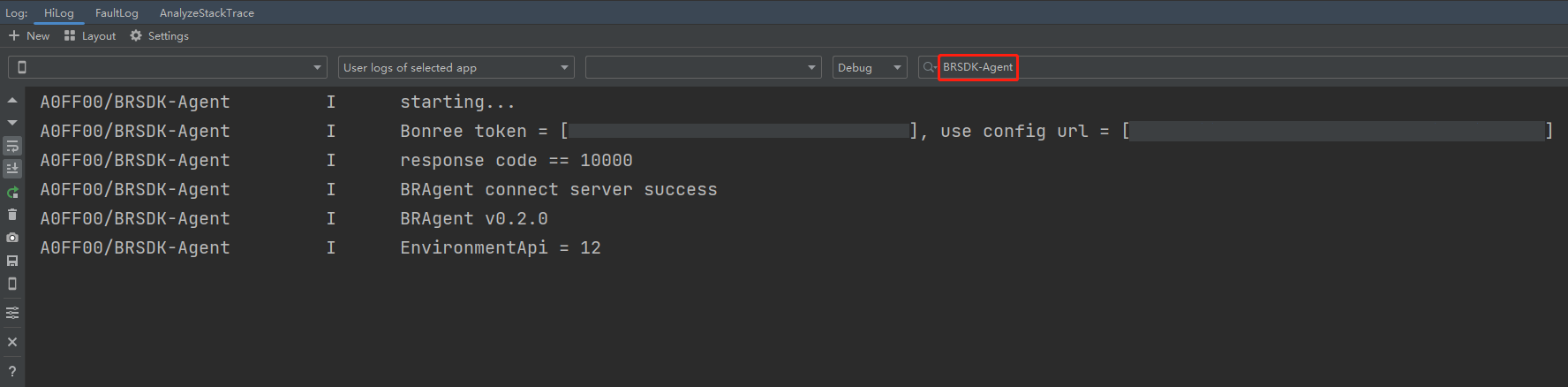
Start the embedded APP and check the hilog logs. Filter for the BRSDK-Agent tag. The following logs indicate successful embedding and that data collection has started:
BRSDK-Agent   I   starting...         (Note: BRAgent integrated successfully)
BRSDK-Agent   I   Bonree token*****   (Note: BRAgent started successfully)
BRSDK-Agent   I   BRAgent connect server success (Note: BRAgent data setting successful)
BRSDK-Agent   I   BRAgent v***        (Note: *** corresponds to the BRAgent version in the current zip file name)
Note: We recommend configuring data collection rules on the platform under Installation & Deployment / Rule Configuration / Data Collection / Terminal Application immediately after completing SDK integration, to avoid discrepancies between platform data and your expectations.