Database Collection Configuration
The Database Collection Configuration feature is primarily used to set collection rules for SQL/NoSQL statements in both relational and non-relational databases. By configuring parameters such as the truncation threshold for SQL/NoSQL statement length and the threshold for obtaining execution plans for slow SQL calls in relational databases, this feature enables the collection of database operation statements to meet needs like performance analysis and problem troubleshooting. Simultaneously, it avoids potential negative impacts on system performance caused by collecting excessively long statements or over-collecting execution plans, thereby achieving a balance between data collection and system performance. This module supports both custom collection rules and default collection rule configurations, with custom rules taking precedence over default rules.
Use Cases
- Performance Analysis: When performance analysis of executed SQL/NoSQL statements in the database is required, configuring appropriate collection rules to capture statement length, call duration, and other information helps analyze statement execution efficiency and identify performance bottlenecks.
- Problem Troubleshooting: When database failures or anomalies occur, utilizing collected information, such as SQL execution plans (obtained when call duration exceeds the set threshold), helps quickly pinpoint the root cause, for instance, issues like slow database response due to inefficient SQL queries.
- System Operations: By configuring reasonable truncation thresholds and execution plan acquisition thresholds, operational needs can be met without negatively impacting database system performance due to excessive data collection, enabling efficient operations.
Getting Started
Navigate to Deployment Configuration -> Rule Configuration -> Data Collection -> Database to manage the data collection settings.
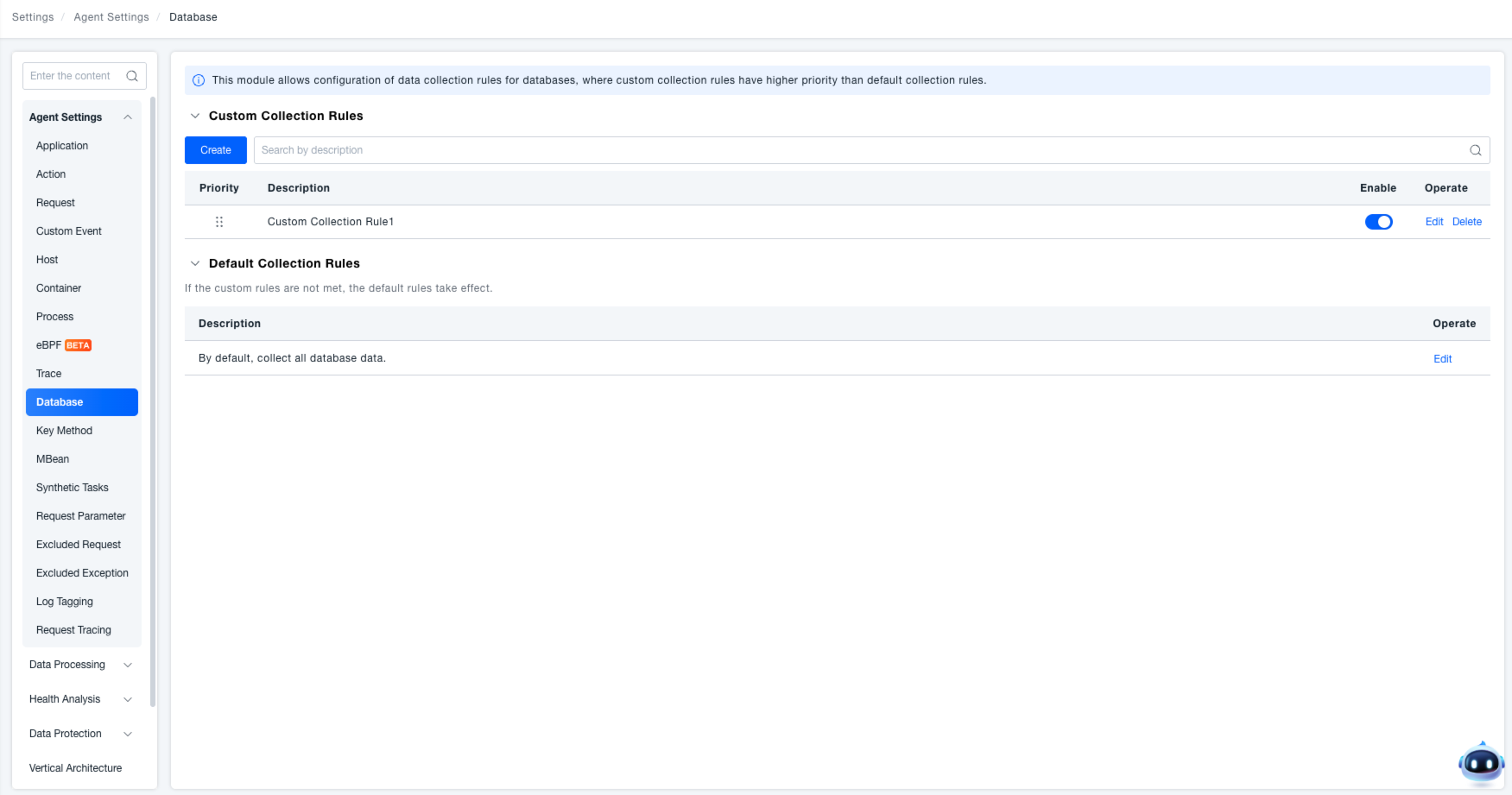
Collection Rule List
- Custom Rules List: Displays priority, description, enabled status, and actions (Edit, Delete). Rules are executed according to their priority.
- Default Rules List: Indicates that "If no custom rule is matched, the default rule takes effect." The description is defaulted to "Collect all database data by default". The action only supports Edit (In read-only mode, the action label changes to View, and all controls within the drawer are disabled).
Configuring a Custom Collection Rule
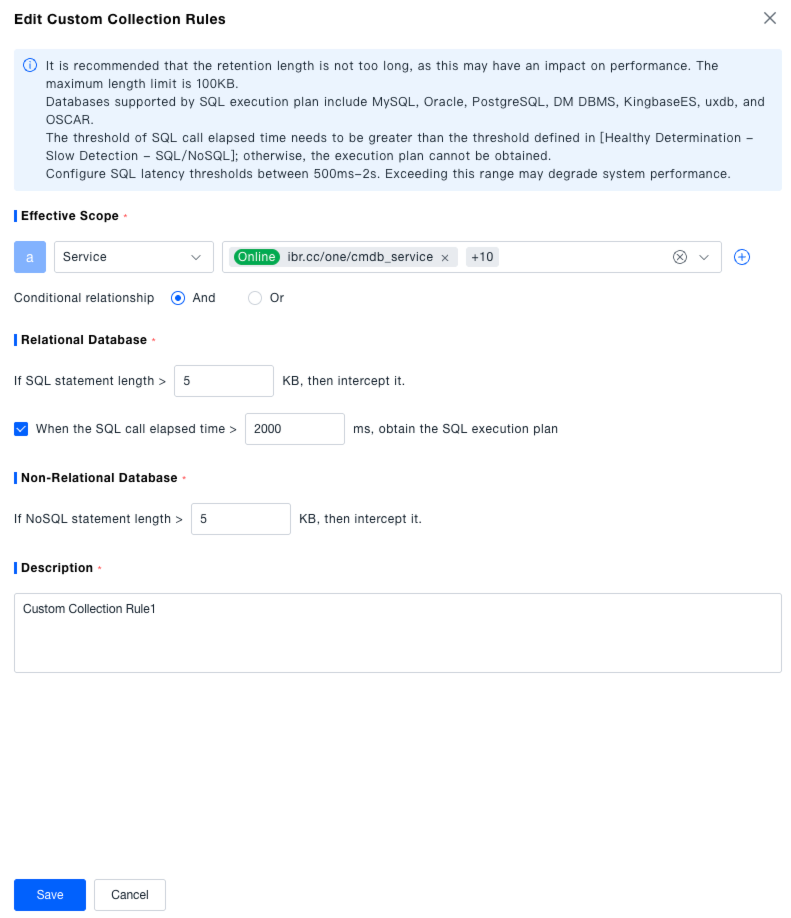
Click the "Create" or "Edit" button to open the drawer for creating/editing a custom collection rule. A tip is displayed at the top: "It is recommended not to set an excessive retention length, as it may impact performance. The maximum length limit is 100KB. SQL execution plan support is available for MySQL, Oracle, PostgreSQL, DM DBMS, KingbaseES, uxdb, and OSCAR. The SQL call duration threshold must be greater than the threshold defined in [Health Assessment - Slow Request Detection - SQL Statement / NoSQL Operation]; otherwise, the execution plan cannot be captured. The recommended range for the SQL call duration threshold is between 500ms and 2s to avoid potential system performance impacts."
- Scope: Required. Define the effective scope by selecting Services, Service Tags, Process Groups, or Process Group Tags. Conditions can be combined using "AND" or "OR".
- Configuration Items:
- Relational Databases: Configure the SQL statement length truncation rule (default: 5KB). Configure the SQL call duration threshold (default: 2000ms). Manually enable the rule switch for "Capture SQL execution plan when the SQL call duration exceeds the set value".
- Non-relational Databases: Configure the NoSQL statement length truncation rule (default: 5KB).
- Description: Required field. Must be manually entered, with a character limit of 100. If left blank when saving, a "Cannot be empty" prompt will appear.
- Save: Click the "Save" button to complete the creation of the custom collection rule.
Configuring the Default Collection Rule
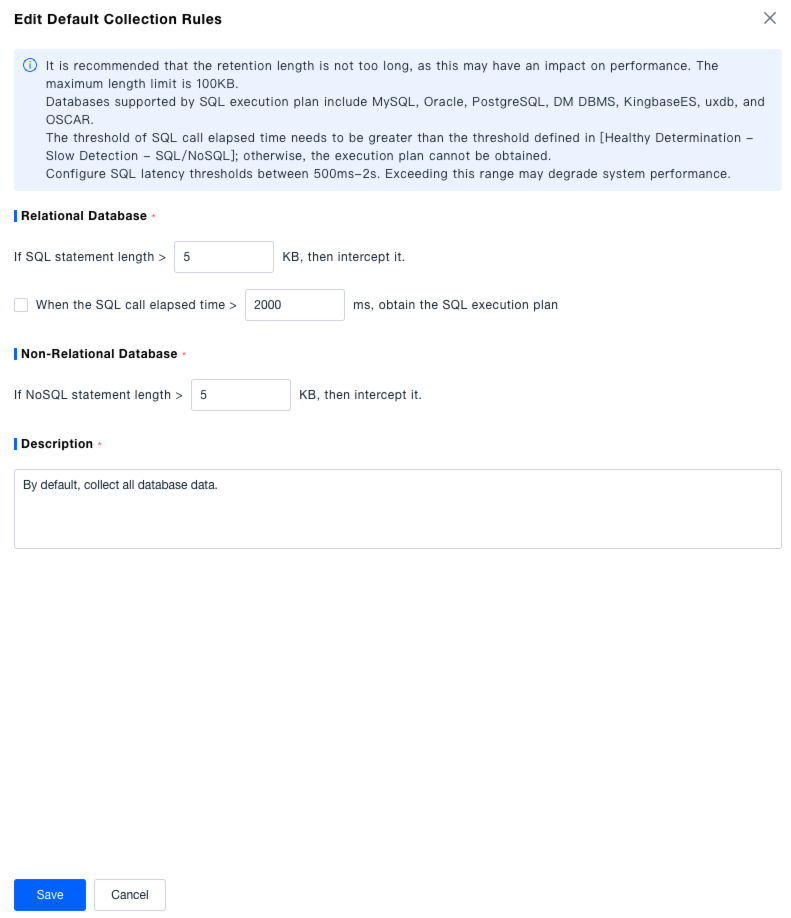
Click the "Edit" button for the default collection rule to open the edit drawer. The top tip text is consistent with the one shown when creating a custom rule.
- Configuration Items:
- Relational Databases: Configure the SQL statement length truncation rule (default: 5KB). Configure the SQL call duration threshold (default: 2000ms). The rule switch for "Capture SQL execution plan when the SQL call duration exceeds the set value" is disabled by default but can be manually enabled.
- Non-relational Databases: Configure the NoSQL statement length truncation rule (default: 5KB).
- Description: Required field. Defaults to "Collect all database data by default".
- Save: Click the "Save" button to complete the editing of the default collection rule.
- It is recommended not to set an excessive retention length, as it may impact performance. The maximum length limit is 100KB.
- SQL execution plan support is available for MySQL, Oracle, PostgreSQL, DM DBMS, KingbaseES, uxdb, and OSCAR.
- The SQL call duration threshold must be greater than the threshold defined in [Health Assessment - Slow Request Detection - SQL Statement / NoSQL Operation]; otherwise, the execution plan cannot be captured.
- The recommended range for the SQL call duration threshold is between 500ms and 2s to avoid potential system performance impacts.