uni-app
Integration Guide
- Unzip
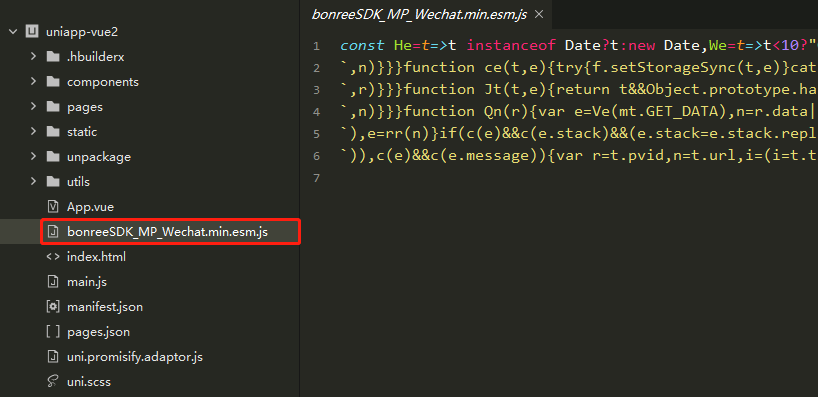
BonreeSDK_TDEM_MP.Wechat.zip, open the project withHBuilder-X, and addbonreeSDK_MP_Wechat.min.esm.jsto the project; if you are packaging for the Douyin platform, unzipBonreeSDK_TDEM_MP.Tiktok.zipand addbonreeSDK_MP_Tiktok.min.esm.jsto the project; if you are packaging for the Alipay platform, unzipBonreeSDK_TDEM_MP.Alipay.zipand addbonreeSDK_MP_Alipay.min.esm.jsto the project. The following figure shows the integration diagram when packaging for the WeChat platform:
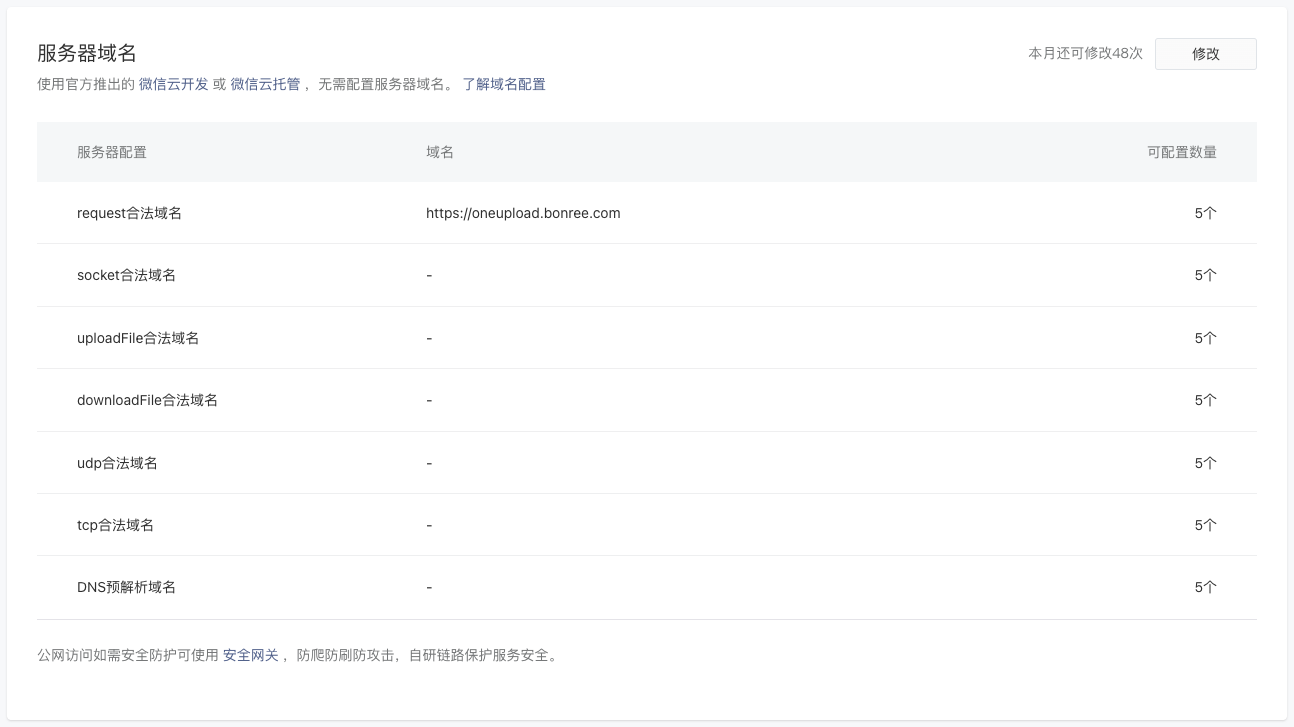
- When using the public cloud platform, you need to add the data reporting domain to the server domain names in the WeChat/Douyin/Alipay Mini Program Management Backend. The example shows the public cloud platform data reporting domain
https://oneupload.bonree.com. For private environment domains, please configure according to the actual deployment situation or contact technical support to obtain them.
Setup
-
Import the agent file in the main.js file:
Import when running in WeChat Mini Program:
import {BonreeRUM} from './bonreeSDK_MP_Wechat.min.esm.js'Import when running in Douyin Mini Program:
import {BonreeRUM} from './bonreeSDK_MP_Tiktok.min.esm.js'Import when running in Alipay Mini Program:
import {BonreeRUM} from './bonreeSDK_MP_Alipay.min.esm.js' -
Start the mini program agent, setting the Config address and AppID in the passed configuration parameters:
<#Config Address#> and <#AppID#> can be obtained from the platform. For the method to obtain them, please refer to How to Query AppID and Config Address?. If you have any questions, please contact technical support.
BonreeRUM.start({
    configAddress: "<#Config Address#>",
    appId: "<#AppID#>"
})
The initialization location of the mini program agent differs between vue2 and vue3 projects.
In vue2 projects:
import App from "./App";
import {BonreeRUM} from './bonreeSDK_MP_Wechat.min.esm.js'    // Import in WeChat Mini Program
// import {BonreeRUM} from './bonreeSDK_MP_Tiktok.min.esm.js' // Import in Douyin Mini Program
// import {BonreeRUM} from './bonreeSDK_MP_Alipay.min.esm.js' // Import in Alipay Mini Program

// #ifndef VUE2
import Vue from "vue";
import "./uni.promisify.adaptor";

BonreeRUM.start({
    configAddress: "<#Config Address#>",
    appId: "<#AppID#>",
});

Vue.config.productionTip = false;
App.mpType = "app";
const app = new Vue({
    ...App,
});
app.$mount();
// #endif

// #ifdef VUE2
import { createSSRApp } from "vue";
export function createApp() {
    const app = createSSRApp(App);
    return {
        app
    };
}
// #endif
In vue3 projects:
import App from "./App";
import {BonreeRUM} from './bonreeSDK_MP_Wechat.min.esm.js'    // Import in WeChat Mini Program
// import {BonreeRUM} from './bonreeSDK_MP_Tiktok.min.esm.js' // Import in Douyin Mini Program
// import {BonreeRUM} from './bonreeSDK_MP_Alipay.min.esm.js' // Import in Alipay Mini Program

// #ifndef VUE3
import Vue from "vue";
import "./uni.promisify.adaptor";
Vue.config.productionTip = false;
App.mpType = "app";
const app = new Vue({
    ...App,
});
app.$mount();
// #endif

// #ifdef VUE3
import { createSSRApp } from "vue";
export function createApp() {
    BonreeRUM.start({
        configAddress: "<#Config Address#>",
        appId: "<#AppID#>",
    });
    const app = createSSRApp(App);
    return {
        app
    };
}
// #endif
- Run the mini program simulator. In
HBuilder-X, choose to run the project with WeChat/Douyin/Alipay Developer Tools. - After the project runs successfully in WeChat/Douyin/Alipay Developer Tools, check the
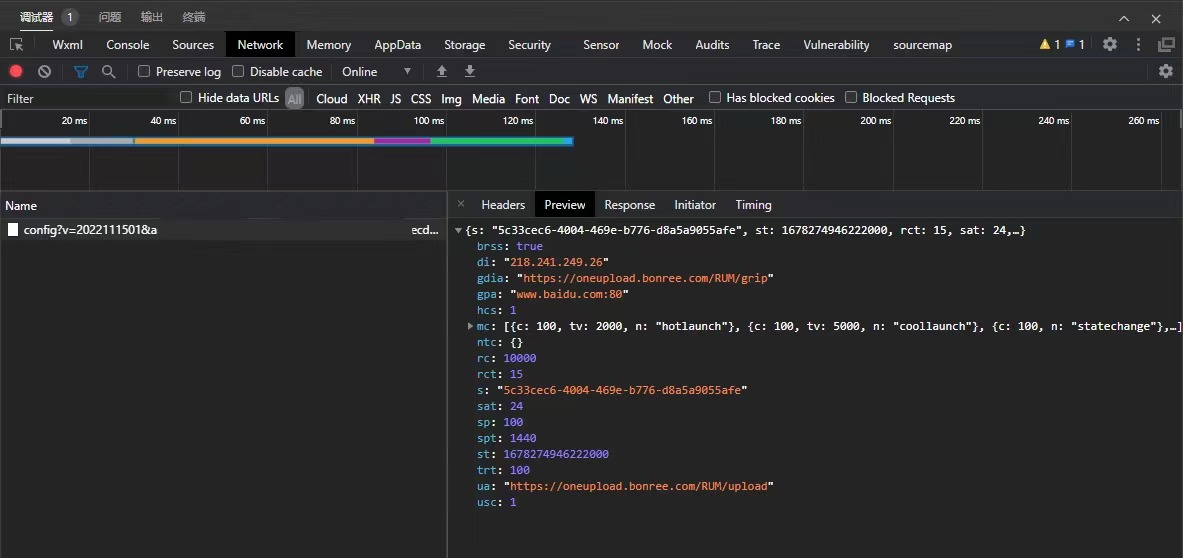
Networkin the debugger of WeChat/Douyin Developer Tools. If there is a config request result output and thercfield in the response is 10000, it indicates successful integration. The following figure shows the response result in WeChat Developer Tools:
Note: We recommend configuring data collection rules on the platform under Installation & Deployment / Rule Configuration / Data Collection / Terminal Application immediately after completing SDK integration, to avoid discrepancies between platform data and your expectations.