Security Compliance
1. Filling in SDK-Related Content in the Privacy Policy
1.1 Collection and Acquisition
In the section of the Privacy Policy describing the collection and acquisition of your personal information, fill in the following content based on the actual situation.
When you activate and use the service, we will collect your device information (ODID, AndroidID, IDFV, operating system, device manufacturer and model, OS version, CPU manufacturer, CPU instruction set, IP address, etc.) through the Bonree SDK for statistical analysis of your usage effectiveness within the App.
1.2 Device Information Explanation
1.2.1 ODID
For HarmonyOS NEXT platform devices, the Bonree SDK will collect the ODID by default as the unique identifier for the device when gathering anonymous IDs. The ODID is obtained using the anonymous device identifier capability provided by Huawei for developers. For detailed information, please refer to the Huawei Developer official website. If you do not wish to collect and use the ODID, you can call the custom device ID interface to replace it.
1.2.2 HarmonyOS Permissions Description
| Permission | Purpose | Corresponding Platform Function | Required | Permission Request Timing |
|---|---|---|---|---|
| ohos.permission.INTERNET | Send network data | All platform functions for distribution and data display | Required - SDK will automatically stop without authorization | Before SDK startup |
| ohos.permission.GET_NETWORK_INFO | Determine current network environment changes | Network-related data | Required - without authorization, cannot obtain network status, calculate traffic changes, generate network status switch events, and may even cause SDK to fail to start normally and report data | Before SDK startup |
| ohos.permission.ACCESS_BLUETOOTH | Get Bluetooth switch status | Device status | Not required | Any time |
| ohos.permission.APPROXIMATELY_LOCATION | Get location switch status | Device status | Not required | Any time |
1.2.3 AndroidID
For Android platform devices, the Bonree SDK will collect the AndroidID by default as the unique identifier for the device when gathering anonymous IDs. The AndroidID is a randomly generated 64-bit hexadecimal number created by the system upon the device's first boot. The ANDROID_ID value is reset when the device is wiped or restored to factory settings. It is not a fixed, unchangeable ID and complies with MIIT regulations prohibiting the collection of unique identifiers that cannot be reset by the user. While there might be some compliance risks under stricter regulations, considering the accuracy of collection, the Bonree SDK still provides the method to collect the AndroidID. If you do not wish to collect and use the AndroidID, you can call the custom device ID interface to replace it.
1.2.4 IDFV
For iOS platform devices, the Bonree SDK will collect the IDFV (Identifier for Vendor) by default as the unique identifier for the device when gathering anonymous IDs. Using IDFV carries certain compliance risks. However, considering the accuracy of collection, the Bonree SDK still provides the method to collect the IDFV. If you do not wish to collect and use the IDFV, you can call the custom device ID interface to replace it.
1.2.5 IMEI/MEID
The Bonree SDK does not collect the device's IMEI or MEID information.
1.2.6 MAC Address
The Bonree SDK does not collect the device's MAC address information.
2. App Store Privacy Questions
Apple updated its privacy policy in iOS 14.3, requiring publishers to fill out a privacy report when updating or releasing an App. How should this be filled out if the App integrates the Bonree SDK?
By default, you only need to select "Device ID" and "Product Interaction." If you call the custom user information interface for user association, you also need to check "User ID," as shown in the figure below:
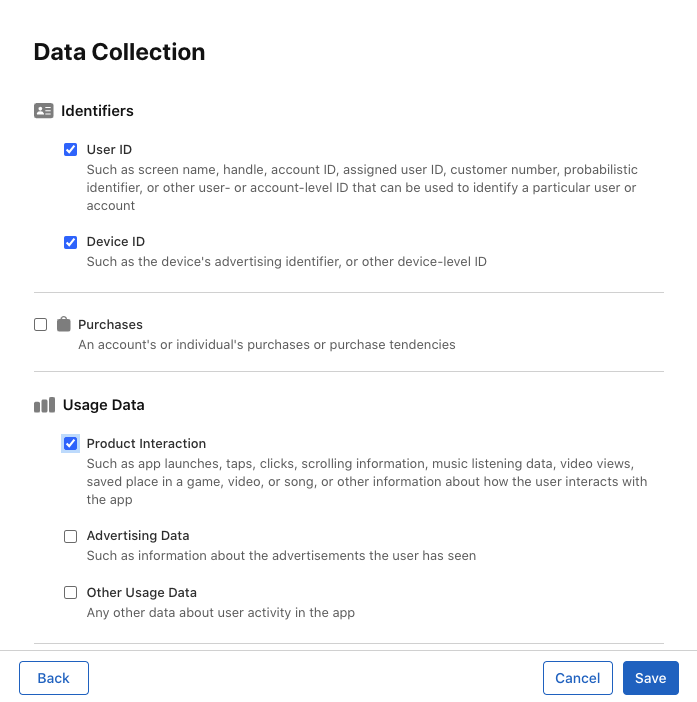
After saving, a series of collection type panels will be generated on the App privacy page based on our selections. Clicking on a corresponding panel allows for more detailed choices.
2.1 User ID
The Bonree SDK collects the User ID when the custom user information interface is called, for use in analytics functionality. Therefore, select "Analytics" here, as shown below:
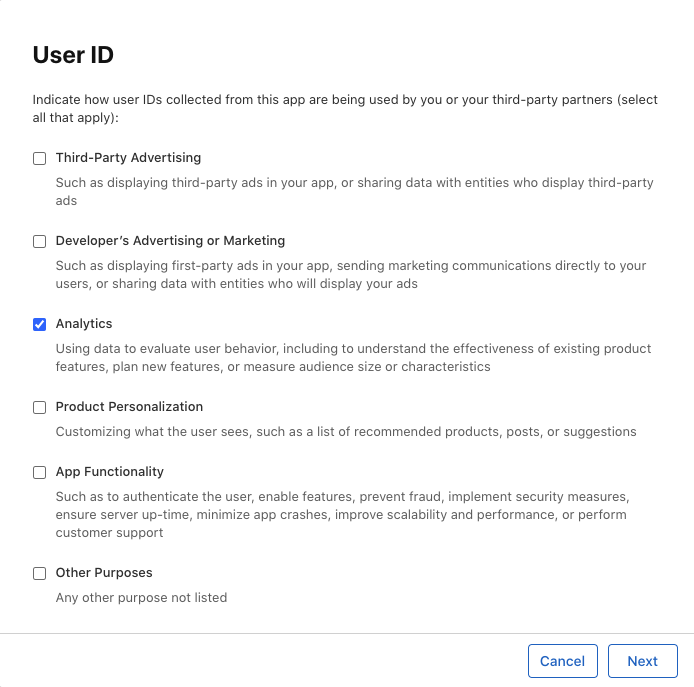
After checking, click Next to choose whether the collected User ID is linked to the user's identity. Check this based on the specific business context, referring to Apple's definition of linkage. For example:
- Remove direct identifiers (e.g., email address or name) before collecting data.
- Process the data to disassociate it from the true identity and prevent re-association.
- Furthermore, to prevent the data from being linked to a specific user identity, you must avoid certain activities after collecting the data:
- You must not attempt to re-associate the data with the user's identity.
- You must not link the data with other datasets that could enable the data to be associated with the user's identity.
Note: According to the definitions in relevant privacy laws, "Personal Information" and "Personal Data" are considered linked to the user.
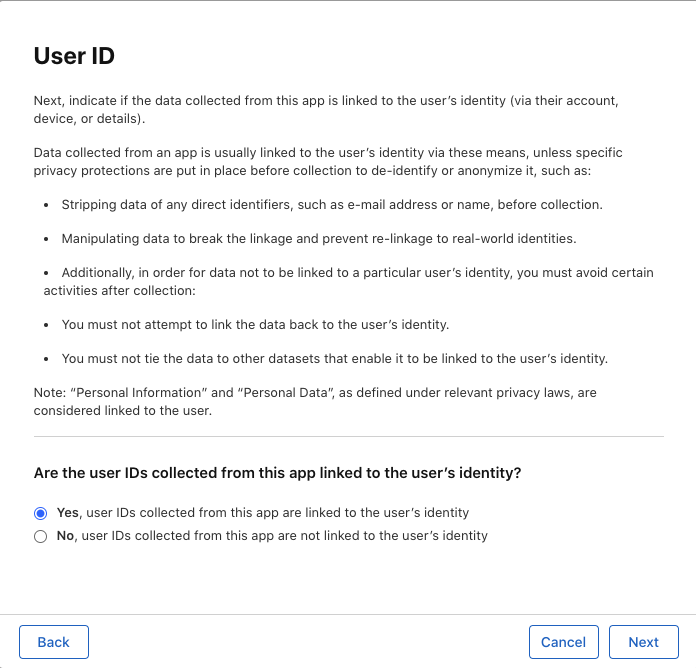
Click Next. You need to select whether it is used for tracking purposes. Here, you need to select Yes. The purpose of tracking by the Bonree SDK is to retrieve issues where user experience is compromised and to understand the App usage process, for locating and resolving problems and improving the user experience, as shown below:
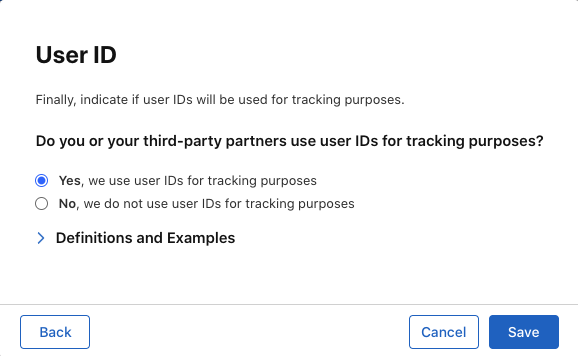
2.2 Device ID
The Bonree SDK collects the Device ID to gather data before a user logs in. Therefore, select "Analytics" here as well, as shown below:
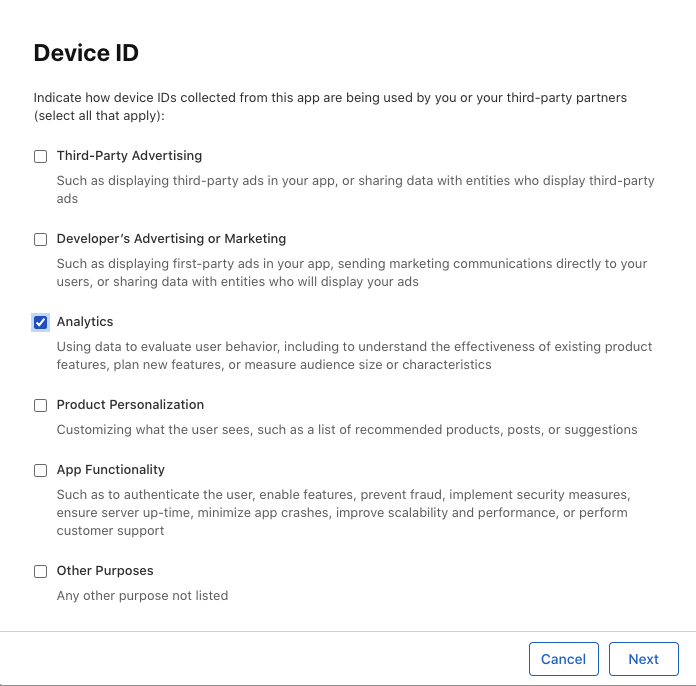
Click Next. Since the collected data will be bound to the Device ID, select Yes here, as shown below:
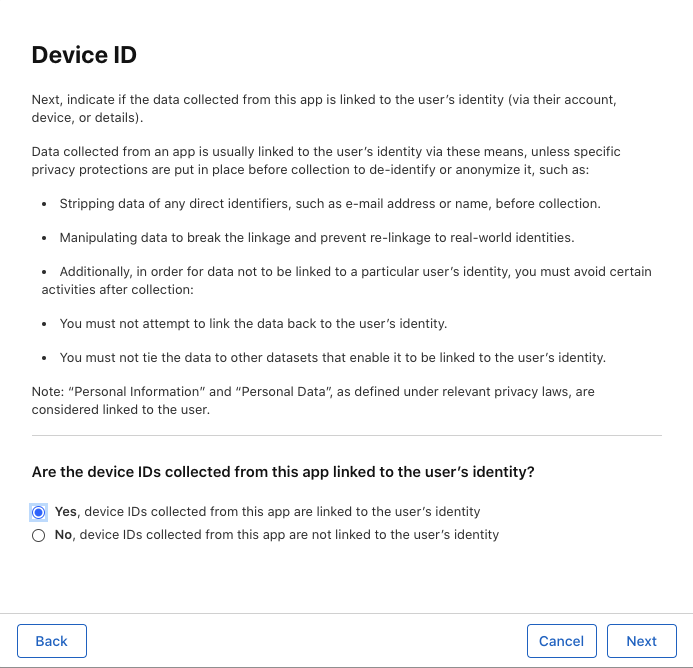
Click Next again. Similar to the User ID, select Yes here. The purpose of tracking by the Bonree SDK is to retrieve issues where user experience is compromised and to understand the App usage process, for locating and resolving problems and improving the user experience, as shown below:
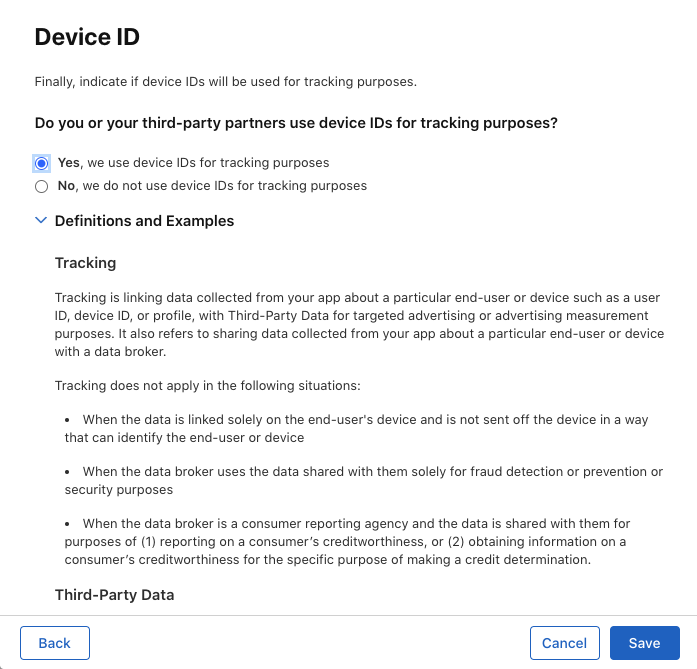
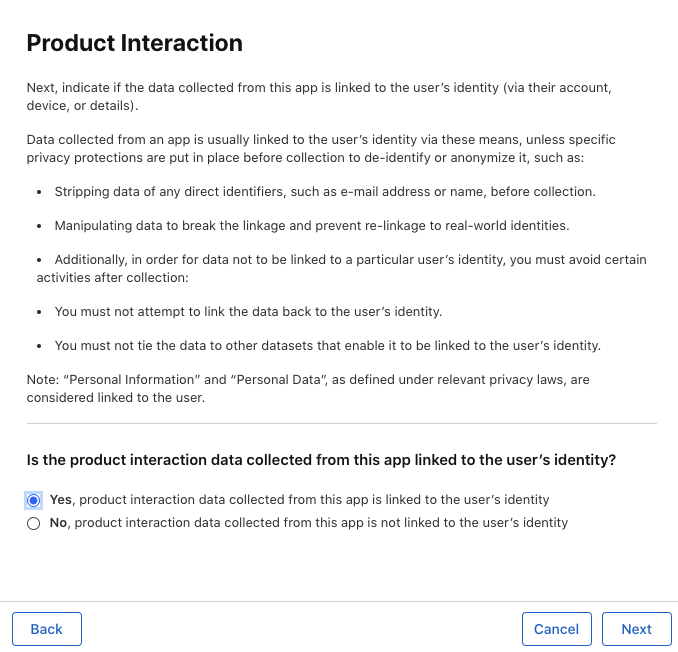
2.3 Product Interaction
The Bonree SDK collects events such as App launches, view visits, user clicks, network requests, H5 page visits, application crashes, ANRs, lag, network switches, and foreground/background switches to monitor and analyze user experience issues within the App. Therefore, select "Analytics" here as well, as shown below:
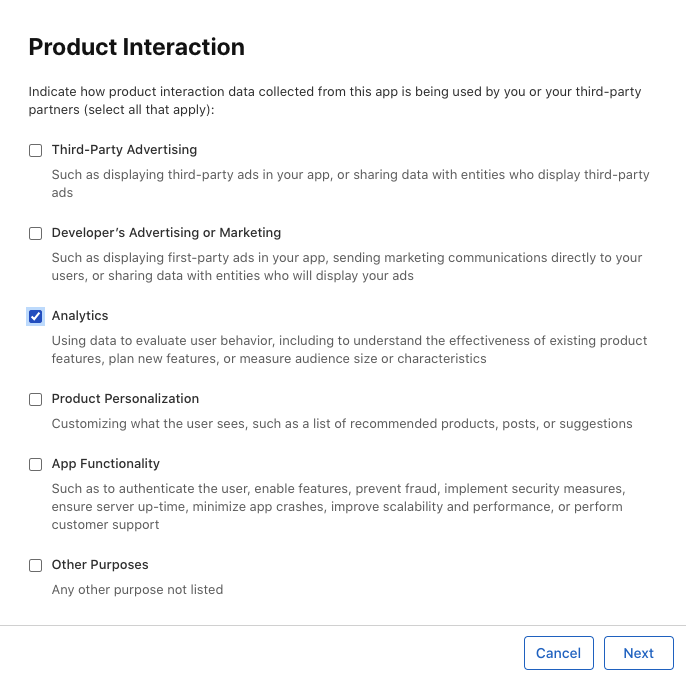
Click Next and continue to select Yes, as shown below:
3. Bonree SDK Compliance Statement
By default, the Bonree SDK requires selecting "Device ID", "Product Interaction", and "Crash Data".
If the custom user information interface is called and a User ID is reported, "User ID" must also be selected.
3.1 Bonree Data Complies with Relevant Laws and Regulations on Data Collection
Based on self-inspection, Bonree Data's products comply with the requirements of the "Information Security Technology - Basic Specification for Personal Information Collection in Mobile Internet Applications (App) (Draft for Comments)." For the above standard, the Bonree Data SDK provides the following functionalities:
- Start/Stop data collection after initialization.
- Enable/Disable data collection for the current App.
- Prohibit data collection in mobile network environments.
- Prohibit data collection when the App is in the background.
3.2 Cybersecurity Assurance
3.2.1 Self-Inspection Results Based on the "Cybersecurity Law of the People's Republic of China"
Based on self-inspection, the Bonree Analysis products (including SDKs) provided by Bonree Data to customers do not violate the mandatory provisions of the "Cybersecurity Law of the People's Republic of China."
3.2.2 Self-Inspection Based on the ISO 27001 Information Security Management System
Bonree Data complies with the standards of the ISO 27001 Information Security Management System certification. Bonree Data also holds ISO 9001 and CMMI 3 certifications.
4. Application Performance Monitoring SDK (HarmonyOS Edition) Privacy Policy Clause Template
When the APP runs for the first time, a privacy pop-up should appear. The pop-up must display a simplified version of the privacy policy and provide a link to the full version, clearly prompting the user to read and choose whether to agree to the privacy policy. The pop-up should include an "Agree" button and a "Disagree" button for the user to actively choose. Furthermore, you must inform users that you have chosen to use the Bonree SDK service and add the following clause to your "Privacy Policy" as a reference:
Note:The types of personal information collected are publicized based on your selection of the SDK's extended functionalities and the configuration of optional information.
- SDK Name: Bonree Application Performance Monitoring SDK (HarmonyOS Edition)
- Purpose of Use: For application performance monitoring of the APP
- Operator: Beijing Bonree Data Technology Co., Ltd.
- Types of Personal Information Collected: Device information, network information, etc.
- Privacy Policy Link: Privacy Policy
Please add the above clause to your "Privacy Policy" and ensure that the privacy policy pops up before the APP runs for the first time, obtaining the end user's consent.