uni-app-x Plugin Integration Guide
This plugin is suitable for uni-app-x projects in HBuilder. It is used by packaging project resources into AndroidStudio or Xcode projects via offline packaging.
Integration Steps
- Integrate into the uni-app-x project
- Integrate as a local UTS plugin in HBuilder
- Integrate into the Android/iOS project
1. Uni-app-x Project Integration
Due to differences in compilation principles between iOS and Android, the integration steps vary.
Android
-
Modify the
App.uvuefileImport the plugin:
import { Bonree } from "@/uni_modules/bonree-unix-plugin"Call
ReportJsErrorin the onError method of default:export default {
onError(err: any) {
// #ifdef APP-ANDROID
ReportJsError(err)
// #endif
}
}
iOS
-
Import JS files
Add the files
BRPageMixin.jsandBRWatchRouter.jsto your uni-app-x project, placing them at the same level asmain.js. -
Modify the
App.uvuefileStep 1: Import the route monitoring file
Step 2: Mixin the route monitoring object
<script>
    // #ifdef APP-IOS
    import BRWatchRouter from './BRWatchRouter.js'; // Import route monitoring
    // #endif
    export default {
        // #ifdef APP-IOS
        mixins:[BRWatchRouter],// Add mixin
        // #endif
        onLaunch: function() {
            console.log('App Launch')
        },
        onShow: function() {
            console.log('App Show')
        },
        onHide: function() {
            console.log('App Hide')
        }
    }
</script> -
Add the
BRPageMixin.jsfile to the project entry pageThe
BRPageMixin.jsfile is also mixed into the page via mixin to compensate for the situation where the route instance is not yet ready when the first page renders and route information cannot be collected.// Page vue file, e.g., index.uvue
<template>
<view class="uni-container">···</view>
</template>
<script>
// #ifdef APP-IOS
import BRPageMixin from '../../BRPageMixin.js';
// #endif
export default {
// #ifdef APP-IOS
mixins:[BRPageMixin],
// #endif
data() {}
}
</script>
2. Plugin Integration in HBuilder
-
Copy the uni-app-x plugin package to the
uni_modulesdirectory. If theuni_modulesdirectory does not exist, create it in the project root directory.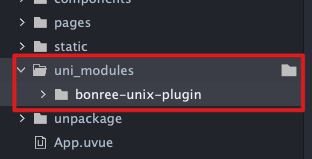
-
Import the plugin in the file where you need to start it, and call the startup method at the desired location.
// Import plugin
import { Bonree } from '@/uni_modules/bonree-unix-plugin';
// Start plugin
Bonree.setConfigAddress("<#Config Address#>")
Bonree.start("<#AppID#>")
3. Integration into Android/iOS Projects
Integration into Android Project
This plugin is developed according to the official uni-app-x specifications, so it can run normally by following the official documentation.
Integration into iOS Project
This plugin is developed according to the official uni-app-x specifications, so it can run normally by following the official documentation.
Note: We recommend configuring data collection rules on the platform under Installation & Deployment / Rule Configuration / Data Collection / Terminal Application immediately after completing SDK integration, to avoid discrepancies between platform data and your expectations.