Prometheus Remote Write
通过 Prometheus 服务提供的 Remote Write 机制,获取 Prometheus 监控平台的指标到 ONE 平台。
前置条件
- ONE平台能够访问 Prometheus 所在的环境。
开始使用
ONE 平台配置
进入数据体系 -> 数据集成页面,找到 Prometheus 数据接入卡片,点击开始集成,选择Prometheus Remote Write 写入 Exporter 指标数据方式。
填写对应参数后获取指标推送地址。
Prometheus 平台配置
- 编辑 prometheus.yaml 文件,修改 remote_write 参数 将Open Metric指标远端写入到的ONE平台。
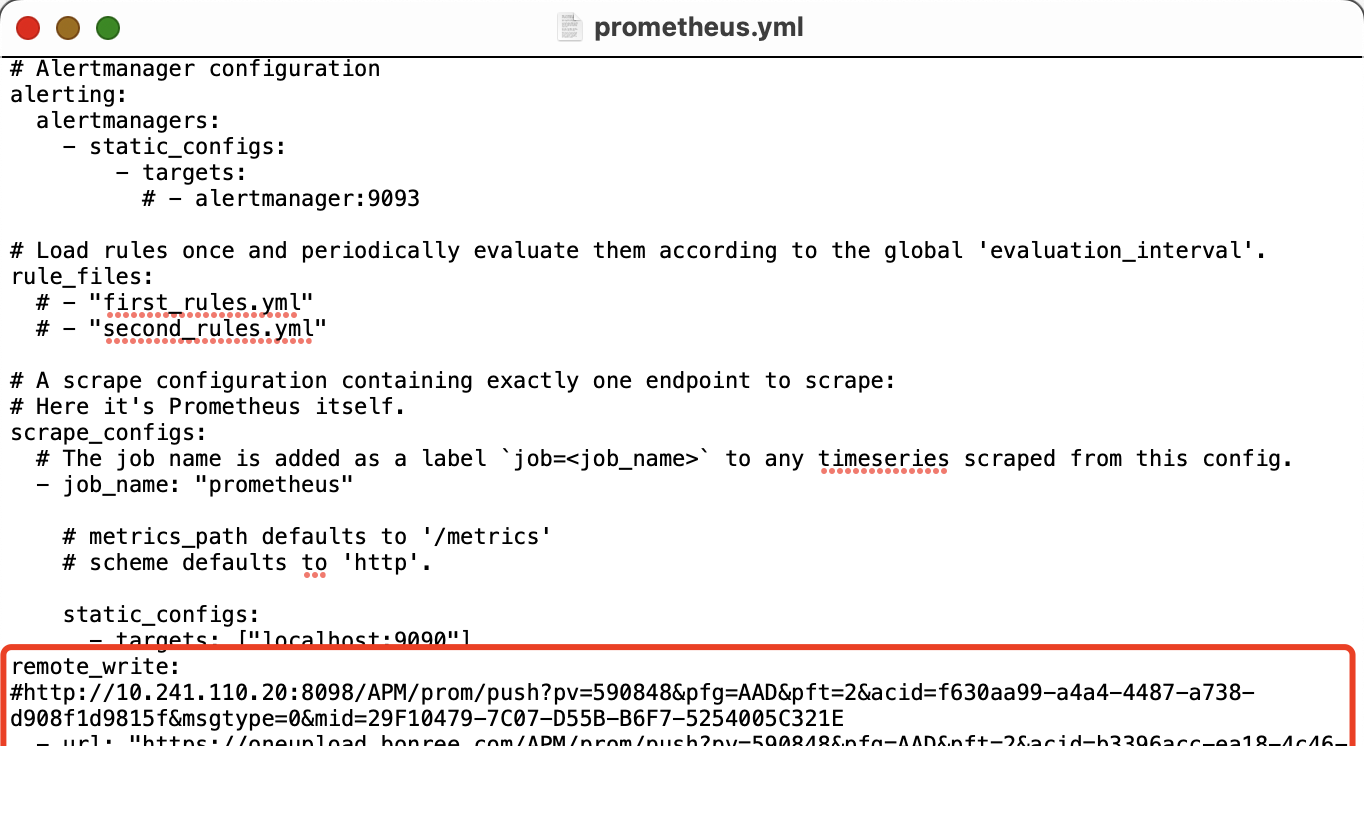
配置数据流
- ONE平台提供开箱即用的默认数据处理流。
- 也可以根据所需监控场景的需要,手动配置数据流。
验证
- 在 数据体系 -> 数据模型 ->指标 下查看对应的指标注册数据。
- 在 观测洞察 -> 数据探索 下查看对应指标数据。