Data Desensitization Configuration
Data desensitization masks credentials, passwords, keys, and other sensitive information in Trace and process data. The platform masks some common authentication headers by default; other fields must be specified through custom rules. Trace rules apply by service scope, and process rules apply by host scope. Collection-side masking requires SmartAgent 10.4.0 or later.
Core Capabilities
- Trace Data Protection: Use custom rules to mask sensitive values in HTTP request headers, POST parameters, response headers, web request URLs, URL paths, and query parameters.
- Process Data Protection: Use keyword rules to mask sensitive properties in environment variables, command lines including startup arguments, and virtual machine system information.
- Differentiated Scope: Apply a Trace rule globally or to selected services, service tags, process groups, or process group tags. Apply a process rule to all hosts or a custom host scope.
- Priority Rule Engine: Create multiple rules and adjust their order. A smaller sequence number has higher priority. After a field matches, later rules are not evaluated.
- Fixed Masking Method: Retain the first character and replace all remaining characters with
*. The result is irreversible.
Use Cases
Scenario 1: Mask authentication request headers: When Trace details contain Authorization, Token, or API Key values, use a Trace desensitization rule to prevent credentials from being displayed in plain text.
Scenario 2: Mask process password properties: When process details contain environment variables such as SPRING_DATASOURCE_PASSWORD, use a keyword rule to mask the value and protect sensitive runtime configuration.
Scenario 3: Apply different rules to different scopes: Configure separate service or host scopes when production and test services, or critical and general hosts, require different protection ranges.
Getting Started
Prerequisites
Before configuring data desensitization, complete the following preparations:
- Confirm agent version: Use SmartAgent 10.4.0 or later so that masking can be performed during collection.
- Confirm the protected object: The field to protect is in Trace data or process data.
- Confirm the collection method: Spans collected by ebPF Agent do not support Trace desensitization. Serverless agents support only process rules that apply to all hosts.
Log content masking is not included. Desensitization is one-way and irreversible. The original value cannot be restored.
Open Data Desensitization
Navigate to Deployment Configuration → Rule Configuration → Data Security → Data Desensitization, and select the Trace Desensitization or Process Desensitization tab. The same page also provides Network Request Desensitization and SQL Obfuscation tabs.
- Trace desensitization applies to Trace-level data collected by the agent, including HTTP request headers, HTTP POST parameters, HTTP response headers, and web request URLs.
- Process desensitization applies to three types of process-level data: environment variables, command lines including startup arguments, and virtual machine system information.
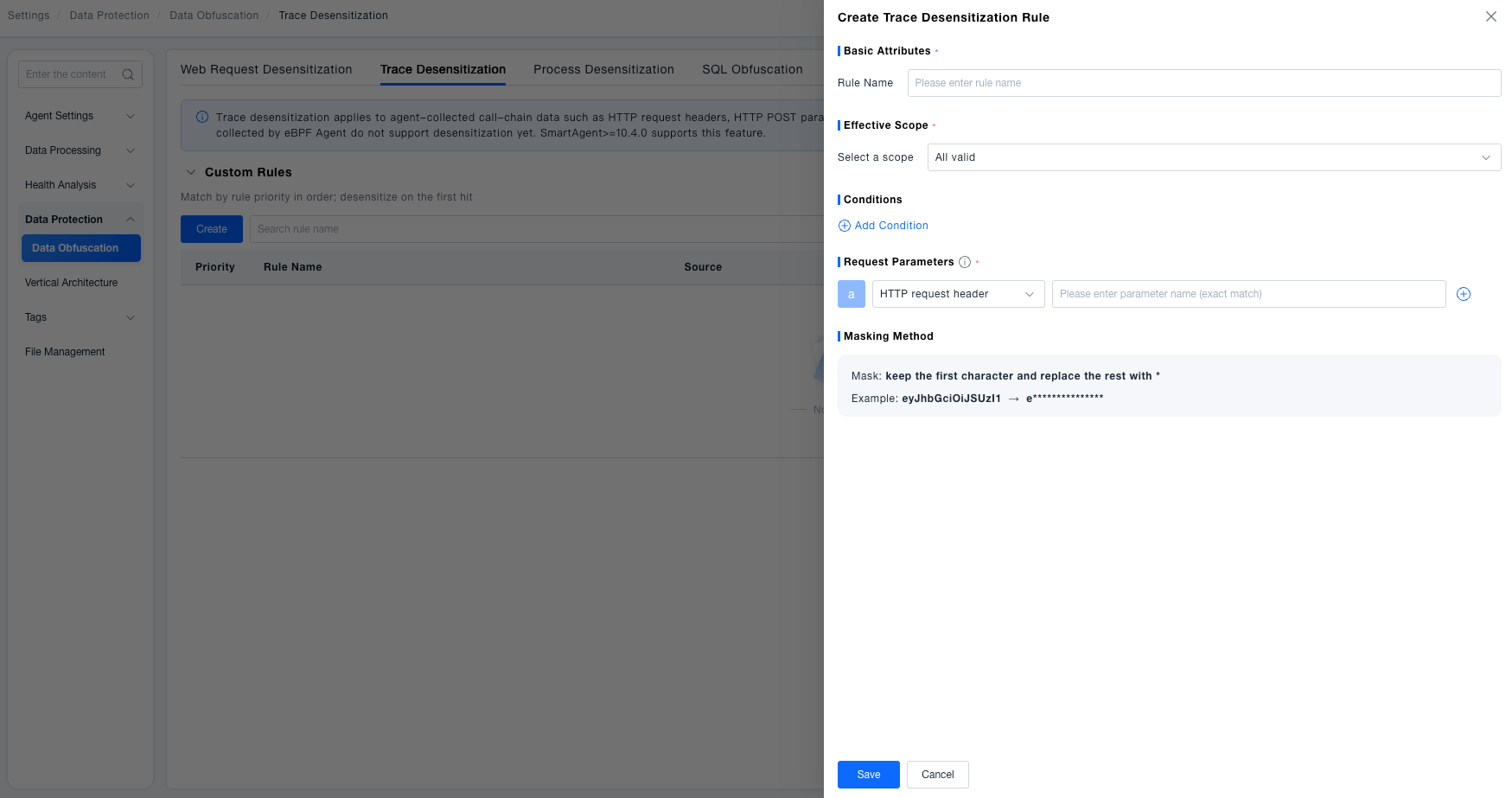
Create a Trace Desensitization Rule
- On the Trace Desensitization page, click Create Trace Desensitization Rule.
- Enter a rule name and configure Scope: Select Global to apply the rule to all services. Select Custom and choose at least one object from services, service tags, process groups, or process group tags, combining multiple conditions with "AND" or "OR".
- Optionally add URL path, request parameter, Request Header parameter, or Cookie conditions to further limit the matching requests.
- Under Request Parameters, select a parameter source and configure the name:
Parameter source Parameter name configuration HTTP request header Enter the exact request header name HTTP POST parameter Enter the exact form or JSON field name HTTP response header Enter the exact response header name Web request URL No name is required. The complete URL is masked Web request URL path No name is required. The URL path is masked Web request URL query parameter Enter the exact query parameter name - Click Save. The rule participates in matching when it is enabled.
Authorization, x-api-key, API_Key, api-key, X-Goog-Api-Key, X-Baidu-API-Key, and X-TC-Token are masked by default and do not need to be configured again.
Create a Process Desensitization Rule
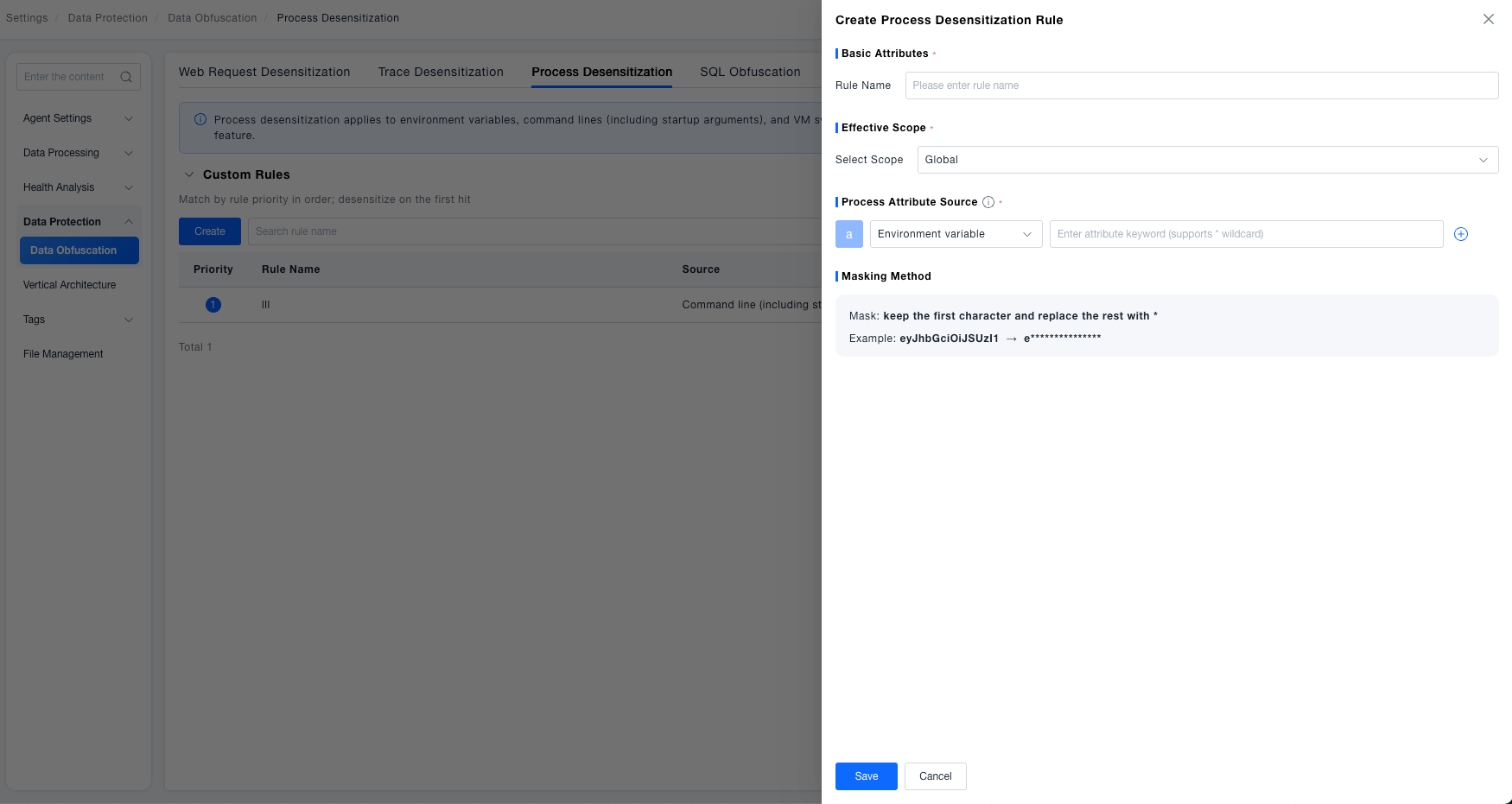
- On the Process Desensitization page, click Create Process Desensitization Rule.
- Configure Host Scope: Select All Hosts or Custom Host Scope.
- Select a property source: environment variable, command line including startup arguments, or virtual machine system information.
- Enter a property-name keyword. For example,
*PASSWORD*matches properties whose names containPASSWORD, regardless of case. - Click Save. The rule participates in matching when it is enabled.
When using a * wildcard, enter at least three valid characters in addition to *. Serverless agents can match only all-host rules.
Manage Rules
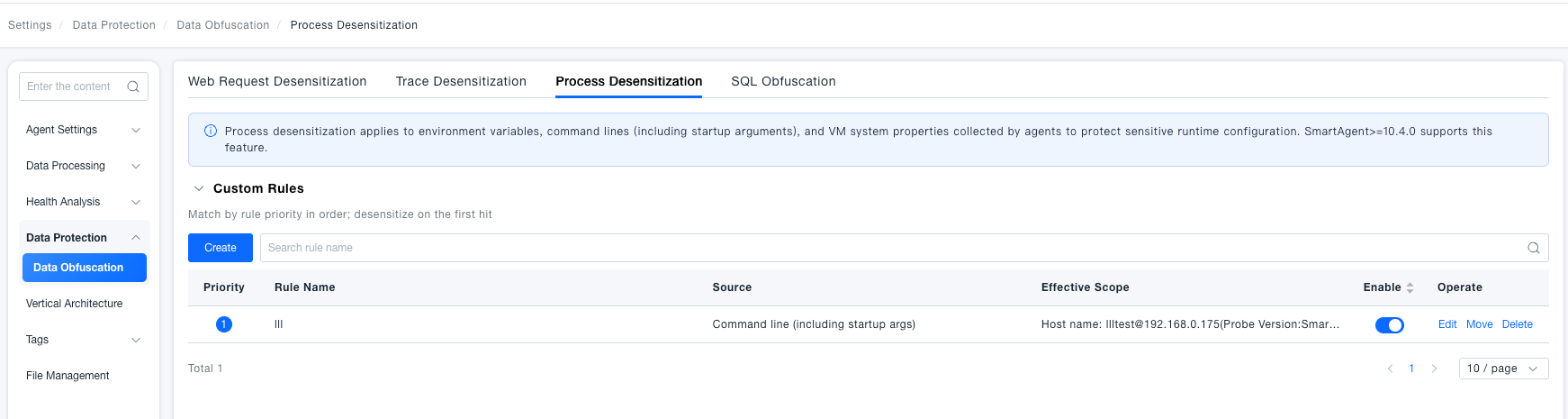
Trace and process desensitization rules are displayed in a list and support the following operations:
| Operation | Description |
|---|---|
| Adjust Priority | Move a rule to change its order. A smaller sequence number has higher priority, and later rules are not evaluated after a match |
| Enable/Disable | Control whether the rule participates in matching |
| Edit | Modify the rule name, scope, matching conditions, or parameters |
| Delete | Delete a rule that is no longer used |
Special Notes
Fixed Masking Method: All rules retain the first character and replace the remaining characters with *. The original value cannot be restored.
Trace Condition Limits: Secondary conditions do not support regular expressions. Web request URL and Web request URL path can each be configured only once in the same rule.
Process Keyword Matching: Process property keywords are case-insensitive. A wildcard keyword must contain at least three valid characters.
Collection Limits: Spans collected by ebPF Agent do not support Trace desensitization. Serverless agents support only all-host rules.