Service Identification
ONE supports attributing multiple processes to the same service based on process attributes, meeting the refined needs of businesses for "service aggregation and naming", and helping service identification and management to be more in line with business logic.
Custom Naming Rules
It is used for the refined definition of business-specific service naming logic, supporting the configuration of "effective scope", "process attribute aggregation rules", and "rule description".
Rule Creation
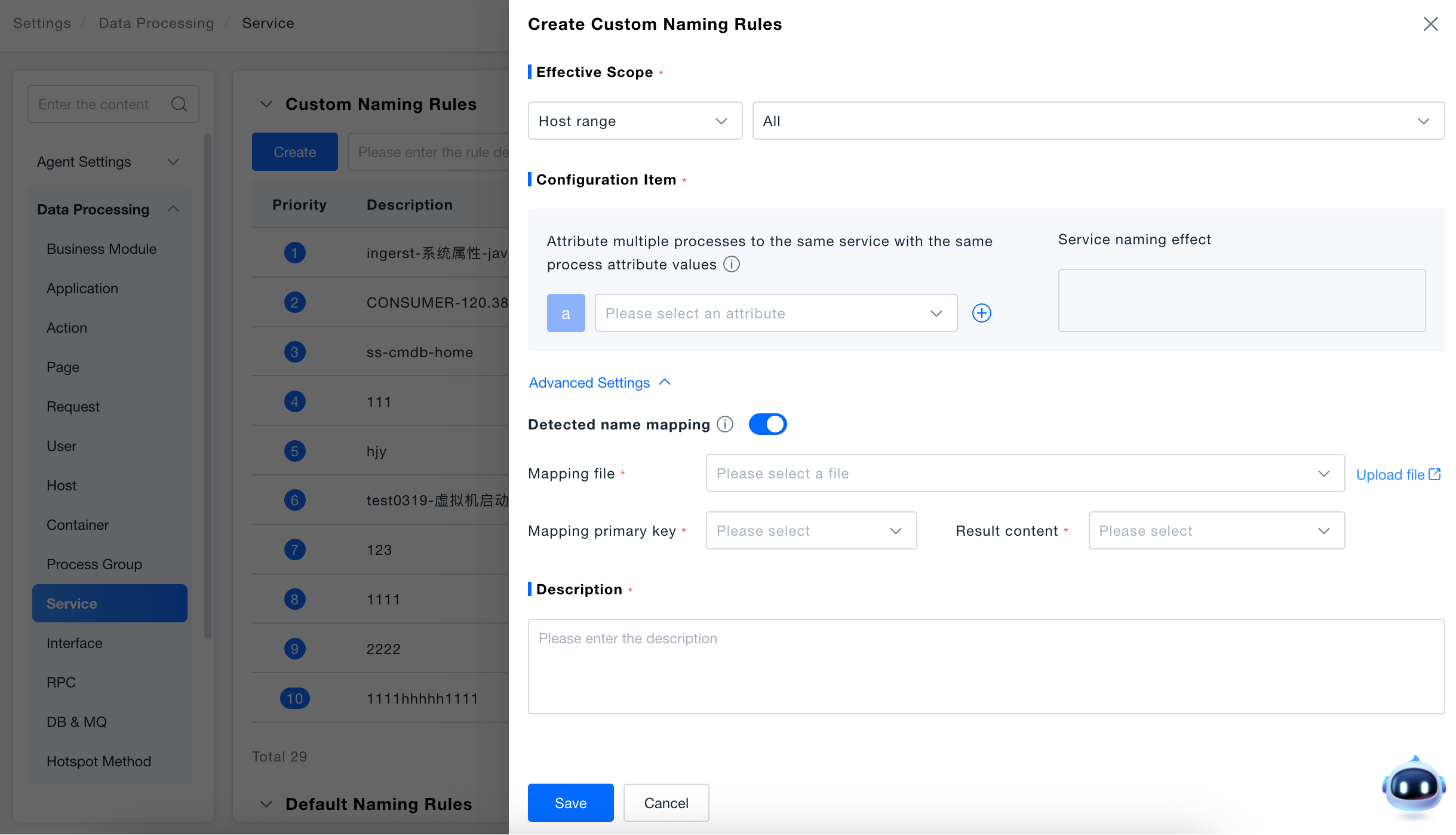
Create Rule: Click the Create button to pop up the Create Custom Naming Rule window, where you can configure new service naming rules.
Configure Effective Scope: Select the host range where the rule takes effect (e.g., "All hosts") to specify which hosts the rule applies to for service naming.
Configure Service Aggregation and Naming Logic:
- In the configuration items, select the process attributes used for service aggregation (such as "environment variables", "container labels", "process name", etc.) through the "Please select attribute" drop-down box;
- If multi-attribute combination aggregation is required, click the "+" button on the right side of the attribute selection box to add additional attribute conditions;
- The service naming effect area will preview the service name style in real-time to help verify the rationality of the rule.
Advanced Settings: Name mapping supports custom modification of service identification names through mapping files. If the service identification name automatically collected by the platform matches the "Mapping Primary Key", it will be automatically replaced with the "Result Content" and saved to the platform.
- Status: Advanced configuration is closed and collapsed by default. Click the "Advanced Configuration" text to expand the configuration content.
- Mapping File: The selected file source is the file uploaded in the existing "File Management" feature. After selection, the "Upload File" button jumps to the "File Management" feature page.
- Mapping Primary Key/Result Content: Drop-down to select the column names in the selected file.
Description: In the input box, enter the purpose of the rule (e.g., "Aggregate and name services based on the environment variable SERVICE_NAME").
Default Naming Rules

Provide service naming logic for common scenarios (takes effect when there are no custom rules): By default, service names are generated according to the process group name. If you need to adjust the process group identification logic, you can click Configure Process Group Identification Rules to jump to the configuration.