Built-in MCP Server Tools
Overview
ONE MCP service is Bonree ONE's built-in MCP Server, pinned first in Resources > Tools > MCP Services with a Built-in badge. It cannot be edited or deleted.
It currently provides 61 tools covering alerts, events, logs, traces, entities, metrics, mobile apps, relationships, tags, observation perspectives, and dashboards. Select these tools when orchestrating Agents in Workspace; external MCP clients can invoke the same tools via MCP Key.
In the ONE MCP detail drawer Tools tab, filter by tag category and click a tool for description, parameters, and output examples.
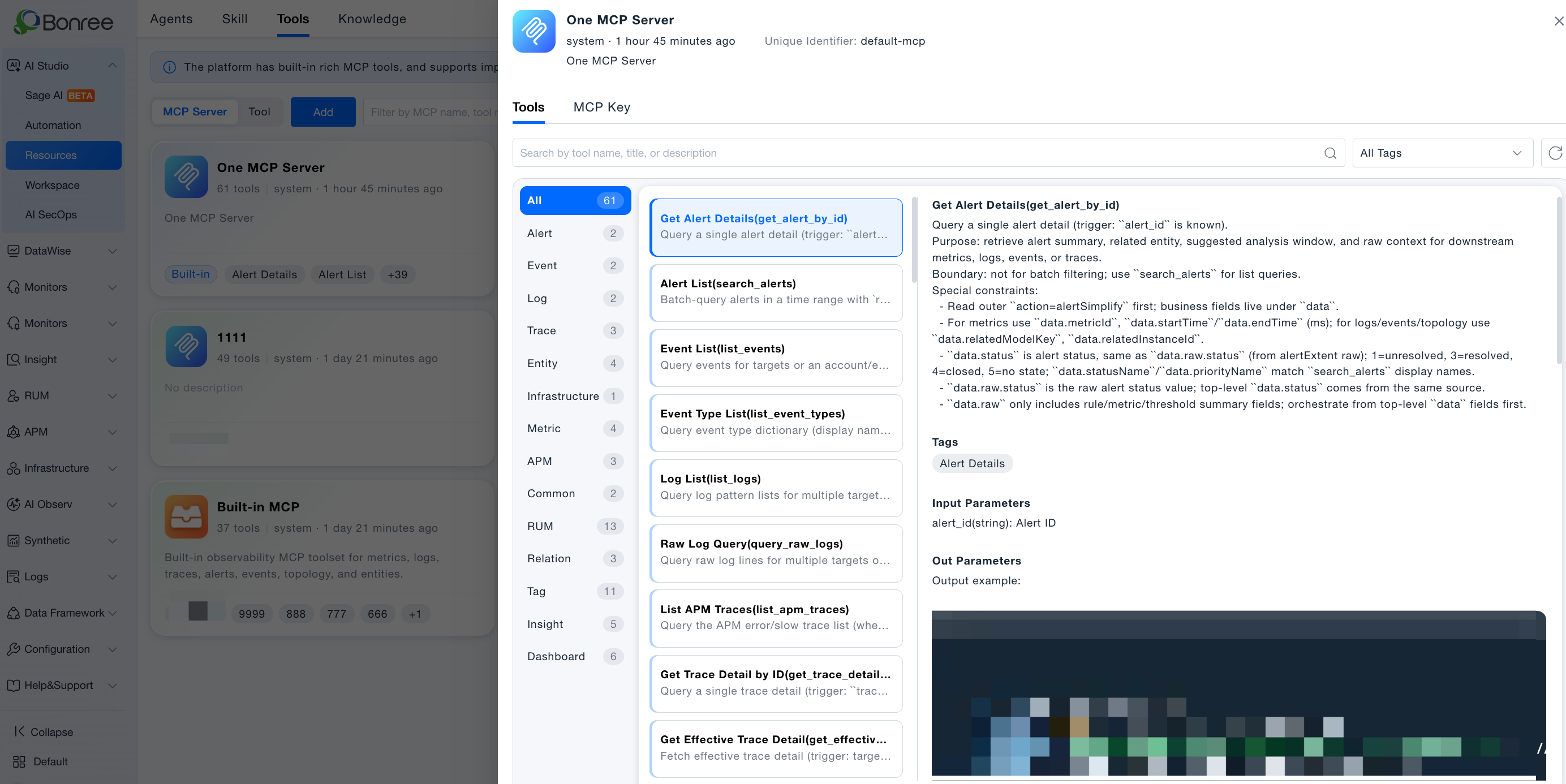
Category overview
| Category | Count | Description |
|---|
| Alerts | 2 | Single alert detail and alert list search |
| Events | 2 | Event list and event type dictionary |
| Logs | 2 | Structured and raw log query |
| Traces | 3 | APM trace list and detail |
| Entities | 4 | Entity search, list, types, and fields |
| Infrastructure | 1 | Host top processes by resource |
| Metrics | 4 | Metric data, metadata, dimensions, time series |
| System services | 3 | Connection pools, slow SQL, error ratios |
| General | 2 | HTTP requests and scheduled tasks |
| Mobile apps | 13 | Crashes, ANR, JS errors, network, app management |
| Relationships | 3 | Entity relations and topology subgraph |
| Tags | 11 | Tag and tag key CRUD |
| Observation | 5 | APM observation perspective management |
| Dashboards | 6 | Dashboard query and component management |
Alerts
| Tool | ID | Summary |
|---|
| Get alert detail | get_alert_by_id | Query single alert by known alert_id; get summary, related entities, suggested time window |
| Alert list | search_alerts | Batch search alerts by time range and conditions |
Events
| Tool | ID | Summary |
|---|
| Event list | list_events | List events for entity or account environment |
| Event type list | list_event_types | Event type dictionary for filtering |
Logs
| Tool | ID | Summary |
|---|
| Log list | list_logs | Query logs across targets/accounts by pattern |
| Raw log query | query_raw_logs | Query raw log lists |
Traces
| Tool | ID | Summary |
|---|
| List APM traces | list_apm_traces | List error/slow APM traces |
| Trace detail | get_trace_detail_by_id | Trace detail by ID |
| Effective trace detail | get_effective_trace_detail | Effective trace detail with entity context |
Entities
| Tool | ID | Summary |
|---|
| Search entities | search_entity | Search by entity type and keywords |
| List entities | get_entities | Get entity instance list |
| List entity types | list_entity_types | Available entity types |
| List entity fields | list_entity_fields | Fields for an entity type |
Infrastructure
| Tool | ID | Summary |
|---|
| Host top processes | list_host_top_processes_by_resource | Top processes by resource type on host |
Metrics
| Tool | ID | Summary |
|---|
| Query metric | query_metric | Query metric data |
| Search metric metadata | search_metric_metadata | Search metric metadata |
| List metric dimensions | list_metric_dimensions_by_metric_id | Dimensions by metric ID |
| Metric time series | query_metric_by_target_id | Time series by target ID |
System services
| Tool | ID | Summary |
|---|
| List connection pools | list_connection_pools | Database connection pool list |
| Top slow SQL | list_top_slow_sql | Top slow SQL statements |
| APM error ratio | list_apm_error_ratio | Error ratio TOP list and detail |
General
| Tool | ID | Summary |
|---|
| HTTP request | send_http_request | Send generic HTTP request |
| Create scheduled task | create_scheduled_task | Create scheduled task |
Mobile apps
| Tool | ID | Summary |
|---|
| List app crashes | list_app_crash | Mobile app crash list |
| List JS errors | list_app_js_error | JS error list |
| List ANR | list_app_anr | ANR list |
| Crash detail | get_app_crash_detail | Single crash detail |
| ANR detail | get_app_anr_detail | Single ANR detail |
| JS error detail | get_app_js_error_detail | Single JS error detail |
| List app requests | list_app_request | Network request list |
| Request detail | get_app_request_detail | Single request detail |
| Create app | create_app | Create mobile app |
| Delete app | delete_app | Delete mobile app |
| Update monitor state | update_app_monitor_state | Update app monitoring state |
| Get collect config | get_data_collect_config | Read data collection config |
| Update collect config | update_data_collect_config | Update data collection config |
Relationships
| Tool | ID | Summary |
|---|
| One-hop related entities | get_one_hop_related_entities | Related entities by relation edge |
| Related by metric | get_related_entities_by_metric | Entities related via metric dimensions |
| Entity subgraph | get_entity_subgraph | Entity relationship subgraph |
| Tool | ID | Summary |
|---|
| List tags | list_user_tags | User tag list |
| Create tag | create_tag | Create tag |
| Update tag | update_tag | Update tag |
| Delete tag | delete_tag | Delete tag |
| List tag keys | list_tag_keys | Tag key list |
| Create tag key | create_tag_key | Create tag key |
| Update tag key | update_tag_key | Update tag key |
| Delete tag key | delete_tag_key | Delete tag key |
| Tags by key | list_tags_by_key | Tags under a key |
| Add entity tags | add_entity_tags_batch | Batch add tags to entities |
| Remove entity tags | remove_entity_tags | Remove tags from entities |
Observation
| Tool | ID | Summary |
|---|
| List perspectives | list_observation_perspectives | APM observation perspective list |
| Create perspective | create_observation_perspective | Create perspective |
| Update perspective | update_observation_perspective | Update perspective |
| Delete perspective | delete_observation_perspective | Delete perspective |
| List entity types | list_observation_entity_types | Entity types available in perspective |
Dashboards
| Tool | ID | Summary |
|---|
| List dashboards | list_dashboards | Dashboard list |
| Get dashboard | get_dashboard | Dashboard detail |
| Create dashboard | create_dashboard | Create dashboard |
| Update name | update_dashboard_name | Rename dashboard |
| Add component | create_dashboard_component | Add chart/card to dashboard |
| Delete dashboards | delete_dashboards | Batch delete dashboards |
How to use
Select in Agent orchestration
- Create or edit an Agent in Workspace, MCP tools step.
- Select tools from ONE MCP service (use categories above).
- Publish and test in Sage AI or Automation.
- Resources > Tools, open ONE MCP service.
- Tools tab: filter by tag or search; click a tool for full docs.
Invoke via MCP Key externally
External clients using MCP Key call the same tools; scope follows Key environment/domain binding.
Notes
- Tool count and names follow the current platform version; UI is authoritative after upgrades.
- Some tools have explicit boundaries (e.g.,
get_alert_by_id for single ID only; use search_alerts for lists).
- Built-in ONE MCP only; custom MCP tools are not covered here.
- Validate parameters and outputs via detail Output example before production orchestration.